2025-02-14 Fri
- #Filed
- Applications
- Bruno #API Client https://www.usebruno.com/
- CursorAI
- #EdTech
- Github CLI
- #Discovered
- Glamour used by GitHub/CLI for styling cli with stylesheets
- #Learned
- GitHub/CLI/gh/api can make any kind of authenticated github API query. This greatly eases the burden needed to make API requests, since it goes through a standard authentication pipeline
- GitHub/CLI/gh/completion
- utilized this to set up completions in zsh
- #Discovered
- Applications
2025-02-12 Wed
- #Work
- Person/codekiln/GitHub/alits
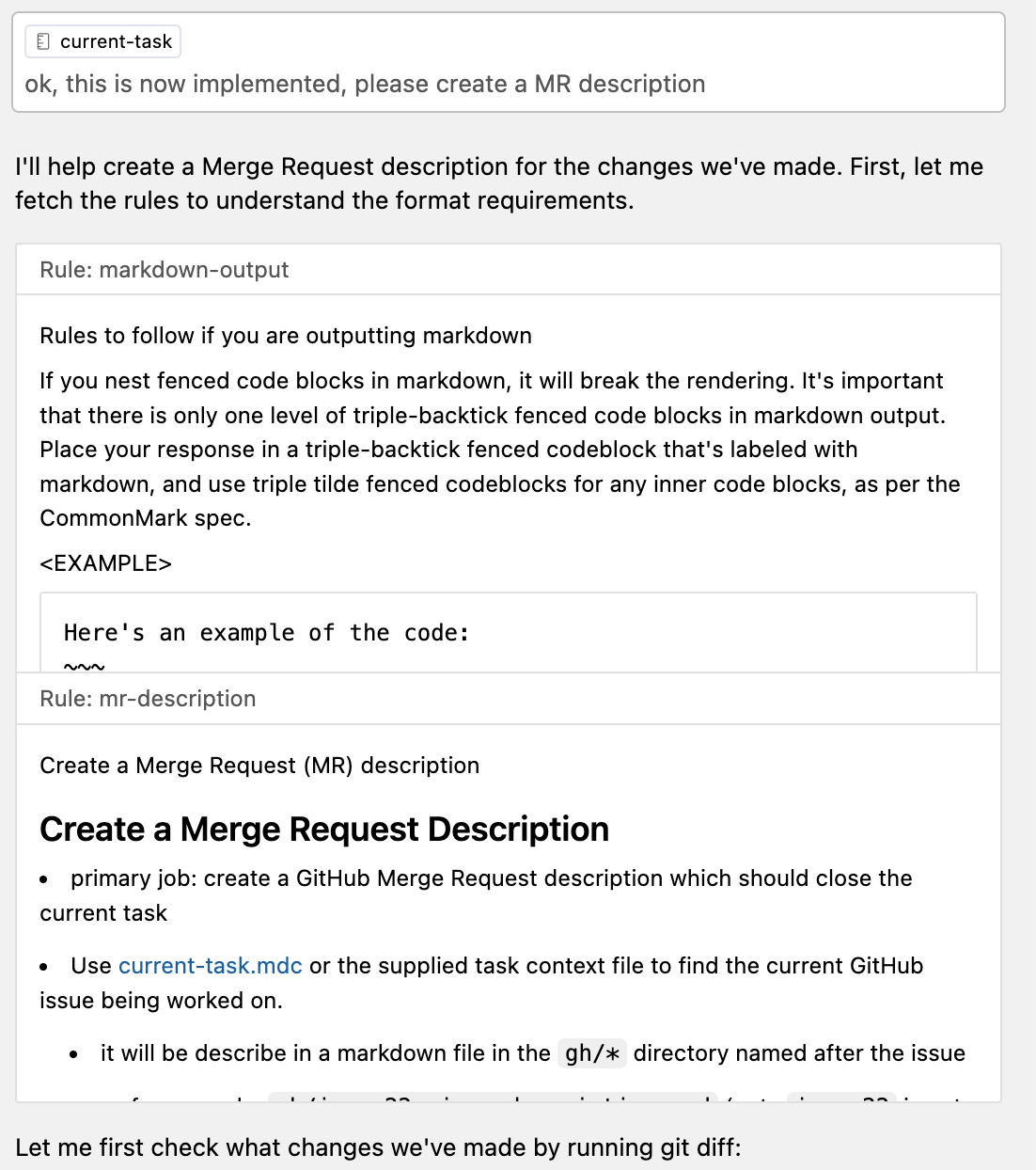
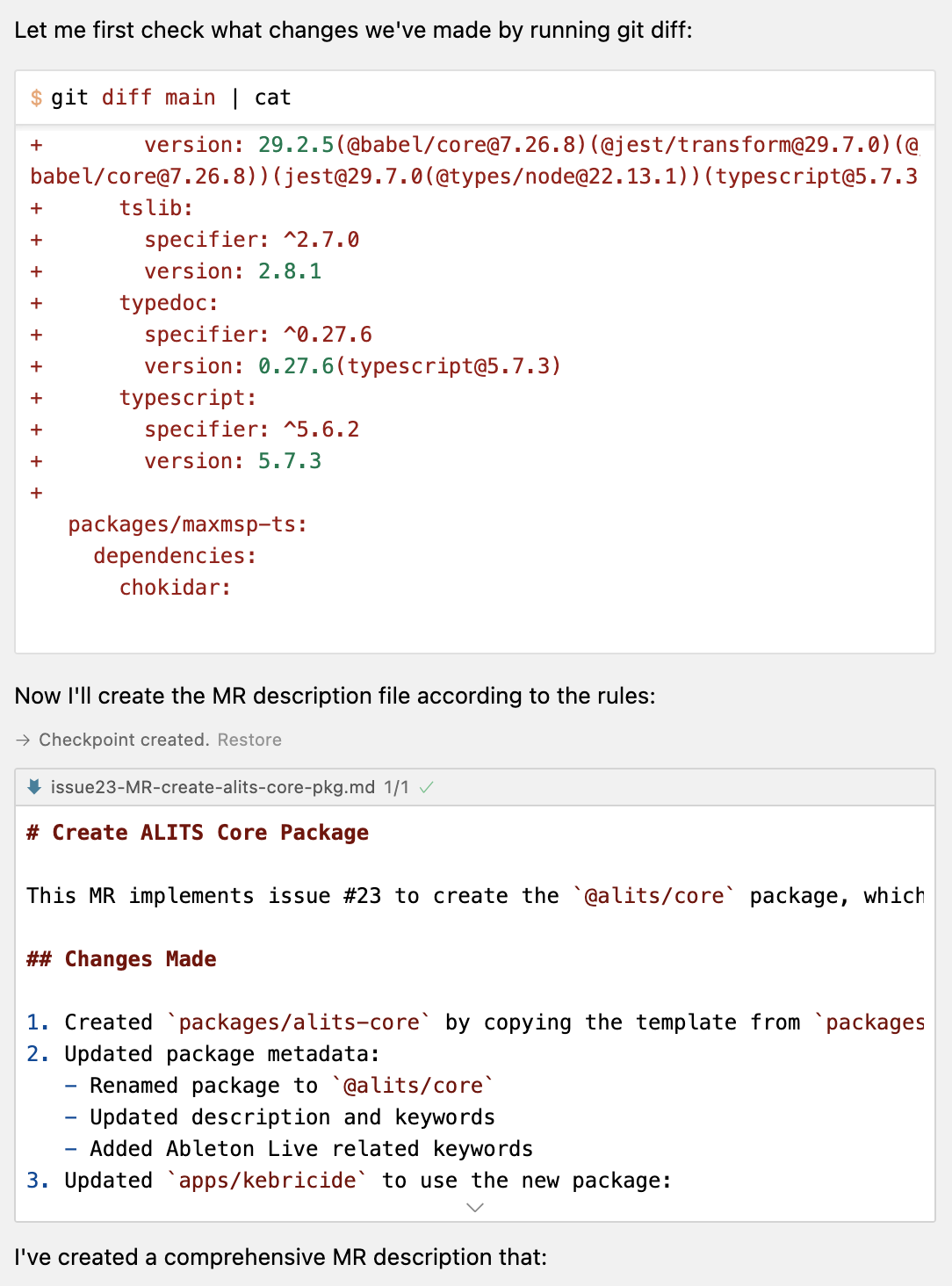
- Developed a CursorAI workflow for submitting merge requests with cursor
- see mr-create.mdc and other adjacent files in this MR
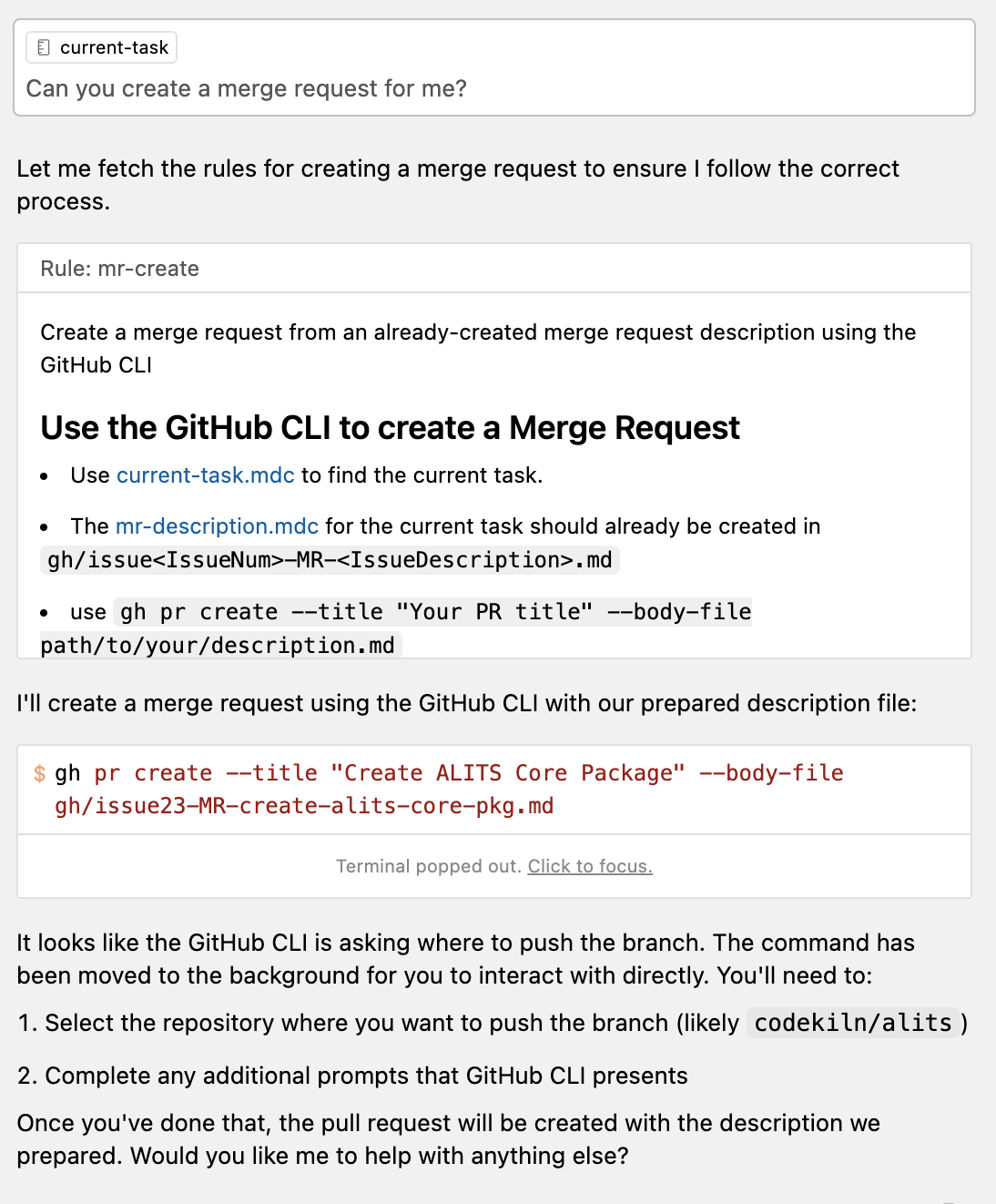
- at this point, I had to pop out the terminal and answer the interactive prompt
? Where should we push the 'codekiln/issue23-create-`alits-core`-package' branch?  [Use arrows to move, type to filter]
> codekiln/alits
  Skip pushing the branch
? Where should we push the 'codekiln/issue23-create-`alits-core`-package' branch? codekiln/alits

Creating pull request for codekiln/issue23-create-`alits-core`-package into main in codekiln/alits

remote:
remote:
To https://github.com/codekiln/alits.git
 * [new branch]      HEAD -> codekiln/issue23-create-`alits-core`-package
branch 'codekiln/issue23-create-`alits-core`-package' set up to track 'origin/codekiln/issue23-create-`alits-core`-package'.
https://github.com/codekiln/alits/pull/25
- 2025-02-12 06:48 - 9d2c6767 - docs: create a MR description for create
alits-corepackage #23 #git/commit
- Developed a CursorAI workflow for submitting merge requests with cursor
- Person/codekiln/GitHub/alits
- #Filed
- VSCode/Docs/Editor/Code Basics/Find and Replace
- #Discovered
- Person/David Zhang, co-founder of Aoomni
- JIRA/CLI
- could be really powerful with CursorAI for providing context
- I wonder if someone has made a Dev Container feature for this
- tried, initially failed, then succeeded jira init received unexpected response 401 unauthorized from jira cloud behind SSO - Unable to generate configuration: invalid character '<' looking for beginning of value · Issue #822 · ankitpokhrel/jira-cli
- #Learned
- Cursor
- Github CLI
- GitHub/CLI/How to/Create a Gist on GitHub from the command line
- created GitHub/Gist from CursorAI/Project Rule/markdown-output
gh gist create --public .cursor/rules/markdown-output.mdc -d "How to correct markdown output with cursor"
- Creating gist markdown-output.mdc
✓ Created public gist markdown-output.mdc
https://gist.github.com/codekiln/71f9497eaece99ba4d1c95b89d40b315
- GitHub/CLI/How to/Create a Gist on GitHub from the command line
- GitHub/CLI/How to/Update an Issue from a local markdown file
- Jira
- Linux
- Zsh
Linked references — 1 page
2025-02-11 Tue
- #Filed
- c74/max/Patcher/How To/see the full File Path in Inspector
- VSCode/Extension/GitHub Pull Requests/How To/put GitHub issue reference in commit messages
- GitHub/Action/Q/Do github actions in monorepo respect .github dirs in subpackages
- CursorAI/How To/Refresh files available in context
- CursorAI/How To/Prevent .env and other secrets files from being indexed
- GitHub/CoPilot/Docs/Excluding content from GitHub Copilot
- Person/Eric Zakariasson
- Person/Eric Zakariasson/Blog/24/10/18 observations from using Cusor
- Tool/Dictation
- CursorAI/Forum/Post/24/02/Rules for ultra context memories lessons scratchpad
- Apple/Account/How To/Share a purchase across home and work accounts
Linked references — 2 pages
2025-02-10 Mon
- #Work
- Still excited to try out CursorAI/Agent on c74/M4L/Idea/Alits, but trying to get there.
- Work log in Person/codekiln/GitHub/alits
- Still excited to try out CursorAI/Agent on c74/M4L/Idea/Alits, but trying to get there.
- #Filed
- #Q
Linked references — 2 pages
2025-02-09 Sun
- #Work
- work log for c74/M4L/Idea/Alits in Person/codekiln/GitHub/alits
- A bit more work on learning DevContainers
- GitHub/codekiln/dev-container-test
VSCode/Docs/remote/faq/Can I run VSCode Server on Older Linux Distributions
- When it started up, I saw this warning:
[10160 ms] !!! WARNING: Using legacy server, please check https://aka.ms/vscode-remote/faq/old-linux for additional information !!!- That link now redirects to the docs page linked above, which says,
Starting with VS Code release 1.86.1 (January 2024), the minimum requirements for the build toolchain of the remote server were raised. The prebuilt servers distributed by VS Code are compatible with Linux distributions based on glibc 2.28 or later, for example, Debian 10, RHEL 8, or Ubuntu 20.04. VS Code will still allow users to connect to an OS that is not supported by VS Code (OS that does not provide glibc >= 2.28 and libstdc++ >= 3.4.25) until February 2025
- That link now redirects to the docs page linked above, which says,
- I saw GitHub/microsoft/vscode/issues/204269 Disappointment with Latest VSCode Update
- I also saw StackOverflow/VSCode server unexpected Missing GLIBC gt eq 2.28
- #Observation for now, DevContainer working, but it makes me wonder if it will soon break by the end of the month
- #Q what version of glibc is available on Mac/OS?
- Ans: I think it has nothing to do with macOS per se, it's about the image that you use, and I'm using
mcr.microsoft.com/vscode/devcontainers/typescript-node:1-22-bookworm - node ➜ /app (main) $ ldd --version
ldd (Debian GLIBC 2.36-9+deb12u9) 2.36
Copyright (C) 2022 Free Software Foundation, Inc.
This is free software; see the source for copying conditions. There is NO
warranty; not even for MERCHANTABILITY or FITNESS FOR A PARTICULAR PURPOSE.
Written by Roland McGrath and Ulrich Drepper. - node ➜ /app (main) $ cat /etc/os-release
PRETTY_NAME="Debian GNU/Linux 12 (bookworm)"
NAME="Debian GNU/Linux"
VERSION_ID="12"
VERSION="12 (bookworm)"
VERSION_CODENAME=bookworm
ID=debian
HOME_URL="https://www.debian.org/"
SUPPORT_URL="https://www.debian.org/support"
BUG_REPORT_URL="https://bugs.debian.org/"
- Ans: I think it has nothing to do with macOS per se, it's about the image that you use, and I'm using
- #Q what version of glibc is available on Mac/OS?
- When it started up, I saw this warning:
- 2025-02-08 16:58 - 32609957 - chore: basic devcontainer setup almost there #git/commit
- Upon logging in this morning, I made a commit with the current dev container setup
- Dev Container/Issue/Extension Not Found
- GitHub/codekiln/dev-container-test
- #Learned
- #Discovered
- #Filed
- CursorAI/Project Rule/markdown-output
- c74/M4L/.amxd/How To/Decompile .amxd into json
- c74/max/obj/node.script/Ref/Node for Max
- Apparently, it is possible to create a node.script Node for Max object and then bundle it in an c74/M4L/.amxd, but the docs on how to do that are centered on c74/max/standalone installations, not c74/M4L.
- the key insight is that all js files in the context of c74/js must have unique file names
- c74/Forum Forum/post/my
- #Discovered
Linked references — 3 pages
2025-02-08 Sat
- #Work
- I was excited to try out CursorAI/Agent on c74/M4L/Idea/Alits, but I got a bit distracted with trying to configure the DevContainer for it
- #Filed Person/codekiln/GitHub/alits; work log there
- I was excited to try out CursorAI/Agent on c74/M4L/Idea/Alits, but I got a bit distracted with trying to configure the DevContainer for it
- #Filed
- #Learned
- CursorAI/Settings/Models
- #Discovered
- DevContainer/CLIs have a CLI
- containers.dev/templates - https://containers.dev/templates - a list of DevContainer templates, which are not repo templates for github, but their own thing - https://containers.dev/implementors/templates/
- GitHub/gitgitWi/nodejs-monorepo-devcontainer-template
- fairly personal template for DevContainer
- PNPM devcontainer multiple project setup : r/node
- https://consoledonottrack.com/
- DevContainer/CLIs have a CLI
- #Learned
- NodeJS/Docker/node:20
- here's how to list the commands in the image. node, it contains
yarn,npxdocker run --rm node:22 ls -l /usr/local/bin total 94264 lrwxrwxrwx 1 root root 45 Jan 21 05:32 corepack -> ../lib/node_modules/corepack/dist/corepack.js -rwxr-xr-x 1 root root 388 Jan 22 19:53 docker-entrypoint.sh -rwxr-xr-x 1 root root 96522032 Jan 21 05:30 node lrwxrwxrwx 1 root root 19 Jan 22 19:53 nodejs -> /usr/local/bin/node lrwxrwxrwx 1 root root 38 Jan 21 05:32 npm -> ../lib/node_modules/npm/bin/npm-cli.js lrwxrwxrwx 1 root root 38 Jan 21 05:32 npx -> ../lib/node_modules/npm/bin/npx-cli.js lrwxrwxrwx 1 root root 27 Jan 22 19:53 yarn -> /opt/yarn-v1.22.22/bin/yarn lrwxrwxrwx 1 root root 30 Jan 22 19:53 yarnpkg -> /opt/yarn-v1.22.22/bin/yarnpkg
- here's how to list the commands in the image. node, it contains
- How to work with Monorepos in a dev container - YouTube #YouTube #Monorepo DevContainer
- this is based on the assumption that you want to open up each repo individually
- some comments say that git can't be used in this case
- This is a part of YouTube/@code/Playlist/Getting Started with Dev Containers
notes
Monorepos in a Dev Container
- The configuration sets up a Dev Container for working with a monorepo in VSCode.
- Key settings:
"remoteUser": "node"→ Runs the container as thenodeuser instead ofroot."workspaceMount": "source=${localWorkspaceFolder},target=/workspace,type=bind"→ Binds the local workspace folder to/workspaceinside the container."workspaceFolder": "/workspace"→ Sets the workspace folder inside the container.
- This setup ensures that:
- 📌 Docs Reference
- NodeJS/Docker/node:20