Person/codekiln/GitHub/alits
Properties
- alias
- Alits
- for the summary of the idea, see c74/M4L/Idea/Alits
- Work Log
- 2025-09-09 Tue
- A list of special topics related to c74/M4L
- https://docs.cycling74.com/legacy/max8/vignettes/jsliveapi
- https://docs.cycling74.com/legacy/max8/vignettes/live_api_overview
- Basic Javascript programming: Global Methods - Max 8 Documentation
- Live API Overview - Max 8 Documentation
- Controlling Live using Max for Live – Ableton
- Max for Live learning resources – Ableton
- Tutorial: Max for Live Best Practices, Part 1 | Cycling '74
- https://maxforlive.com/resources/M4L-Production-Guidelines.pdf
- c74/M4L/obj/live.object
- A list of special topics related to c74/M4L
- 2025-09-08 Mon
- using Person/Brian Madison/BMAD to define a project brief; see alits/docs/brief.md at main · codekiln/alits.
- Also, used ChatGPT to help define a phased implementation plan; see alits/docs/live-object-model-implementation-phases.md at main · codekiln/alits
create
alits-corepackage · Issue #23 · codekiln/alits- 2025-02-12 Wed
- CursorAI
- add CursorAI/Project Rule/markdown-output to project
logbook- Note, this is also in GitHub/codekiln/gist/markdown-output.mdc #GitHub/Gist
- add CursorAI/Project Rule/markdown-output to project
- CursorAI
- 2025-02-12 Wed
create a kebricide package within the apps dir of GitHub/aptrn/maxmsp-ts-library-template
logbook- 2025-02-11 Tue
file GitHub/Issue to add
alits-corelogbook- create
alits-corepackage - filed create
alits-corepackage · Issue #23 · codekiln/alits
- create
pull maxmsp-ts into monorepo until original is compatible · Issue #20 · codekiln/alits
- for some reason, in the merge request we are getting failures pull maxmsp-ts into monorepo until original is compatible · codekiln/alits@db6dd08
- key error
Run pnpm run build

> alits-monorepo@ build /home/runner/work/alits/alits
> turbo build

• Packages in scope: @codekiln/maxmsp-ts, @my-username/my-library, kebricide, maxmsp-test
• Running build in 4 packages
• Remote caching disabled
@codekiln/maxmsp-ts:build
@my-username/my-library:build
kebricide:build
cache miss, executing dbfe99f6e1cd9d58

> kebricide@0.0.1 build /home/runner/work/alits/alits/apps/kebricide
> pnpm maxmsp build

undefined
 ERR_PNPM_RECURSIVE_EXEC_FIRST_FAIL  Command "maxmsp" not found
 ELIFECYCLE  Command failed with exit code 254.
Error:  command finished with error: command (/home/runner/work/alits/alits/apps/kebricide) /home/runner/setup-pnpm/node_modules/.bin/pnpm run build exited (254)
maxmsp-test:build
Error: kebricide#build: command (/home/runner/work/alits/alits/apps/kebricide) /home/runner/setup-pnpm/node_modules/.bin/pnpm run build exited (254)
 ERROR  run failed: command  exited (254)

 Tasks:    2 successful, 4 total
Cached:    0 cached, 4 total
  Time:    3.321s
Failed:    kebricide#build

 ELIFECYCLE  Command failed with exit code 254.
Error: Process completed with exit code 254.
- When I try to reproduce in the dev container, it looks like I have cached results ... I wonder what the right answer is for this?
node ➜ /app (codekiln/issue20-pull-maxmsp-ts-into-monorepo-until-original-is-compatible) $ pnpm install
! Corepack is about to download https://registry.npmjs.org/pnpm/-/pnpm-10.2.1.tgz
? Do you want to continue? [Y/n] y

Scope: all 5 workspace projects
Lockfile is up to date, resolution step is skipped
Already up to date
 EACCES  EACCES: permission denied, symlink '../../../apps/kebricide' -> '/app/node_modules/.pnpm/node_modules/kebricide'

pnpm: EACCES: permission denied, symlink '../../../apps/kebricide' -> '/app/node_modules/.pnpm/node_modules/kebricide'
    at async Object.symlink (node:internal/fs/promises:1001:10)
    at async forceSymlink (/home/node/.cache/node/corepack/v1/pnpm/10.2.1/dist/pnpm.cjs:101363:9)
    at async symlinkHoistedDependency (/home/node/.cache/node/corepack/v1/pnpm/10.2.1/dist/pnpm.cjs:143563:9)
    at async Promise.all (index 0)
    at async /home/node/.cache/node/corepack/v1/pnpm/10.2.1/dist/pnpm.cjs:143554:9
    at async Promise.all (index 2)
    at async symlinkHoistedDependencies (/home/node/.cache/node/corepack/v1/pnpm/10.2.1/dist/pnpm.cjs:143540:7)
    at async hoist (/home/node/.cache/node/corepack/v1/pnpm/10.2.1/dist/pnpm.cjs:143416:7)
    at async headlessInstall (/home/node/.cache/node/corepack/v1/pnpm/10.2.1/dist/pnpm.cjs:149440:36)
    at async _install (/home/node/.cache/node/corepack/v1/pnpm/10.2.1/dist/pnpm.cjs:188646:33)
- for some reason, in the merge request we are getting failures pull maxmsp-ts into monorepo until original is compatible · codekiln/alits@db6dd08
file GitHub/Issue pull maxmsp-ts into monorepo until original is compatible
logbook- Until Feature request: Max for Live compatibility - make it possible to compile all js assets to the root directory (not lib/) for use in Max for Live · Issue #28 · aptrn/maxmsp-ts issue is fixed or the MR Max for Live compatibility - optionally compile js assets to root directory by codekiln · Pull Request #29 · aptrn/maxmsp-ts GitHub/MR is merged, pull updated maxmsp-ts into this monorepo.
- 2025-02-10 Mon
- create GitHub/MR to fix Feature request: Max for Live compatibility - make it possible to compile all js assets to the root directory (not lib/) for use in Max for Live · Issue #28 · aptrn/maxmsp-ts - Max for Live compatibility - optionally compile js assets to root directory by codekiln · Pull Request #29 · aptrn/maxmsp-ts
file GitHub/Issue dev container requires unusual setup
logbook- currently, in order to get the DevContainer to initialize correctly, I need to do:
- If I don't, then I get a failure related to trying to call
unameon thenodeuser in the image.
file GitHub/Issue create project-directory-structure cursor project rule with project directory structure and context · Issue #15 · codekiln/alits
- create a CursorAI/Project Rule entry describing the directory structure and project context
- #Filed TODO add GitHub CLI inside of dev container · Issue #14 · codekiln/alits
file GitHub/Issue create apps/kebricide with Project/ dir and js next to it · Issue #13 · codekiln/alits
logbook- TODO Create a folder at
apps/kebricidefor GitHub/codekiln/kebricide- TODO folder should have same rough structure as
apps/maxmsp-test, but instead of putting typescript inCode, typescript will mirror the directory structure of GitHub/zsteinkamp/m4l-typescript-base, with a structure roughly like:
- TODO folder should have same rough structure as
- TODO Create a folder at
file a GitHub/Issue App js assets uniquely named and next to
apps/*/Project/*.amxd· Issue #12 · codekiln/alitslogbook- GitHub/aptrn's original template was for c74/max/standalone, where there are c74/max/Projects that can manage the paths unique to each application so as to include each generated c74/max/js item.
- I could add each library to the c74/max/File Browser path manually, which could work, but I have to be careful that each generated js file is uniquely named.
- That doesn't seem like a great approach for portability or getting a great Dev/Experience.
- Instead, if we utilize rollupjs and Typescript options so everything is compiled to a file that's adjacent to the c74/M4L/.amxd file that's uniquely named, then the downstream developer won't have to mess with modifying c74/M4L/max's paths.
Acceptance Criteria
- #Filed Person/codekiln/GitHub/alits/Todos
- 2025-02-09 Sun
would the GitHub/aptrn/maxmsp-ts #CLI be useful here? ANS: probably not
- theoretically, GitHub/Barnard-PL-Labs/MaxPy could be used to dynamically generate the patch ...
#Discovered that at least some people have a way to open c74/max/Project files in Ableton/Max for Live
- Convert a .maxproj file into a .amxd file | AudioSEX - Professional Audio Forum
- Basically what I would like to do is convert this .maxproj or .maxpatch into a .axmd file to use it as a Max Instrument in Ableton.
- so far i know you need to open the project file in Max4Live.
- Okay open Ableton, drag in an empty M4L device, click on the "old school chip" icon on the right of the device, opens M4L edit panel.
- Now you need to open the project file and then you can save it. Only in that mode, you have to option save it as amxd file for use in Ableton.
- Is there a special trick to exporting patches or saving as M4L devices? - MaxMSP Forum | Cycling '74
- Hi Jeremy, for me, "Export Max for Live Device..." is greyed out, both when opening the amxd from Max or from Live. I did find a workflow using "freeze device" and "save as", that seems to do the trick. Are these equivalent?
- This is after I read through all doc pages that seem to be related to building and distributing M4L devices from the long list at https://docs.cycling74.com/max8/vignettes/max_for_live_topic, but I couldn't find a page that groups these related topics, so I'm not sure if I missed something.
- Max/MSP, Max4Live, & RNBO (the thread) - Equipment - lines #Cool Forum/post llllllll/Forum
- EDIT: I saved it as an M4L object with presentation mode if you want to hack it from there: Dropbox - ManuallyClockedSeq.amxd - Simplify your life
- DOUBLE EDIT: I highly, highly recommend buying this book, which is all about hacking the live.step object for more advanced behaviors: Books About Max | Cycling '74 Book/Max Cookbook is there
- Convert a .maxproj file into a .amxd file | AudioSEX - Professional Audio Forum
Breakthrough - creating a new Ableton/Max for Live/MIDI Effect and then opening
.maxprojDOES work in Ableton Live- I even get the
js: Hello! Writing from typescript!in the console! so, we're in business possibly ... done
is there some way to do something similar to what is done in GitHub/aptrn/maxmsp-ts-library-template/apps/maxmsp-test/maxmsp-test.maxproj with a c74/max/Project/Window, but in c74/M4L, Ableton/Max for Live?
logbook- is there something equivalent to the project window?
- When I was working with the c74/max/Project/Window before, I was in c74/max/v/9, and the built-in version for Ableton/Max for Live is c74/max/v/8, so it might be in a different spot, but I can't seem to find it in the UI. Alternatively, it could be that they removed support for Max Projects from Max for Live deliberately.
- #Observation when I open the gear icon for c74/max/Project/Window I'm given the ability to choose between Project Inspector, Search Paths, Open Actions. When I do Search Paths, I can see a
project defaultwith path that includes has thesubfolderschecked. I wonder if I could do this for max for live? - Max 8 documentation for c74/max/Project/Window is here Anatomy of the Project Window - Max 8 Documentation
- see also Working With Projects - Max 8 Documentation
- see also Project Settings - Max 8 Documentation
- see also Project Search Paths - Max 8 Documentation
- Previous versions of Max used a single global search path for locating files used by the application. For instance, the "patches" folder inside the Max application folder was typically used to store patchers, media files, 3rd party externals and help files, and so on. Projects provide new means for controlling how Max searches for files.
- Projects also maintain a list of additional folders to be searched when locating project assets. This list works similarly to the list found in Max's c74/max/Menu/Options/File Preferences window, but is used only by the project.
- #Insight #Observation ok, so it sounds like c74/max/Projects are the only way to have project-specific paths added. So I either need to change the compilation directory for GitHub/aptrn/maxmsp-ts-library-template/apps/maxmsp-test so that the compiled assets are in the same directory as the patcher, similar to the way GitHub/zsteinkamp/m4l-typescript-base does it, or instruct users to add a folder manually to the search path using the File Preferences menu. The latter is not as ergonomic, because it will likely require additional set-up and reminders for users. However, it may be the fastest way for me to get going. Of course, it's at least POSSIBLE that if I save my c74/M4L/.amxd file in the parent directory of the generated typescript assets, I may be able to access the items via a relative path...
- #Observation when I open the gear icon for c74/max/Project/Window I'm given the ability to choose between Project Inspector, Search Paths, Open Actions. When I do Search Paths, I can see a
- #Conclusion no, there's no way to do something similar to c74/max/Projects in Ableton/Max for Live; I need to explore other approaches such as
- 1 - using a relative path to a sub-directory
- 2 - changing the Typescript/tsconfig compilation setting so that it compiles to the same directory as the c74/M4L/.amxd file
- 3 - instruct Ableton/Max for Live users to manually add a directory to c74/max/Menu/Options/File Preferences
is there some way a relative path can work? ANS: probably not?
logbook- I tried creating
apps/maxmsp-test/maxmsp-test.amxdwith a c74/max/obj/js asjs ./Code/Main.js, and gotjs: can't find file ./Code/Main.js, even thoughapps/maxmsp-test/Code/Main.jsexists - I wish there was a way to open c74/M4L/.amxd files ... there probably is because Person/Zack Steinkamp/blog/posts/2022-02-15-git-diff-amxd-max says >
.amxdfiles are basically JSON, but with a non-JSON file header. This binary part at the beginning makes git fall back to binary file mode when trying to show diffs. Usualy that's not very helpful. - #Discovered that if I go to c74/max/Menu/File/Show File Browser I'm taken to c74/max/File Browser window, which lets one create c74/max/Collections of files. interesting. I tried adding
apps/maxmsp-test/Code/Main.jsto the file paths, but got "no new files have been added to the search path" because the extension is invalid. So that probably won't work.
- I tried creating
is there some way that the c74/M4L/.amxd could be extracted into json, and then we could add the multiple file paths into the .amxd directly? see c74/M4L/.amxd/How To/Decompile .amxd into json
- #Conclusion - while it is feasible to "decompile" the
.amxdinto.json, and this could conceivably help in actually versioning.amxdin git asjsonand treating.amxdas a compiled artifact using git hooks, I don't yet see a way that would help me add additional paths to the available search paths for the c74/max/obj/js obj.
- #Conclusion - while it is feasible to "decompile" the
- try 2 - changing the Typescript/tsconfig compilation setting so that it compiles to the same directory as the c74/M4L/.amxd file, following the hint of GitHub/zsteinkamp/m4l-typescript-base - I just m moved the .amxd file and that works
logbook- try just moving the .amxd file to be adjacent to the .js file, the way it's done in typescript base - WORKS as long as I manually add the path to ableton
logbookif I do that, I'm able to load the first javascript file
- js
"use strict"; var mylib = require("lib/@my-username-my-library/myLibrary_index.js"); inlets = 1; outlets = 1; autowatch = 1; function bang() { post(mylib.greet() + "\n"); } bang(); // .ts files with this at the end become a script usable in a [js] or [jsui] object // If you are going to require your module instead of import it then you should comment // these two lines out of this script var module = {}; module.exports = {}; - How do relative imports work in GitHub/zsteinkamp/m4l-typescript-base? we're importing from utils there ... let me look at the compiled js artifacts #Q
logbook- it's doing
var utils_1 = require("./utils");, whereutils.jsis in the same folder - so they are both using
require- I see c74/js/Ref/jsrequire has the docs for that.
- it's doing
- DOING it does NOT work by default to use require to access a file from another nested folder by default, for example,
var mylib = require("lib/@my-username-my-library/myLibrary_index.js");even if that path is adjacent to c74/M4L/.amxd - is there a way to get around this with c74/max/Menu/Options/File Preferences? ANS: YESlogbook
- #Conclusion
- I might be utilize a "monorepo" based approach to utilize typescript libraries in Ableton/Max for Live, but it seems as though each library I create, I have to manually add it separately to the c74/max/Menu/Options/File Preferences, unless ...
- try just moving the .amxd file to be adjacent to the .js file, the way it's done in typescript base - WORKS as long as I manually add the path to ableton
- I even get the
- 2025-02-11 Tue
test if I'm able to utilize the library in c74/max/js
- 2025-02-09 Sun
try using the built-in test functions from GitHub/aptrn/maxmsp-ts-library-template using GitHub/aptrn/maxmsp-ts-example
- There is already a greet function in
packages/my-library/src/index.tsandapps/maxmsp-test/src/Main.tscontains a test c74/max/js object which is likely referenced inapps/maxmsp-test/Patchers/Test.maxpat- ts
import * as mylib from "@my-username/my-library";

inlets = 1;
outlets = 1;
autowatch = 1;

function bang() {
  post(mylib.greet() + "\n");
}

bang();

// .ts files with this at the end become a script usable in a [js] or [jsui] object
// If you are going to require your module instead of import it then you should comment
// these two lines out of this script
let module = {};
export = {};
- I'm downloading c74/max/v/9 to try it out. should be free for 30 days, so, until 2025-03-11 Tue or so.
- it doesn't currently compile the required javascript files into the same directory as the example patcher.
apps/maxmsp-test/Patchers/Test.maxpatis in a different directory thanapps/maxmsp-test/Code/Main.js, so max doesn't find it - OH WAIT I have the wrong thing open ... I needed to open
apps/maxmsp-test/maxmsp-test.maxproj, now that's working!
- it doesn't currently compile the required javascript files into the same directory as the example patcher.
- Key insight: I needed to use
apps/maxmsp-test/maxmsp-test.maxprojto open it up.- It turns out that c74/File Extension/.maxproj is just json, and when I open it, I can see references to other JS assets:
- I can also see these in the Project view
- but if I were to create a new c74/M4L project in Ableton, I don't think that I'd know how to associate these. Are they automatically detected from the imports? in the inspector, upon selecting the c74/max/js
js Mainobject, I see - I see Projects | Cycling '74 Documentation c74/max/Ref/Projects
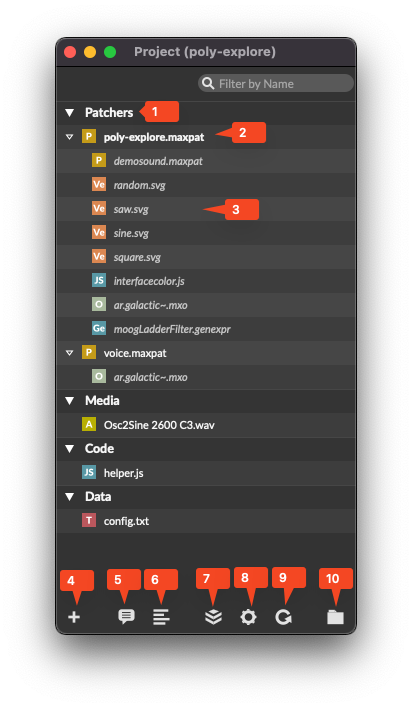
- I see that number 4 above allows you to add dependencies to the project:
- That is greyed out for me, though, perhaps because I didn't start my trial?
- #Discovered
- c74/max/obj/node.script/Ref/Node for Max
- In the Project Inspector disable the option "Keep Project Folder Organized" (NOTE - NOT AS PICTURED, YOU NEED TO UNCHECK)

- You can now close the Project Inspector. We will now use the
+Button in the bottom left corner in order to add our main patcher to the project by choosing "Add New File…" and creating a Max Patcher calledn4m-bundler.main.maxpat - #Observation when I open the gear icon for c74/max/Project/Window I'm given the ability to choose between Project Inspector, Search Paths, Open Actions. When I do Search Paths, I can see a
project defaultwith path that includes has thesubfolderschecked. I wonder if I could do this for max for live?
- c74/max/obj/node.script/Ref/Node for Max
- I see that the README from GitHub/aptrn/maxmsp-ts-example has a Bundle Dependencies for Max section
You can install dependencies using
pnpm i -D <package-name>. If you're sure the dependency is compatible with Max, you can add it to the config file.The configuration file
maxmsp.config.jsondetermines which dependencies are included in the compiled output. The defaultoutput_pathislib, placed as a subdirectory of theoutDirfound in thetsconfig.jsonfile.
- There is already a greet function in
- 2025-02-09 Sun
2025-02-08 Sat
- tried to get DevContainer spec from GitHub/zsteinkamp/m4l-typescript-base working with Person/codekiln/GitHub/alits, which was created from GitHub/aptrn/maxmsp-ts-library-template
- #Error
- Error from inside the dv container
[1259 ms] Keep-alive process ended.
[1261 ms] Shell server terminated (code: 137, signal: null)


[1324 ms] Error reading shell environment.
[1324 ms] Shell server terminated (code: 1, signal: null)

Error response from daemon: container ba8901b9aeafaad738f91e3d681c309c73504967e32d4b42669ca7fea8d2c4d3 is not running

[1324 ms] Start: Run in container: mkdir -p '/tmp/devcontainers-e15077b4-5822-42d3-a12f-87f095e1973f1739007908030' && cat > '/tmp/devcontainers-e15077b4-5822-42d3-a12f-87f095e1973f1739007908030/env-loginInteractiveShell.json' << 'envJSON'
[1324 ms] Stdin closed!
[1324 ms] Failed to cache user env: Shell server terminated (code: 137, signal: null)
Error: An error occurred setting up the container.Shell server terminated (code: 126, signal: null) OCI runtime exec failed: exec failed: cannot exec in a stopped container: unknown Start: Run in container: (command -v getent >/dev/null 2>&1 && getent passwd 'root' || grep -E '^root|^[^:]*:[^:]*:root:' /etc/passwd || true) Stdin closed! Error: An error occurred setting up the container. at htA (/Users/me/.cursor/extensions/ms-vscode-remote.remote-containers-0.394.0/dist/spec-node/devContainersSpecCLI.js:410:3955) at process.processTicksAndRejections (node:internal/process/task_queues:95:5) at async TtA (/Users/me/.cursor/extensions/ms-vscode-remote.remote-containers-0.394.0/dist/spec-node/devContainersSpecCLI.js:482:4021) at async iB (/Users/me/.cursor/extensions/ms-vscode-remote.remote-containers-0.394.0/dist/spec-node/devContainersSpecCLI.js:482:4963) at async wrA (/Users/me/.cursor/extensions/ms-vscode-remote.remote-containers-0.394.0/dist/spec-node/devContainersSpecCLI.js:663:203) at async DrA (/Users/me/.cursor/extensions/ms-vscode-remote.remote-containers-0.394.0/dist/spec-node/devContainersSpecCLI.js:662:14830) at async /Users/me/.cursor/extensions/ms-vscode-remote.remote-containers-0.394.0/dist/spec-node/devContainersSpecCLI.js:482:1190 Stop (552 ms): Run: /Applications/Cursor.app/Contents/Frameworks/Cursor Helper (Plugin).app/Contents/MacOS/Cursor Helper (Plugin) /Users/me/.cursor/extensions/ms-vscode-remote.remote-containers-0.394.0/dist/spec-node/devContainersSpecCLI.js up --user-data-folder /Users/me/Library/Application Support/Cursor/User/globalStorage/ms-vscode-remote.remote-containers/data --container-session-data-folder /tmp/devcontainers-a68b82b6-a332-4932-8764-912b26f5e8b11739007283189 --workspace-folder /Users/me/Documents/GitHub/alits --workspace-mount-consistency cached --gpu-availability detect --id-label devcontainer.local_folder=/Users/me/Documents/GitHub/alits --id-label devcontainer.config_file=/Users/me/Documents/GitHub/alits/.devcontainer/devcontainer.json --log-level debug --log-format json --config /Users/me/Documents/GitHub/alits/.devcontainer/devcontainer.json --default-user-env-probe loginInteractiveShell --mount type=volume,source=vscode,target=/vscode,external=true --skip-post-create --update-remote-user-uid-default on --mount-workspace-git-root --include-configuration --include-merged-configuration Exit code 1 Command failed: /Applications/Cursor.app/Contents/Frameworks/Cursor Helper (Plugin).app/Contents/MacOS/Cursor Helper (Plugin) /Users/me/.cursor/extensions/ms-vscode-remote.remote-containers-0.394.0/dist/spec-node/devContainersSpecCLI.js up --user-data-folder /Users/me/Library/Application Support/Cursor/User/globalStorage/ms-vscode-remote.remote-containers/data --container-session-data-folder /tmp/devcontainers-a68b82b6-a332-4932-8764-912b26f5e8b11739007283189 --workspace-folder /Users/me/Documents/GitHub/alits --workspace-mount-consistency cached --gpu-availability detect --id-label devcontainer.local_folder=/Users/me/Documents/GitHub/alits --id-label devcontainer.config_file=/Users/me/Documents/GitHub/alits/.devcontainer/devcontainer.json --log-level debug --log-format json --config /Users/me/Documents/GitHub/alits/.devcontainer/devcontainer.json --default-user-env-probe loginInteractiveShell --mount type=volume,source=vscode,target=/vscode,external=true --skip-post-create --update-remote-user-uid-default on --mount-workspace-git-root --include-configuration --include-merged-configuration Exit code 1
- Error from inside the dv container
- Docker/CLI/ps/-a
- Docker/CLI/logs
- Ok, so the problem is that
turbo- that is, turborepo - is not found inside the container.- I see that the Docker/Dockerfile has
CMD ["npm", "run", "dev"],- GitHub/aptrn/maxmsp-ts-library-template mentions
pnpm, but npm should work just as good - it's calling
turbo build. we don't yet have turborepo installed
- GitHub/aptrn/maxmsp-ts-library-template mentions
- GitHub/zsteinkamp/m4l-typescript-base has this in the package.json/scripts/dev:
- #Discovered StackOverflow/How do I make pnpm work as intended in a vscode dev container? from 2023/09 which has significant debugging work needed to get pnpm working with DevContainers.
- I see that the Docker/Dockerfile has
- Struggled with this for a few more hours.
- tried this
- https://github.com/npm/cli/issues/8075#issuecomment-2627424610
- Relevant/related issues:
- Newly published versions of package managers distributed from npm cannot be installed due to key id mismatch nodejs/corepack#612
- Installing pnpm 10.1.0 on windows fails with
cannot find matching keyidpnpm/pnpm#9014
See also this nodejs/corepack#616 (comment) for the rundown. In particular:
The workarounds are to set the environment variable
COREPACK_INTEGRITY_KEYS=0, to manually update tocorepack@0.31.0or to install it using knowledge of the release's hash.
You can manually update corepack by runningnpm install -g corepack@latest.
(If you'd rather "install it using knowledge of the release's hash", see his other comment here: nodejs/corepack#612 (comment) : runnpm view npm@11.1.0 dist.shasumto get the hash.) - Newly published versions of package managers distributed from npm cannot be installed due to key id mismatch nodejs/corepack#612
- https://github.com/pnpm/pnpm/issues/7727#issuecomment-2377433810
- https://github.com/npm/cli/issues/8075#issuecomment-2627424610
- I keep getting
node-1 | ? The modules directories will be removed and reinstalled from scratch. Proceed? (Y/n) ‣ • Packages in scope: @my-username/my-library, maxmsp-testwhen I try to do docker-compose up - Non-Interactive pnpm install --no-optional hangs without --config.confirmModulesPurge=false · Issue #6778 · pnpm/pnpm
- #Error
- tried to get DevContainer spec from GitHub/zsteinkamp/m4l-typescript-base working with Person/codekiln/GitHub/alits, which was created from GitHub/aptrn/maxmsp-ts-library-template
- 2025-09-09 Tue
