2025-01-31 Fri
- #Discovered
AI/Workflow/Merge Request
- Cursor Looking at Git PR - Discussion - Cursor - Community Forum CursorAI/Forum
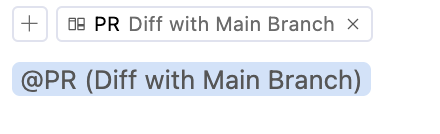
I was looking for the same thing and was bout to build a pipeline for PR review, but that is actually not necessary. In Cursor Chat, you can use @PR to reference it and add some instructions that serve your needs.
Here’s how I do it:@PR (Diff with Main Branch) Please analyze the code changes and provide the following information: 1. **Intent and Purpose**: Summarize the goal of the changes. Explain what functionality or behavior the changes aim to introduce, modify, or fix. 2. **Potential Issues**: Identify any possible problems the changes might introduce, such as: - Bugs or unintended side effects. - Performance concerns. - Code quality issues (e.g., readability, maintainability, scalability). - Violations of best practices or standards. 3. **Suggestions for Improvement**: Recommend any improvements or alternative approaches that could enhance the code.
- CursorAI/@/PR does a diff with the main branch
- Cursor Looking at Git PR - Discussion - Cursor - Community Forum CursorAI/Forum
CursorAI/Settings/Features/MCP Servers
- This has to do with Model Context Protocol
MCP servers, how can they improve the experience in Cursor? : r/cursor Reddit/cursor 2025/01
- https://www.mcp.run/
Host, discover, publish, and manage Model Context Protocol servlets for LLMs + agents.
- Use Cases
- comment by jvnk
In the course of your prompting, you could ask for things like "look up the docs for ....", "query this sqlite db for...", "create this table..." so on and so forth. The sky is the limit really.
The LLM should figure out it wants to call a tool, and format a response appropriately. Cursor(I believe) is providing the model a system prompt so it understands how to do this. The response is handed back to the LLM and then it decides how to present it to you, but the actual interactions should also be visible.
For me, I can ask it to look at files I don't have open in Cursor using the
filesystemserver, or query the perplexity API to search the web for updated docs info using mcp-perplexity, etc etc.
- comment by femio
Kind of? The context length doesn't change but Cursor can more easily check files on your computer even if it's out of context.
Just think of MCP servers as a library of tools that you can install. Cursor comes with tools for say, running CLI commands built in. You just have access to a collection of pre-built ones.
- comment by badasimo
It also has a security benefit. Cursor can already interact with things sort of... raw. You can let it SSH into a remote server for instance or run commands on your computer. An MCP will have a defined set of things it can and can't do and interact with and have it formatted better for interacting with an LLM.
For instance many command line tools have styling and decoration, interactive features etc that an LLM doesn't need, it just needs output. Lately agent has struggled with things like that.
I believe that we will have other agents/models inside MCPs doing their own special things. For instance operating browsers and things like that.
- comment by jvnk
- https://www.mcp.run/
PDF/Tool
- What's a CLI tool to join PDFs? #Q
- no memory of where this came from, but on Mac/OS I have right click > Quick Actions > Create PDF which works great
Reddit/learnpython PyPDF vs PyPDF2 vs PyPDF3 vs PyPDF4 vs others : r/learnpython 2023/02
- recommends PyMuPDF Python/Library
- Apparently the pypdf Python/Library is compatible
- History of pypdf — pypdf 5.2.0 documentation
- In order to make things simpler for beginners,
PyPDF2was merged back intopypdf. Now all lowercase, without a number. We hope that the folks who developPyPDF3andPyPDF4also join us. - Text extraction improvements, e.g. for math content. pypdf is now comparable with Tika, pypdfium2, and PyMuPDF GitHub/py-pdf/benchmarks 2023/10
- In order to make things simpler for beginners,
- History of pypdf — pypdf 5.2.0 documentation
- Apparently the pypdf Python/Library is compatible
- recommends PyMuPDF Python/Library
Reddit/LangChain What’s the Best Python Library for Extracting Text from PDFs? : r/LangChain 2024/07
- so many recs
- PyMuPDF highly recommended
- deepdoctection/deepdoctection: A Repo For Document AI
- deepdoctection is a Python library that orchestrates document extraction and document layout analysis tasks using deep learning models. It does not implement models but enables you to build pipelines using highly acknowledged libraries for object detection, OCR and selected NLP tasks and provides an integrated framework for fine-tuning, evaluating and running models. For more specific text processing tasks use one of the many other great NLP libraries.
- deepdoctection focuses on applications and is made for those who want to solve real world problems related to document extraction from PDFs or scans in various image formats.
- VikParuchuri/marker: Convert PDF to markdown + JSON quickly with high accuracy GitHub/VikParuchuri/marker
- via Reddit/User/polymorfi
Marker running as a container using CUDA where available https://github.com/VikParuchuri/marker/
- via Reddit/User/polymorfi
- VikParuchuri/marker: Convert PDF to markdown + JSON quickly with high accuracy GitHub/VikParuchuri/marker
- What's a CLI tool to join PDFs? #Q
- GitHub/Desktop
AI/Workflow/Chat with Codebase
- CursorAI/Chat/with Codebase
- I just opened up cursor on the GitHub/langchain-ai/langgraph repo ()langchain-ai/langgraph: Build resilient language agents as graphs.), it was indexed basically instantaneously.
- Then I hit Cmd+L, asked
Can you help me understand if there's a way I can search for an assistant by name?
- and got some great answers, including links to citations highlighting the parts of the markdown files that are relevant.
- I will definitely be using this feature a lot to explore codebases!
- CursorAI/Chat/with Codebase
- VSCode/Extension/Pylance VSCode/Python
Support go-to-implementation · microsoft/pylance-release · Discussion #2642 GitHub/Issue
- The "find implementation" feature doesn't seem to work well. I have a method f in a class A that inherits from B and reimplements f, and I'd like to list all "f" implementation, but nothing gets listed.
- Is the feature included in Pylance, and if yes, am I missing something?
- We don't implement the go-to or find implementation calls, so this would be an enhancement.
- Moving this issue to discussion as an enhancement request for comments and upvotes.
- For someone like me coming from IntelliJ Idea/PyCharm, missing this features feels like a real degradation of productivity. We have a massive codebase with thousands of files and hundreds of class hierarchies.
- Now that type hierarchy has been added (#4978 - thanks!), does it make sense to also support "Find All Implementations"?
- I find a solution. Use "Show Type Hierarchy" to find implementation methods and "Show Calls Hierarchy" to find methods in parent classes.
- GitHub/Desktop
- #Filed
CursorAI/Project Rule/markdown-output
Description
Globs
Rule
- # Be careful when nesting markdown fenced code blocks
- Wrap the beginning and end of your answer in backticks.
- If there are code snippets, do not wrap the beginning and end of your answers inside backticks. Instead, wrap the code snippet in a fenced code block that is delimited with three tilde characters.
- VSCode/How To/Go To Next and Previous Changes When Reviewing Github Pull Requests
- VSCode/How To/Go To Python Class by Name
- VSCode/How To/Copy the Python Dotted Class Path
- VSCode/How To/Browse Structural Outline of File
- iPhone/Files/App/How To/Scan Documents to PDF created to document the built-in iPhone scanner functionality for creating multi-page PDFs
- #Decision