View as slides
Toggle theme
Use system theme
Zoom H5/UG/13 Settings/11 SD Space
Properties
logseq-entity
Logseq/Entity/Book/Section/Level 2
up
Zoom H5/UG/13 Settings
prev
Zoom H5/UG/13 Settings/10 Restore Defaults
next
Zoom H5/UG/13 Settings/12 Format SD
Checking SD card open space
Press
MENU
, then use the scroll button to select
SD CARD > REMAIN
.
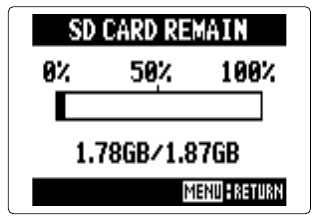
The screen shows how much open space is left on the card.
SD card remain screen
5 Linked References
Hierarchy
Zoom H5
/
UG
/
13 Settings
/
11 SD Space
/
Asset
/
01-SD-card-remain-screen
/
png
Unlinked References