Zoom H5/UG/13 Settings/02 Comp Limiter
Properties
- logseq-entity
- Logseq/Entity/Book/Section/Level 2
Adjusting the input level (compressor/limiter)
- The compressor/limiter raises low input levels and lowers high ones automatically.
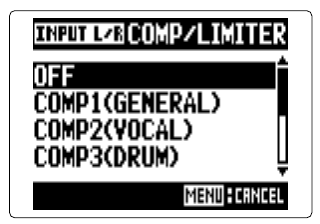
- 1. Press MENU, then use the scroll button to select
IN/OUT > COMP/LIMITER. - 2. Use the scroll button to select the input to adjust, then press it.
- 3. Use the scroll button to select the type, then press it.
Note/Info The compressor/limiter is not applied to backup recordings (Zoom H5/UG/08 Recording/12 Backup Rec).
Types
OFF— compressor/limiter off.- Compressors lower high levels and raise low levels.
- Limiters lower the level when the input goes above a set level.