Zoom H5/UG/12 Tools/08 Rec Format
Properties
- logseq-entity
- Logseq/Entity/Book/Section/Level 2
Setting the recording format
- Choose the format that gives the audio quality and file size you need.
- 1. Press MENU, then use the scroll button to select
REC > REC FORMAT. - 2. Use the scroll button to select the recording format, then press it.
Formats
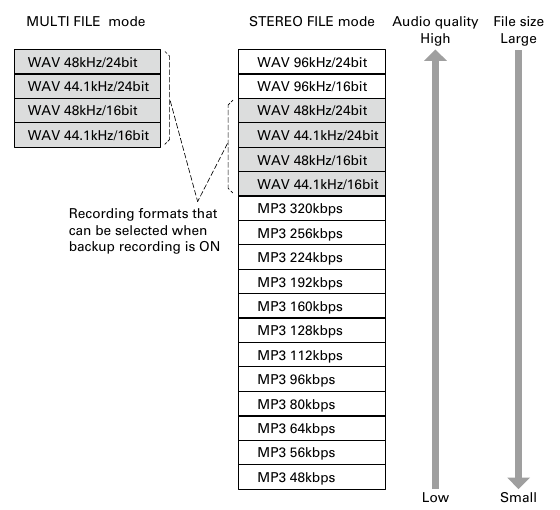
- Recording formats by mode
- Formats nearer the top of each list give higher audio quality and larger files.
MULTI FILEmodeSTEREO FILEmode- WAV:
WAV 96kHz/24bit,WAV 96kHz/16bit,WAV 48kHz/24bit,WAV 44.1kHz/24bit,WAV 48kHz/16bit,WAV 44.1kHz/16bit - MP3:
MP3 320kbps,MP3 256kbps,MP3 224kbps,MP3 192kbps,MP3 160kbps,MP3 128kbps,MP3 112kbps,MP3 96kbps,MP3 80kbps,MP3 64kbps,MP3 56kbps,MP3 48kbps - With Zoom H5/UG/08 Recording/12 Backup Rec on, only
WAV 48kHz/24bit,WAV 44.1kHz/24bit,WAV 48kHz/16bitandWAV 44.1kHz/16bitcan be selected.
- WAV:
Note/Info Use WAV to record high-quality audio.
Note/Info MP3 compression makes files smaller but also lowers the audio quality. Use MP3 when you need to save space, for example to store many recordings on one SD card.