Zoom H5/UG/12 Tools/06 MS to Stereo
Properties
- logseq-entity
- Logseq/Entity/Book/Section/Level 2
Converting input MS signals to stereo
- Available on Inputs 1 and 2 only.
- The H5 can convert the signal from an MS stereo mic on Inputs 1 and 2 into an ordinary L/R stereo signal.
- 1. Press MENU, then use the scroll button to select
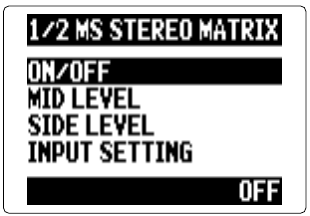
IN/OUT > In1/2 MS MATRIX. - 2. Use the scroll button to select an item, then press it.
ON/OFF
- Use the scroll button to select
ON, then press it. Note/Info When the matrix is on, tracks 1 and 2 become one stereo track.
Note/Info The MS stereo matrix cannot be used together with Zoom H5/UG/12 Tools/07 Mono Mix. Turning
MONO MIXon disables the MS stereo matrix.
- Use the scroll button to select
MID LEVEL
SIDE LEVEL
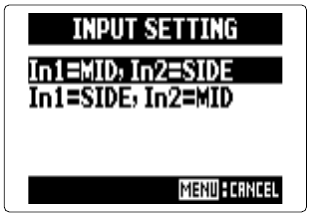
INPUT SETTING