Zoom H5/UG/12 Tools/01 Tuner
Using the tuner
- The tuner reads an input signal so you can tune an instrument.
- 1. Press MENU, then use the scroll button to select
TOOL > TUNER. - 2. Use the scroll button to select the tuner type, then press it.
- The types are
CHROMATIC, GUITAR, BASS, OPEN A, OPEN D, OPEN E, OPEN G and DADGAD.
- 3. Use the scroll button to change the standard pitch.
- The standard pitch can be set from 435 Hz to 445 Hz.
- 4. For every tuner type except
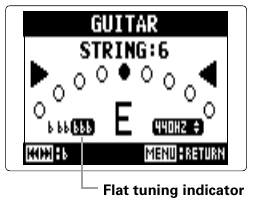
CHROMATIC, use Back and Forward to change the pitch (drop tuning).- Flat tuning indicator
- The tuning can be dropped by up to three semitones.
- 5. Press a track button (L, R, 1 or 2) to select the input to tune.
- 6. Tune the instrument.
Chromatic tuner
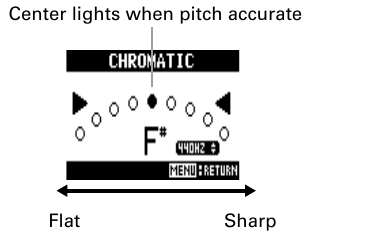
- The tuner detects the input pitch automatically. It shows the nearest note name and how far the pitch is off.
- Chromatic tuner screen
- The center indicator lights when the pitch is accurate. Indicators to its left mean flat; to its right, sharp.
Guitar and bass tuners
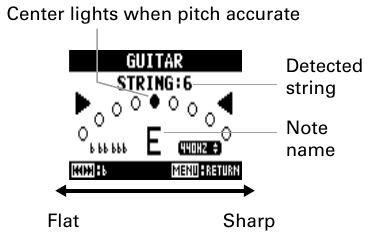
- The tuner detects which string you are playing, so you can tune the strings one at a time.
- Guitar tuner screen
- The screen shows the detected string number and its note name. The center indicator lights when the pitch is accurate.
- Note for each string, from string 1
GUITAR — E, B, G, D, A, E, B (strings 1–7)BASS — G, D, A, E, B (strings 1–5)OPEN A — E, C#, A, E, A, EOPEN D — D, A, F#, D, A, DOPEN E — E, B, G#, E, B, EOPEN G — D, B, G, D, G, DDADGAD — D, A, G, D, A, D