Zoom H5/UG/11 USB/03 Interface Settings/02 Monitor Mix
Monitor signal mixing (MULTI TRACK only)
- With direct monitoring on, you can balance the input signals you hear. This mix does not change the input signals sent to the computer or iPad.
- 1. Press MENU, then use the scroll button to select
IN/OUT > DIRECT MONITOR > MONITOR MIXER. - 2. Select a track and press the scroll button.
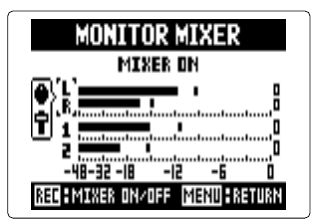
- Monitor mixer screen
- The screen shows a level meter for each track (L/R, 1 and 2) and whether the mixer is on (
MIXER ON).
- 3. Select a parameter and change its value.
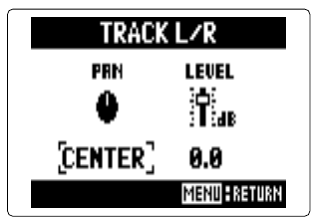
- Track pan and level screen
PAN sets the track's left–right balance; LEVEL sets its volume in dB.- Move the scroll button up or down to move the cursor or change a value.
- Press the scroll button to choose the parameter to change.
- MENU returns to the previous screen.
- 4. Press REC to hear the inputs without the mixer adjustments.
- REC turns the mixer on and off (
MIXER ON / MIXER OFF).
- The recorder's own input monitoring mix uses the same
PAN and LEVEL controls: Zoom H5/UG/12 Tools/03 Monitor Mix.