Zoom H5/UG/10 Project and File Editing/12 Voice Memos
Adding voice memos
- MULTI FILE mode only. Record a spoken memo and attach it to a project.
- 1. Press MENU, then use the scroll button to select
PROJECT. - 2. Select the project for the memo, then select
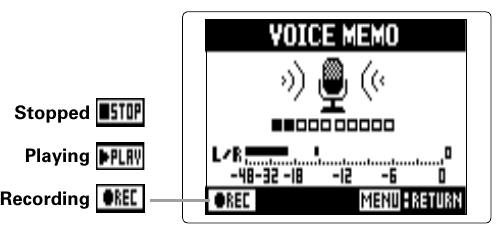
OPTION > VOICE MEMO. - 3. Record the memo.
- 4. Play the memo.
Note/Info Each new recording with REC overwrites the voice memo.
Note/Info Voice memos record from the stereo mic connected to the L/R inputs. They cannot be recorded from Inputs 1/2.
Note/Info The memo file is named in the form
ZOOM0001_VMand recorded as 128 kbps MP3.