Zoom H5/UG/10 Project and File Editing/10 Delete Projects
Deleting multiple projects
- MULTI FILE mode only. Delete several projects in the selected folder at once. The folder is chosen in Zoom H5/UG/08 Recording/07 Save Location.
- 1. Press MENU, then use the scroll button to select
PROJECT. - 2. Press REC.
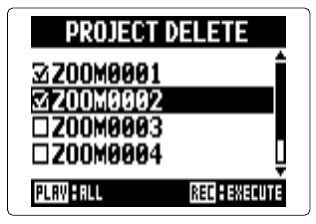
- 3. Select each project to delete. A checked box marks each selected project.
- Project delete list
- Press PLAY/PAUSE to select or clear all projects.
- Press MENU to cancel project deletion.
- 4. Press REC.
- 5. Select
YES.