Zoom H5/UG/10 Project and File Editing/06 Normalize
Normalizing
- WAV format only. Raise the overall level of a WAV project or file that was recorded too quietly.
- 1. Press MENU, then use the scroll button to select
PROJECT(MULTI FILE mode) orFILE LIST(STEREO FILE mode). - 2. Select the project or file to normalize, then select
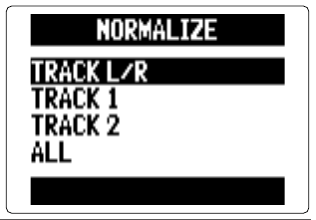
EDIT > NORMALIZE. - 3. In MULTI FILE mode, select the track to normalize:
TRACK L/R,TRACK 1,TRACK 2orALL.- Track select screen
Note/Info A track with no recorded file cannot be selected.
Note/Info
ALLnormalizes every track that has a file. Each file is raised to its own maximum level.Note/Info If a track holds several recordings, including overdubs, only the file currently selected for that track is normalized. See Zoom H5/UG/08 Recording/13 Overdubbing.
- 4. Select
YES. Note/Info Normalizing raises the level of the whole file by the same amount, so that its peak reaches 0 dBFS.