Zoom H5/UG/10 Project and File Editing/05 WAV to MP3
Converting WAV files to MP3 files
- STEREO FILE mode only. Encode a WAV file recorded in STEREO FILE mode as an MP3 file.
- 1. Press MENU, then use the scroll button to select
FILE LIST. - 2. Select a file, then select
OPTION > MP3 ENCODE.Note/Info Files recorded in MS-RAW mode cannot be converted. See Zoom H5/UG/08 Recording/11 Side Mic Level.
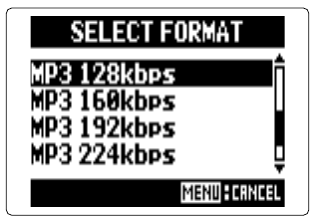
- 3. To change the encoding format, select
SELECT FORMAT, then select a bit rate. - 4. Select
EXECUTEto start encoding. Note/Info If the SD card does not have enough free space, encoding does not start and the
MP3 ENCODEscreen returns.Note/Info The MP3 file is created in the same folder as the WAV file.
Note/Info If the MP3 file's name would match an existing file, the rename screen opens. Change the name before encoding.