Zoom H5/UG/10 Project and File Editing/04 Mixdown
Mixing down a project
- MULTI FILE mode only. Mix a project recorded in MULTI FILE mode down to a stereo WAV file.
- 1. Press MENU, then use the scroll button to select
PROJECT. - 2. Select a project, then select
MIXER/OVERDUB > MIX DOWN. - 3. To change where the mixdown file is saved, select
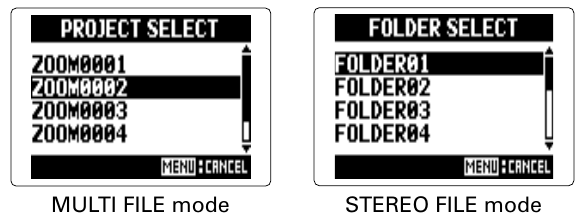
SAVE TO, then selectMULTIorSTEREO. - 4. Select the project (
MULTI) or folder (STEREO) to save it in. - 5. To change the file name, select
NAME, then edit the name as in Zoom H5/UG/10 Project and File Editing/03 Names. - 6. Select
EXECUTEto start the mixdown. Note/Info The volume and pan settings made on the
MIXER/OVERDUBscreen shape the sound of the mixdown. See Zoom H5/UG/09 Playback/07 Mixing Projects.Note/Info The mixdown file has the same sampling frequency and bit rate as the project.