Zoom H5/UG/09 Playback/06 AB Repeat
Properties
- logseq-entity
- Logseq/Entity/Book/Section/Level 2
Repeat playback of a set interval (AB repeat)
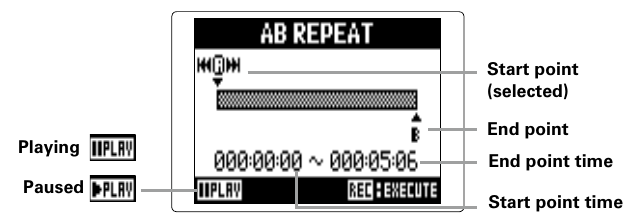
- AB repeat plays the stretch between two set points over and over.
- 1. Press MENU, then use the scroll button to select
PLAY > AB REPEAT. - 2. Use the scroll button to select the A point icon.
- 3. Use Back and Forward to find the start point.
- 4. Use the scroll button to select the B point icon, then set the end point the same way.
- 5. Press REC.
Note/Info To end AB repeat during repeat playback, press Back or Forward to select another project or file, or press REC or STOP to stop playback.