Zoom H5/UG/08 Recording/13 Overdubbing
Properties
- logseq-entity
- Logseq/Entity/Book/Section/Level 2
Overdubbing
- Overdubbing works only in MULTI FILE mode, with 44.1 kHz or 48 kHz WAV formats.
- New recordings can be added to a project that has already been recorded.
Recording an overdub
- 1. Press MENU, then use the scroll button to select
PROJECT. - 2. Select the project to overdub, then press the scroll button.
- 3. Select
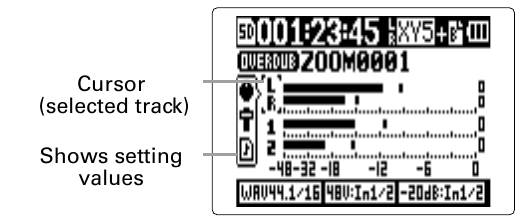
MIXER/OVERDUB > MIXER/OVERDUB. - 4. Press the track button of the track to overdub. Its indicator lights red, and that track's input can be monitored.
- The Input 1/2 stereo link can also be changed here: Zoom H5/UG/08 Recording/05 Inputs and Levels.
- 5. Turn the input volume knob to adjust the input level.
- 6. To hear an existing track while overdubbing, press its track button so its indicator lights green.
- 7. Press REC. Overdubbing on the track chosen in step 4 starts.
- 8. Press STOP to stop.
- The overdubbed track is no longer record-ready, and its indicator lights green.
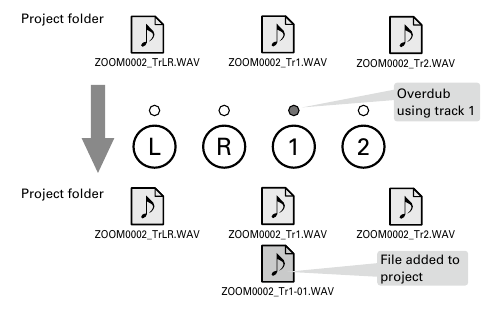
- An overdub never overwrites the file already on a track. It creates a new file named after the track with a two-digit take number, such as
ZOOM0001_TrLR-01.WAV. Any file can later be assigned to any track. - An overdub on track 1 adds a file to the project folder
- 9. Press PLAY/PAUSE to check the recording. Tracks with green indicators play back.
- Mixdown combines overdubbed recordings into one stereo file: Zoom H5/UG/10 Project and File Editing/04 Mixdown.
- 1. Press MENU, then use the scroll button to select
Assigning files to tracks
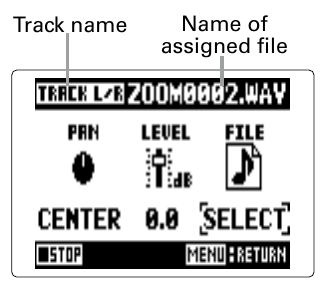
- 1. On the MIXER/OVERDUB screen, use the scroll button to select the track, then press the scroll button.
- 2. Select
FILE, then press the scroll button. - 3. Select a WAV file from the same project folder, then press the scroll button.
- MENU cancels the assignment.
- Select
NONEto remove the assigned file from the track. Note/Info A stereo track accepts only stereo files, and a mono track accepts only mono files.
Note/Info Files recorded in MS-RAW mode cannot be assigned to tracks 1/2.
- Playing back a mixed-down file while overdubbing new tracks lets recordings be layered again and again: Zoom H5/UG/10 Project and File Editing/04 Mixdown.
Ending overdubbing