Zoom H5/UG/08 Recording/07 Save Location
Setting where projects/files are saved
- New recordings go to one of ten folders: projects in MULTI FILE mode, files in STEREO FILE mode.
- 1. Press MENU, then use the scroll button to select
FOLDER.- While
FOLDER is highlighted, the bottom of the menu screen shows the current folder.
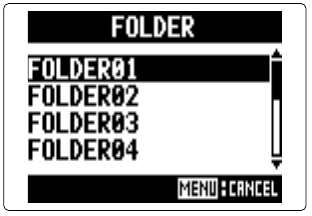
- 2. Select the folder for new recordings, then press the scroll button.
- Folder screen
- The folders are
FOLDER01 to FOLDER10. MENU cancels.
- Folder layout on the SD card: Zoom H5/UG/08 Recording/04 Folders and Files