Zoom H5/UG/08 Recording/05 Inputs and Levels
Selecting inputs and adjusting levels
- Choose whether to record the L/R inputs, Inputs 1/2, or both.
- In MULTI FILE mode, the L/R inputs record to the L/R tracks and Inputs 1/2 record to tracks 1 and 2.
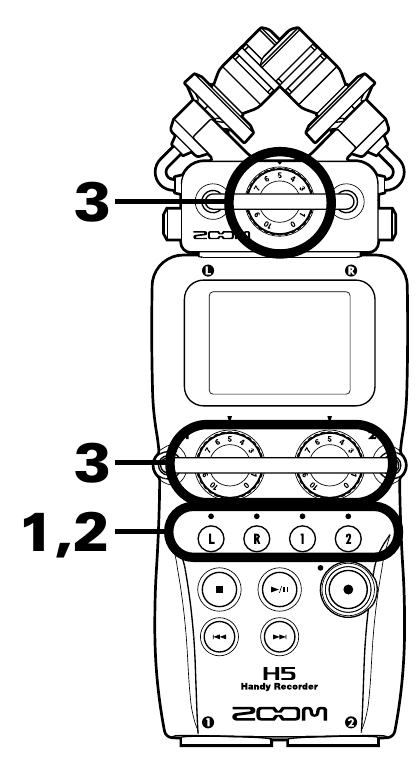
- Track buttons (steps 1 and 2) and input volume knobs (step 3)
- 1. Press the track buttons for the tracks you want to record.
- The indicators of the selected buttons light red. Their input signals can then be monitored through the headphones and line outputs.
Note/Info In STEREO FILE mode, L or R selects the L/R inputs, and 1 or 2 selects Inputs 1/2.
Note/Info In STEREO FILE mode, inputs are selected in pairs. One input of a pair cannot be selected on its own.
- In STEREO FILE mode, skip to step 3.
- 2. In MULTI FILE mode, to record Inputs 1/2 as one stereo file, press 2 while holding 1.
- 3. Turn the input volume knob of each selected input to set its level.
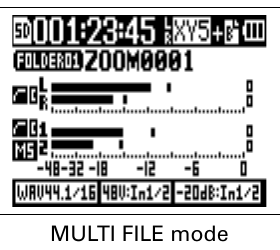
- Level meters in MULTI FILE mode
- Aim for peaks around −12 dB.
- If the sound distorts even with the input level turned down, move the mics or lower the output level of connected devices.
- The compressor/limiter can also control the level: Zoom H5/UG/13 Settings/02 Comp Limiter.
- Wind and other noise can be cut while recording: Zoom H5/UG/13 Settings/01 Low Cut.
Files created