Zoom H5/UG/08 Recording/02 Mode Overview
Recording mode overview
- The H5 has two recording modes, MULTI FILE and STEREO FILE. They create different file types and allow different recording formats.
MULTI FILE mode
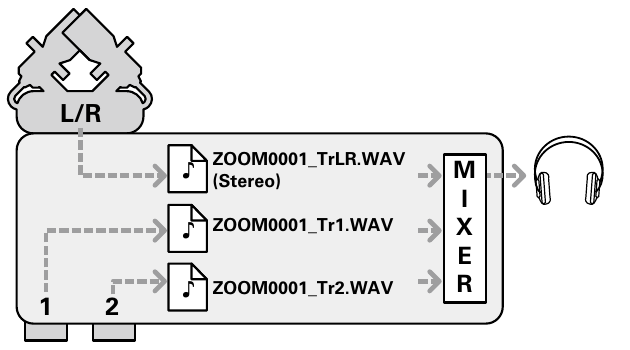
- The L/R inputs from the XY mic or another input capsule record to the L/R tracks. Inputs 1 and 2 record to tracks 1 and 2. Each track is saved as a separate file.
- Because every input has its own file, the playback volume and panning of each one can be changed independently after recording.
- Only 44.1 kHz or 48 kHz WAV, at 16 or 24 bits, can be recorded in this mode.
- Linking Inputs 1 and 2 records them together as one stereo file. A recording with the link on creates two stereo files: one from the L/R inputs and one from Inputs 1/2.
- MULTI FILE mode: one file per track, mixed for monitoring
STEREO FILE mode
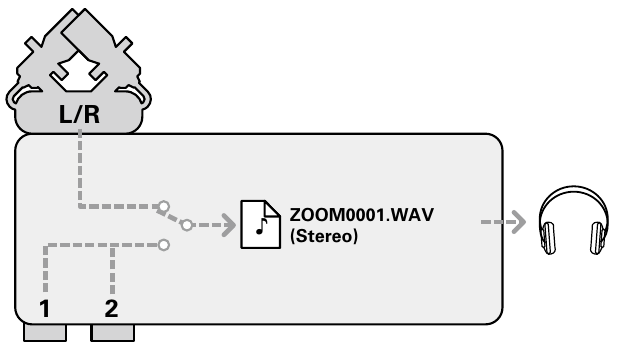
- Whichever of the L/R inputs and Inputs 1/2 are selected record together into a single stereo file. Each pair is switched on or off as a pair: Zoom H5/UG/08 Recording/05 Inputs and Levels.
- Only two tracks can be recorded, but any recording format can be chosen: Zoom H5/UG/12 Tools/08 Rec Format. This includes 96 kHz WAV at 16 or 24 bits, and MP3.
- Use this mode for the highest audio quality or for smaller files.
- STEREO FILE mode: one stereo file