Zoom H5/UG/07 Prep/04 Date and Time
Setting the date and time
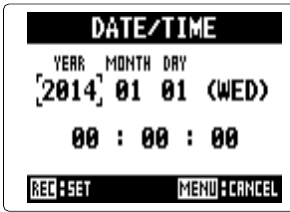
- The H5 stores the recording date and time in each file. Set the clock the first time the recorder is turned on.
- 1. Press MENU, then use the scroll button to select
SYSTEM > DATE/TIME. - 2. Change the date and time.
- Date and time screen
- Move the scroll button up or down to move the cursor between fields.
- Press the scroll button to edit a field, move it up or down to change the value, then press it again to set it.
- 3. Press REC to save the setting. MENU cancels.