Zoom H5/UG/05 Inputs
Connecting mics/other devices to Inputs 1/2
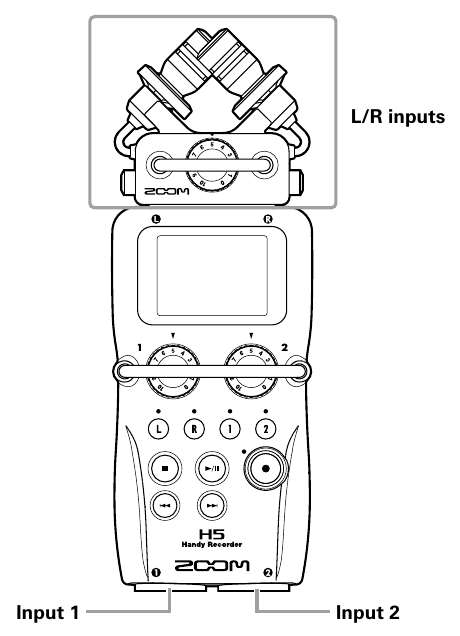
- Besides the L/R inputs on the XY mic, the H5 has Input 1 and Input 2 on the bottom of the main unit. Use all of them together to record up to 4 tracks at once.
- Inputs 1/2 accept mics, instruments and other devices.
- L/R inputs and Inputs 1/2
Connecting mics
Connecting instruments and other devices
- Connect keyboards and mixers directly to the TRS jacks of Inputs 1/2.
- Passive guitars and basses cannot be plugged in directly. Connect them through a mixer or an effects device.
- When connecting a mixer or other device with a standard output level of +4 dB, turn the PAD function on. See Zoom H5/UG/13 Settings/05 PAD.
Connection examples
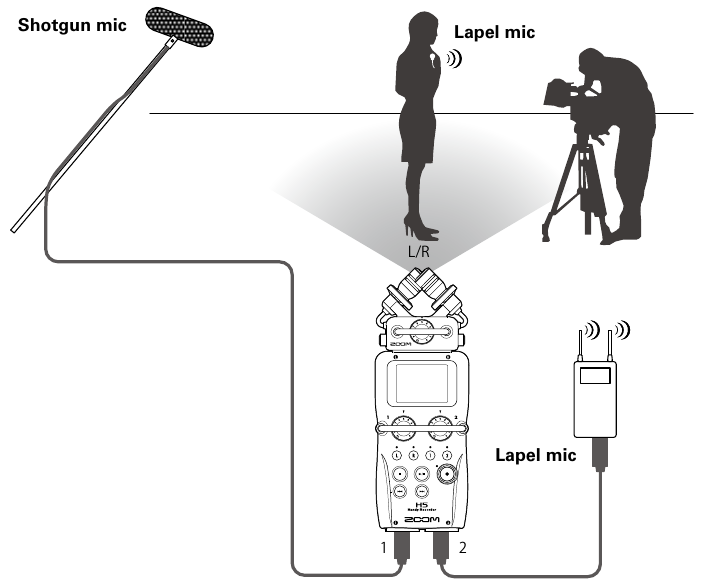
While filming
- L/R input mic: the main subject.
- Shotgun or lapel mics on Inputs 1/2: the performer.
- Shotgun mic on Input 1 and lapel mic on Input 2
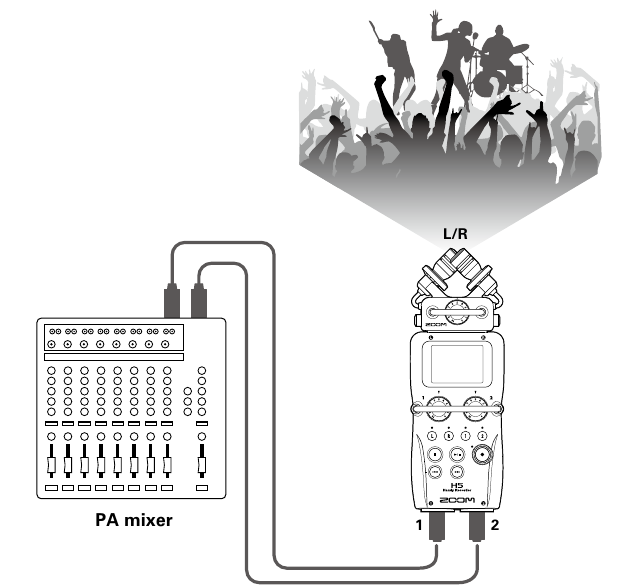
Concert recording
- L/R input mic: the performance on stage.
- Inputs 1/2: the line outputs of the PA mixer.
- PA mixer outputs on Inputs 1/2