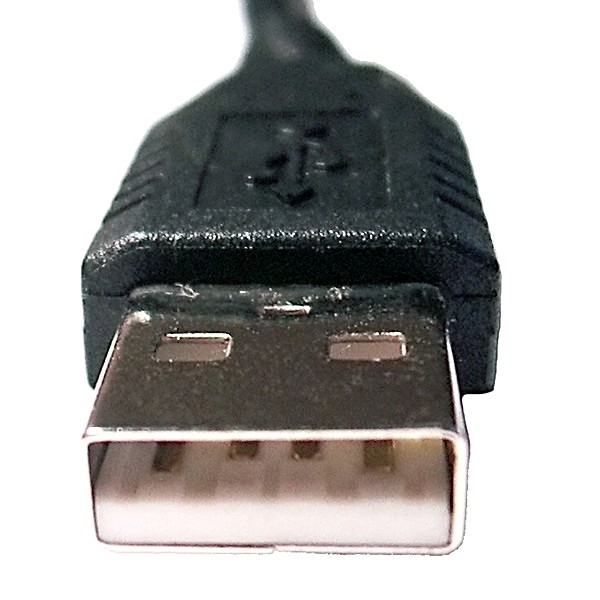
USB/Connector/Ref/USB-A
Properties
- tags
- Diataxis/Reference, USB, USB/Connector
USB-A Connector Reference
Visual Reference
Overview
- Standard USB Type-A connector, the most common USB connector type
- Introduced with USB 1.0 specification (1996)
- Rectangular shape with non-reversible design (must be inserted in correct orientation)
- Primarily used on host devices (computers, hubs, chargers) and some peripherals
Physical Specifications
- Dimensions:
- Width: 12.0 mm
- Height: 4.5 mm
- Length: Variable (depends on plug design)
- Pin Count:
- 4 pins (USB 1.0, 1.1, 2.0)
- 9 pins (USB 3.0 and later)
- Orientation: Non-reversible (must be inserted in correct orientation)
- Gender: Male connector (plugs into host/receptacle)
- Color Coding:
- Black or white interior: USB 2.0
- Blue interior: USB 3.0 and later
Technical Specifications
- USB Versions Supported: USB 1.0, 1.1, 2.0, 3.0, 3.1, 3.2
- Data Transfer Rates:
- USB 1.0/1.1: 1.5 Mbps (Low-Speed) / 12 Mbps (Full-Speed)
- USB 2.0: 480 Mbps (High-Speed)
- USB 3.0 (3.1 Gen 1, 3.2 Gen 1): 5 Gbps (SuperSpeed)
- USB 3.1 Gen 2 (3.2 Gen 2): 10 Gbps (SuperSpeed+)
- USB 3.2 Gen 2x2: 20 Gbps (requires USB-C on other end)
- Power Delivery:
- USB 1.0/1.1/2.0: Up to 2.5W (5V @ 500mA)
- USB 3.0 and later: Up to 4.5W (5V @ 900mA)
Pin Configuration
USB 2.0 (4 pins)
- Pin 1: VCC (+5V) - Power supply
- Pin 2: D- (Data -) - Differential data pair negative
- Pin 3: D+ (Data +) - Differential data pair positive
- Pin 4: GND (Ground) - Ground reference
USB 3.0+ (9 pins)
- Pins 1-4: Same as USB 2.0
- Pin 5: StdA_SSRX- (SuperSpeed receive negative)
- Pin 6: StdA_SSRX+ (SuperSpeed receive positive)
- Pin 7: GND_DRAIN (Ground for shielding)
- Pin 8: StdA_SSTX- (SuperSpeed transmit negative)
- Pin 9: StdA_SSTX+ (SuperSpeed transmit positive)
Compatibility
- Compatible Connectors:
- Backward Compatibility:
- USB 3.0+ connectors are backward compatible with USB 2.0 devices
- USB 2.0 devices will operate at USB 2.0 speeds when connected to USB 3.0+ ports
Common Use Cases
- Host devices (computers, laptops, tablets)
- USB hubs and docking stations
- USB flash drives and external storage
- Keyboard and mouse connections
- Printer and scanner connections
- Charging adapters and power banks
- Audio interfaces and MIDI controllers
Variants
USB-A 2.0
- 4-pin configuration
- Black or white interior
- Supports up to USB 2.0 speeds (480 Mbps)
USB-A 3.0 (USB 3.1 Gen 1, USB 3.2 Gen 1)
- 9-pin configuration
- Blue interior (standard color coding)
- Supports up to 5 Gbps (SuperSpeed)
USB-A 3.1 Gen 2 (USB 3.2 Gen 2)
- 9-pin configuration
- Blue or teal interior
- Supports up to 10 Gbps (SuperSpeed+)
Visual Identification
- Rectangular shape with flat bottom and slightly rounded top
- Hollow interior with visible pins
- USB 3.0+ versions have additional pins visible inside
- Color coding: Blue interior indicates USB 3.0 or later
Standards
- Defined in USB-IF specifications
- USB 1.0/1.1: USB 1.0 specification (1996)
- USB 2.0: USB 2.0 specification (2000)
- USB 3.0+: USB 3.0 and subsequent specifications
Related References