OPML
Properties
- tags
- Markup Language, XML
OPML
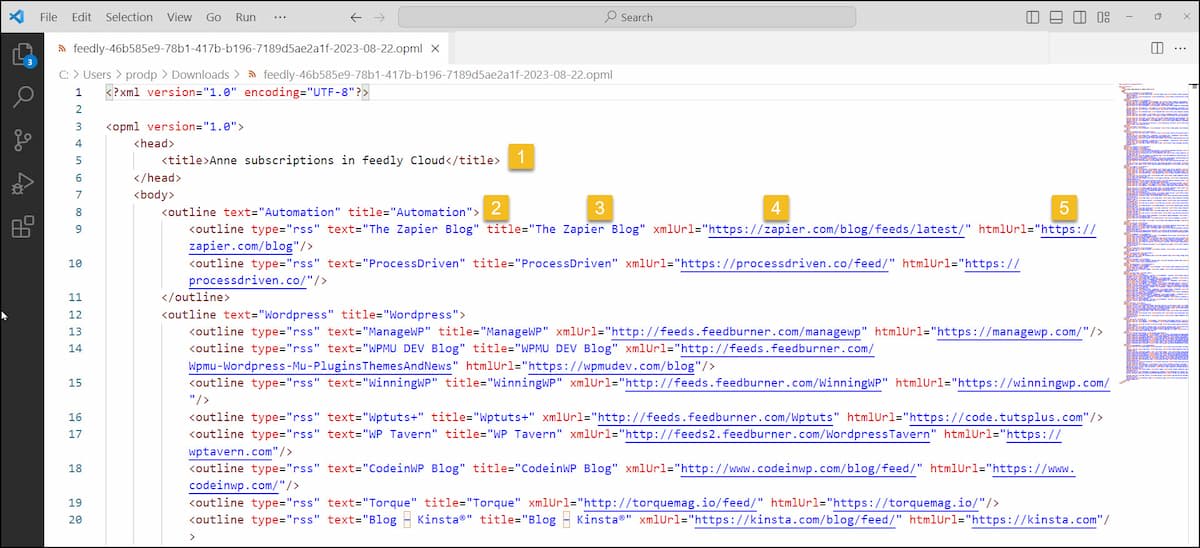
Here’s a breakdown of what OPML (Outline Processor Markup Language) is, how it works, and where it’s used:What it is
- OPML is an XML-based file format designed to represent outlines — hierarchical trees of nodes with attributes. (Wikipedia)
- The root element is
<opml version="x.y">, containing a<head>(metadata) and a<body>(the outline content). (The Library of Congress) - Each node in the outline is represented by an
<outline>element, which can have attributes liketext,type,xmlUrl, etc., and may contain nested<outline>children. (OPML) Key characteristics
- Designed to be human-readable (since XML) and easy to export/import between systems. (Listparser)
- Flexible: while originally intended for outliner applications, it became heavily used for feed subscriptions (RSS/Atom) because the structure fits lists of feeds very well. (Marshall Kirkpatrick)
- Because it uses XML and tree structure, it's portable across operating systems and applications. (file.org)
Common uses
- RSS feed aggregators: Exporting or importing user’s subscription lists in OPML is common. For example, you subscribe to many blogs or podcasts; exporting as OPML allows you to move to another reader easily. (Lifewire)
- Outliner/Note apps / Mind-map tools: Because OPML supports hierarchical outlines, many note-taking or outliner tools support import/export in OPML. (Literature & Latte)
- Knowledge/PKM sharing: In contexts like PKM and Logseq, OPML could potentially serve as an interchange format between tools that represent outlines, theoretically speaking, hierarchies, etc, but I've never seen this before.
Structure example (simplified)
<opml version="2.0">
<head>
  <title>My Feeds</title>
  <dateCreated>2025-11-08T12:34:56Z</dateCreated>
  <ownerName>M</ownerName>
</head>
<body>
  <outline text="Tech Blogs">
    <outline text="AI & ML" type="rss"
             xmlUrl="https://example.com/ai-feed.xml"
             htmlUrl="https://example.com/ai-blog"/>
    <outline text="Distributed Systems" type="rss"
             xmlUrl="https://example.com/ds-feed.xml"
             htmlUrl="https://example.com/ds-blog"/>
  </outline>
  <outline text="Podcasts" type="rss"
           xmlUrl="https://podcast.example.com/feed.xml"
           htmlUrl="https://podcast.example.com"/>
</body>
</opml>
This illustrates how you can nest categories and individual feed entries.