Microfreak/UI/Front/Row/03 Bottom/04 LFO/Button/Shape
Properties
- logseq-entity
- Logseq/Entity/UI/Control
LFO Shape button
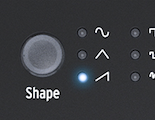
- Steps through the six LFO waveforms; an LED beside each waveform symbol shows the choice.
Settings
- Microfreak/UI/Front/Row/03 Bottom/04 LFO/Button/Shape/Sine
- Microfreak/UI/Front/Row/03 Bottom/04 LFO/Button/Shape/Triangle
- Microfreak/UI/Front/Row/03 Bottom/04 LFO/Button/Shape/Rising Sawtooth
- Microfreak/UI/Front/Row/03 Bottom/04 LFO/Button/Shape/Square
- Microfreak/UI/Front/Row/03 Bottom/04 LFO/Button/Shape/Random Stepped
- Microfreak/UI/Front/Row/03 Bottom/04 LFO/Button/Shape/Random Gliding
Source
371 Linked References
Hierarchy
- MicrofreakUIFrontRow03 Bottom04 LFOButtonShapeAssetPanelpng
- MicrofreakUIFrontRow03 Bottom04 LFOButtonShapeRandom Gliding
- MicrofreakUIFrontRow03 Bottom04 LFOButtonShapeRandom Stepped
- MicrofreakUIFrontRow03 Bottom04 LFOButtonShapeRising Sawtooth
- MicrofreakUIFrontRow03 Bottom04 LFOButtonShapeSine
- MicrofreakUIFrontRow03 Bottom04 LFOButtonShapeSquare
- MicrofreakUIFrontRow03 Bottom04 LFOButtonShapeTriangle