Microfreak/UG/19 Appendix B Vocoder/08 Global Settings/03 Set Gain
19.8.3. How do you set gain?
- The useful gain depends on how loudly you sing or speak and your distance from the microphone.
- Set the MicroFreak master volume to about 50%, then use a non-vocoder preset to establish an average listening level.
- Select the Vocoder Oscillator. Open Utility > Mic Settings > Mic Gain with the Preset encoder. Mic Gain defaults to Auto; turn the encoder left to choose a manual level.
- Hold a key and speak or sing while adjusting gain until the vocoder is loud enough without distortion. For chords, enable Paraphonic mode and check the level again. Leave headroom if your voice changes volume widely.
19.8.3.3. Connecting external sources
- An external audio source can modulate the vocoder, including a guitar, drum machine, phone, tablet, or Eurorack mixer. Match its output level to the MicroFreak input: these sources are usually much louder than a microphone.
- Approximate output levels: microphones -60 to -40 dBU; guitar -20 dBU; phones and tablets -7.78 dBU; Eurorack +13 dBU.
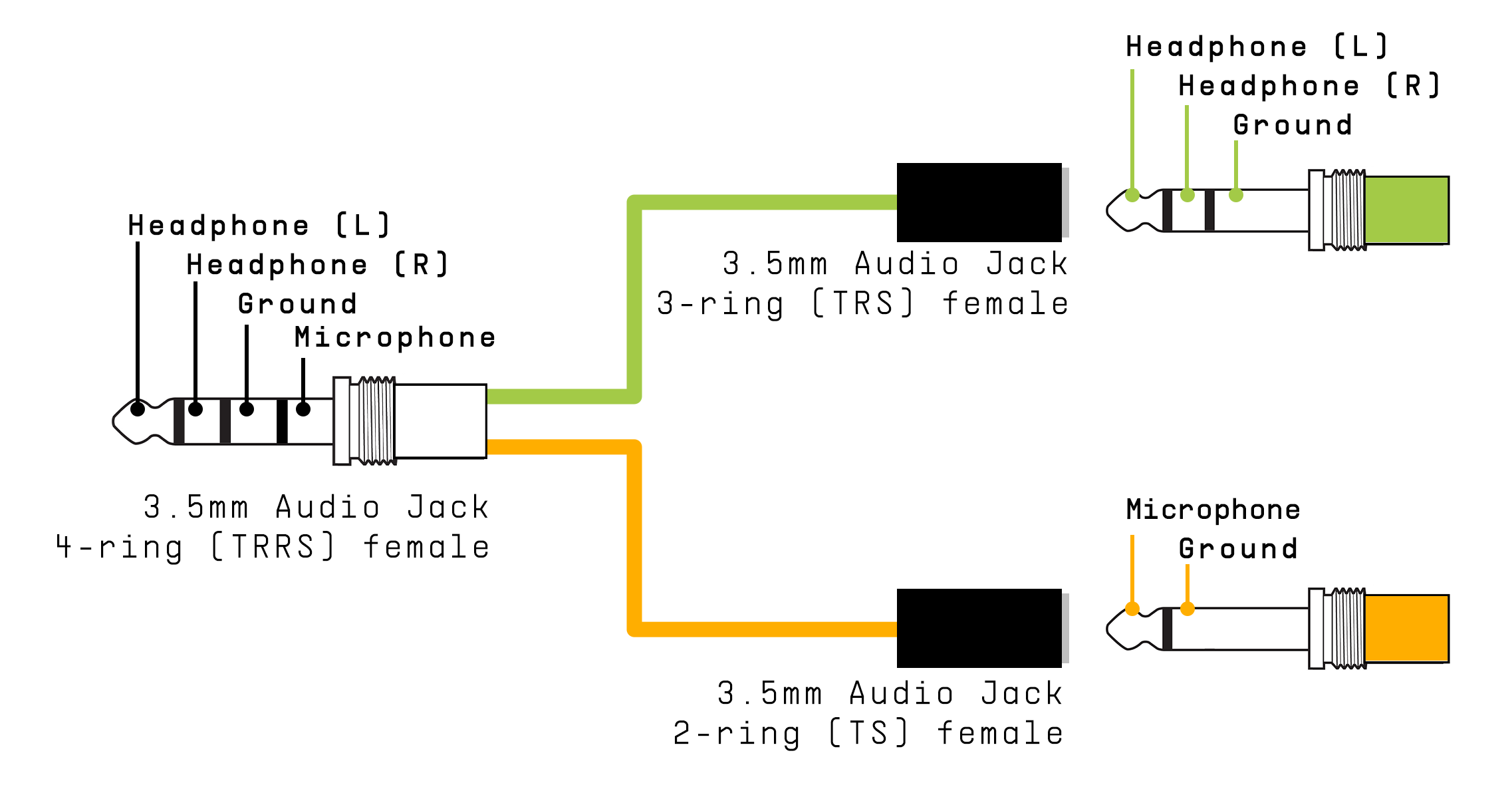
- Use a headphone/microphone splitter that connects the source to the mic contact of the MicroFreak’s 3.5 mm TRRS jack.
- Headphone/Microphone Splitter
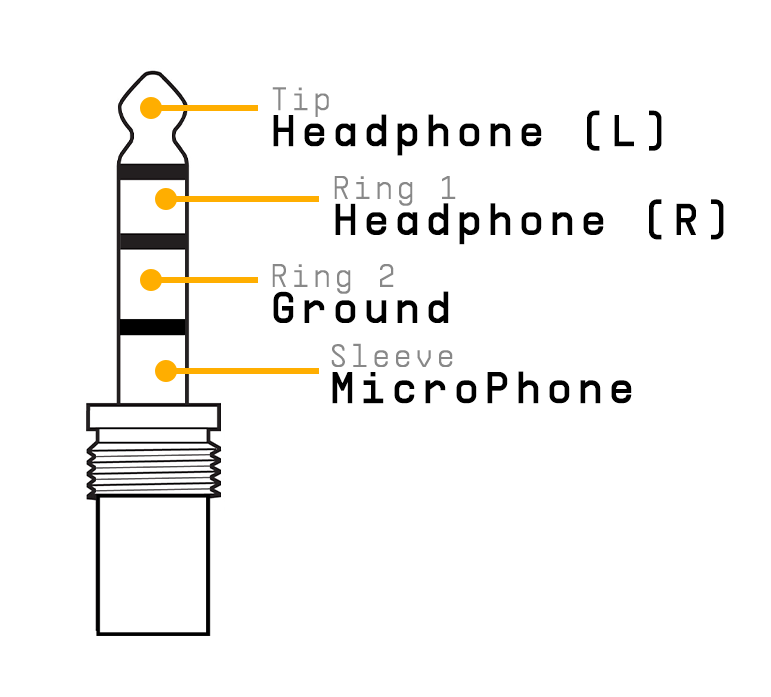
Note/Info The input uses CTIA/AHJ wiring: tip = left audio, ring 1 = right audio, ring 2 = ground, sleeve = microphone.
- CTIA/AHJ connector
Note/Warning Do not connect a Eurorack module directly to the splitter. Its signal can overload or damage the MicroFreak. Use a mixer headphone or line-level output instead.
Connect the device
- Turn off the MicroFreak and gently remove the gooseneck microphone.
- Turn the external device’s output level all the way down to avoid clipping.
- Plug the splitter into the MicroFreak headphone jack and the device signal into the splitter’s mic branch.
- Turn on the MicroFreak.
- Set Utility > Mic Settings > Mic Detection to Off and Mic Gain initially to -12 dB.
- Select a vocoder preset, hold a key, and slowly raise Mic Gain. If there is no sound, slowly raise the source device’s output level.
6 Linked References
Hierarchy
- MicrofreakUG19 Appendix B Vocoder08 Global Settings03 Set Gain01 Noise Gate
- MicrofreakUG19 Appendix B Vocoder08 Global Settings03 Set Gain02 Mic Detection
- MicrofreakUG19 Appendix B Vocoder08 Global Settings03 Set Gain03 External Sources
- MicrofreakUG19 Appendix B Vocoder08 Global Settings03 Set Gain03 External SourcesAsset01-Headphone-Microphone-Splitterpng
- MicrofreakUG19 Appendix B Vocoder08 Global Settings03 Set Gain03 External SourcesAsset02-CTIA-AHJ-Connectorpng