Microfreak/UG/13 Sequencer/01 Use
Properties
- logseq-entity
- Logseq/Entity/Book/Section/Level 2
13.1. Using the Sequencer
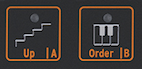
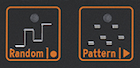
- The icon strip changes function with Arp | Seq. In arpeggiator mode, its icons control Hold, Order, Random, and Pattern. After Shift + Seq activates the sequencer, they control Tie/Rest, pattern A, pattern B, Record/Stop, and Play/Stop.
- The Sequencer Controls
- The Sequencer Controls: Stop and Start
- The Tie/Rest Icon
- Tie/Rest: During step recording, extend a note across steps or enter silence.
- A and B: Select the pattern.
- Record (O): Start step recording while playback is stopped. During playback, press Record to start real-time recording.
- Play (>): Start or stop playback; also ends step recording.
Note/Info During playback, the MicroFreak sends MIDI and analog clock signals. Starting or stopping playback also sends MIDI start or stop messages to external sequencers.
- A preset can contain monophonic or paraphonic patterns. In paraphonic mode, the sequencer can play up to four voices; with Paraphony off, it plays only the lowest note of each step.
- Keyboard notes take priority over sequence notes. If you hold two keys in four-voice paraphonic mode, two voices remain for the sequence, which plays its lowest two notes. Incoming MIDI notes have the same priority as keyboard notes; sequence notes have the lowest priority.
Note/Info The pitch CV output sends the lowest note in a sequence step. During keyboard playing, it sends the most recently played note.
- MIDI sends all notes in a played chord, including velocity and aftertouch, even when the chord has more than four notes.

37 Linked References
Hierarchy
- MicrofreakUG13 Sequencer01 Use01 Select & Play
- MicrofreakUG13 Sequencer01 Use02 Keyboard
- MicrofreakUG13 Sequencer01 Use03 Record
- MicrofreakUG13 Sequencer01 Use03 Record01 Step Time
- MicrofreakUG13 Sequencer01 Use03 Record02 Edit
- MicrofreakUG13 Sequencer01 Use03 Record03 Real Time
- MicrofreakUG13 Sequencer01 Use03 Record04 Copy
- MicrofreakUG13 Sequencer01 Use03 Record05 Arp
- MicrofreakUG13 Sequencer01 UseAsset01-The-Sequencer-Controlspng
- MicrofreakUG13 Sequencer01 UseAsset02-The-Sequencer-Controls-Stop-and-Startpng
- MicrofreakUG13 Sequencer01 UseAsset03-The-Tie-Rest-Iconpng