Microfreak/UG/12 Arpeggiator/05 Arpeggio Range
12.5 Arpeggio Range
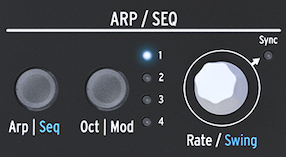
- The Arpeggiator initially plays the held notes within one octave. Press Oct | Mod to choose how many octaves above the held notes are added:
- 1 plays only notes held on the keyboard.
- 2 adds the same notes one octave above.
- 3 adds them two octaves above.
- 4 adds them three octaves above.
- The Arpeggiator and range
- While an arpeggio plays, pressing Octave Up or Octave Down keeps the pitches already in the arpeggio and adds newly played notes in the new octave.
- To transpose a held arpeggio, activate Hold, press Shift, and play a key to set the transposition. The display shows the amount.
- In Scale mode, notes outside the selected scale are forced into it. Different notes can collapse to the same pitch, creating repeated-note or ratcheting effects. Keep Utility > Preset > Scale open while adjusting the scale and transposition.