Microfreak/UG/12 Arpeggiator
12 The Arpeggiator
- An arpeggiator breaks a chord into individual notes and plays them one by one.
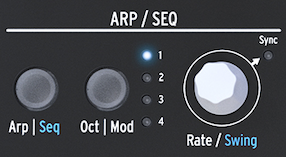
- Press Arp | Seq to activate the Arpeggiator; the button lights white in Arpeggio mode. Press it again to turn the Arpeggiator off.
- A useful starting point is to press Hold, play a chord, then activate the Arpeggiator. It will play the held chord while you adjust the sound.
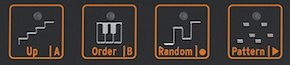
- The four icons above the keyboard select how the notes are played:
- Up plays notes from low to high, regardless of the order in which the keys were pressed.
- Order plays the notes in the order the keys were pressed.
- Random plays the notes in a random order.
- Pattern generates a semi-random pattern from legato key presses.
- The Arpeggiator
- Arpeggiator pattern icons
12.1 Using Patterns
- Press Pattern to generate a semi-random arpeggio from keys played legato. Each new key press generates a new pattern.
- The pattern draws notes from the octave range selected with Oct | Mod. It plays the lowest note twice as often as each higher chord note, emphasizing the root.
- Set the generated pattern length with Utility > Preset > Seq length. This also sets the length used by the Sequencer and Spice & Dice. The default is 16 steps; the range is 4–64.
- When a pattern sounds right, press Hold before releasing the keys. Touching the keyboard again creates a new pattern. With Hold active, the arpeggio continues while you lift your fingers; deactivate Hold to clear it.
12.1.1 Creating Pattern Variations
- Add or remove a finger while playing to generate a new pattern variation.
- Patterns are performance material and are not saved with a preset.
12.2 Gates and Triggers revisited
- Pressing a key produces a gate that stays high while the key is held. The Arpeggiator and Sequencer also generate gates.
- With Amp | Mod off, the Arpeggiator or Sequencer gates control the amplifier directly. With it on, those gates trigger the Envelope, which controls the amplifier.
- Set gate length in Utility > Preset > Default gate length. To hear its effect on the Arpeggiator, turn Amp | Mod off, hold a chord, and adjust the setting.
12.3 Arpeggio Rate
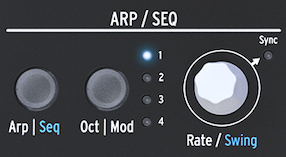
- Rate sets the arpeggio speed. With Sync off, the display shows BPM; the default is 120 BPM, and the Arpeggiator runs independently of internal or external clock.
- With Sync on, the Arpeggiator follows the internal clock and Rate selects a time division. For example, 1/2 gives each note a two-beat duration; 1/4 gives quarter notes, or four notes per measure.
- Available divisions:
- 1 whole note
- 1/2 note and 1/2 note triplet
- 1/4 note and 1/4 note triplet
- 1/8 note and 1/8 note triplet
- 1/16 note and 1/16 note triplet
- 1/32 note and 1/32 note triplet
- A 1/4 division corresponds to a standard metronome tick.
- The Arpeggiator and the Rate knob
12.3.1 Using Sync
- Sync coordinates the timing of modules or connected instruments. The MicroFreak can sync to a DAW or external synthesizer, with Rate setting divisions such as double speed or half speed.
- The LFO, Arpeggiator, and Sequencer can sync to the clock. Their synchronized rhythms can add accents and rhythmic shifts.
12.4 Making it Swing
- Hold Shift and turn the Rate encoder to adjust Swing. The range is 50–75%; 50% is the default straight rhythm. Swing shifts notes around the beat and can loosen a rhythm, especially when combined with straight notes.
12.5 Arpeggio Range
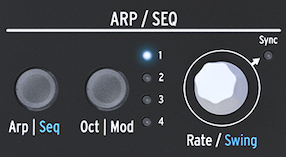
- The Arpeggiator initially plays the held notes within one octave. Press Oct | Mod to choose how many octaves above the held notes are added:
- 1 plays only notes held on the keyboard.
- 2 adds the same notes one octave above.
- 3 adds them two octaves above.
- 4 adds them three octaves above.
- The Arpeggiator and range
- While an arpeggio plays, pressing Octave Up or Octave Down keeps the pitches already in the arpeggio and adds newly played notes in the new octave.
- To transpose a held arpeggio, activate Hold, press Shift, and play a key to set the transposition. The display shows the amount.
- In Scale mode, notes outside the selected scale are forced into it. Different notes can collapse to the same pitch, creating repeated-note or ratcheting effects. Keep Utility > Preset > Scale open while adjusting the scale and transposition.
12.6 Transferring an arpeggio to the Sequencer
- To transfer an arpeggio to a sequence pattern:
- Activate the Arpeggiator with Arp | Seq and play until you find an arpeggio you like. This also works in Paraphonic mode.
- Press Hold and adjust Spice & Dice if desired.
- Press Shift + Up | A or Order | B to transfer it to sequence pattern A or B. Playback switches to the Sequencer.
- The transferred pattern extends to the current sequence length. A three-note arpeggio transferred to an eight-step pattern becomes an eight-step sequence.
- Spice & Dice effects transfer with the arpeggio, providing those effects in a sequence. Recording in Sequencer mode disables Spice & Dice.
- Chords created in Chord mode also transfer to the sequence.
12.7 Arpeggiator fun
- The Arpeggiator can act as a modulation source. The effect is subtle, so increase the modulation amount and extend the octave range. Routing it to two destinations can make the movement easier to hear.
- Example patch:
- Set the oscillator type to Waveshaper.
- Activate the envelope with Amp | Mod. Set Attack to 0 ms, Decay to 100 ms, Sustain to 30%, and Filter Amt to maximum.
- In the Matrix Key | Arp row, assign Assign 1 to Glide with modulation amount about 0.2. Set Glide between 1/32 and 1/16.
- Assign Assign 2 to envelope Attack with modulation amount 10.
- Press Pattern to generate a new arpeggio pattern when you lift a finger from the keyboard.
- To vary the pattern, set Spice with the Spice icon and touch strip, then roll Dice on the strip. This varies the Glide and slows the Attack in the higher octaves.
- An external delay works well with an arpeggio.
12.7.1 Spicing up your Arpeggios
- Use the Bend strip to change the pitch of a playing arpeggio. For strong variation across an octave, set Utility > Preset > Bend range to 12 and make sure Utility > Misc > Relative bend is off.
- A single held note can make a rhythmic pattern: set a medium arpeggio rate, then lift and replace the finger rhythmically. Vary timbre, envelope stages, or volume with modulation or keyboard pressure while keeping the pitch fixed. The manual calls repeating one pitch while changing its other qualities Hoketus.
- A small amount of pitch modulation from the LFO or Cycling Envelope can make a sustained note resemble a monochord: several strings tuned to the same pitch, with occasional strings a step above or below.