Microfreak/UG/11 Icon Strip
Properties
- logseq-entity
- Logseq/Entity/Book/Section/Level 1
11 Using the Icon Strip
- Just above the keyboard, the Icon Strip has function icons and a touch strip.
- The Icon Strip
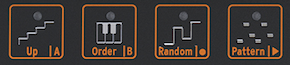
- The function icons on the left control the Arpeggiator and Sequencer. Their full functions are covered in their own chapters. This chapter covers the Hold button, the Spice, Dice, and Bend icons, and ways to use the touch strip to shape a performance.
11.1 The Key Hold Button
- Key Hold locks a key or chord so both hands are free to adjust the MicroFreak's controls.
Note/Info The HOLD state is not saved with the preset.
- The Hold Icon
- Pressing Hold once keeps the held keys active after the fingers lift. In paraphonic mode, playing additional notes adds them to the current chord.
- In Arp mode, Hold keeps the arpeggiated notes playing after keys are released. Turning off Arp or Hold ends them. Playing new keys replaces the notes currently playing.
Note/Info Hold does not work with external MIDI. To hold external MIDI notes, send the MicroFreak a Sustain message.
- In Sequencer mode, the Hold Icon has alternate functions.
- The alternative functions of the Hold Icon
- In Step-record mode, Hold adds a tie or silence.
- In Real-time recording mode, Hold clears the content as the sequence records.
- With Seq Mod, Hold clears sequence modulation; with A or B, it clears the selected sequence.
- When the Sequencer is disabled, Hold returns to its usual Key Hold function.
Note/Info Key Hold can help create a generative, self-evolving patch. Modulating pitch with independent rates from sources such as the LFO and Cycling Envelope makes the pitch change continuously without a sequencer.
11.3 The Touch Strip
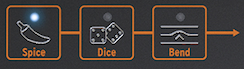
- The touch strip has three functions. Select Spice, Dice, or Bend by pressing its corresponding icon.
- Spice and Dice and Bend
11.3.2 Bend
- Pitch bending raises or lowers a note. Press the Bend icon to enable bending.
- The Bend Strip
- The center is neutral. Moving left lowers the pitch; moving right raises it. Touching another point jumps directly to that pitch.
- In standard mode, pitch follows the strip's absolute position. In relative mode, finger movement is added to or subtracted from the current pitch, regardless of where the finger first touches. Enable relative mode at Utility > Misc > Relative bend.
Note/Info Six W-shaped marks on the strip help guide accurate bends.
- The default bend range is 24 chromatic steps: 12 to either side of center. Utility > Preset > Bend range sets the range, up to 48 steps (four octaves).
- Tapping between two points can alternate pitches quickly. When the finger lifts, pitch returns to the center. Moving a finger slightly on the strip also creates vibrato.
Note/Info Indian music and instruments such as the sarod and sitar offer examples of expressive pitch-bending traditions beyond Western music.




36 Linked References
Hierarchy
- MicrofreakUG11 Icon Strip01 Key Hold Button
- MicrofreakUG11 Icon Strip01 Key Hold ButtonAsset01-The-Hold-Iconpng
- MicrofreakUG11 Icon Strip01 Key Hold ButtonAsset02-The-alternative-functions-of-the-Hold-Iconpng
- MicrofreakUG11 Icon Strip02 Sequencer and Arpeggiator
- MicrofreakUG11 Icon Strip02 Sequencer and ArpeggiatorAsset01-Arpeggio-and-Sequencer-Control-Iconspng
- MicrofreakUG11 Icon Strip03 Touch Strip
- MicrofreakUG11 Icon Strip03 Touch Strip01 Spice and Dice
- MicrofreakUG11 Icon Strip03 Touch Strip02 Bend
- MicrofreakUG11 Icon Strip03 Touch Strip02 BendAsset01-The-Bend-Strippng
- MicrofreakUG11 Icon Strip03 Touch StripAsset01-Spice-and-Dice-and-Bendpng
- MicrofreakUG11 Icon StripAsset01-The-Icon-Strippng