Microfreak/UG/09 Envelope Gen/06 Cycling Envelope
09.6 The Cycling Envelope Generator
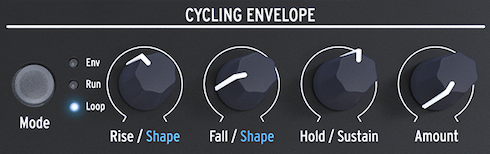
- Unlike a standard envelope that runs through its stages once, the Cycling Envelope can retrigger itself after its final stage. It can act as a complex LFO, producing wave shapes that a standard LFO cannot.
- You can change the shapes of the Rise and Fall stages. The Rise, Fall, and Hold levels can be modulated, so the shape can change in real time.
- The Cycling Envelope Generator
09.6.1 The stages of the Cycling Envelope
- The Cycling Envelope has three stages:
- Rise sets how long the envelope takes to reach its maximum after a keyboard or Arp/Seq trigger.
- Fall/Shape sets how long the envelope takes to fall to zero.
- Hold/Sustain, part of the Fall/Shape control, sets the level held during the Hold stage.
- The Mode button selects Env, Run, or Loop:
- Env: The envelope runs once and stops at the end of Fall.
- Run: The envelope free-runs as an LFO and resets when the MicroFreak receives a MIDI Start command.
- Loop: A keyboard, sequencer, or arpeggiator trigger resets the envelope. It retriggers at the end of Fall in Run and Loop modes.
- In Env mode, a keyboard or external gate starts Rise. Sustain stays high while the key is held; releasing the key ends the gate and starts Fall. In Run and Loop modes, Hold stays high for the time set with the Hold knob before Fall begins.
- To hear the stages, connect CycEnv to oscillator Pitch in the Matrix and set the amount to about 20. Set Rise to about 200 ms, Hold to 0, Fall to 0 ms, and Amount to 50%. Pitch rises, then slowly falls; lowering Amount makes the rise less noticeable.
- In Loop mode, very short Rise, Fall, and Hold settings make the Cycling Envelope cycle quickly as a complex LFO. Change these times to change its wave shape.
- In Loop mode, trigger the envelope with the keyboard or Arp/Seq. Set the arpeggiator near 55 bpm and hold a chord to hear the envelope retrigger on each step.
09.6.2 About Changing Shapes
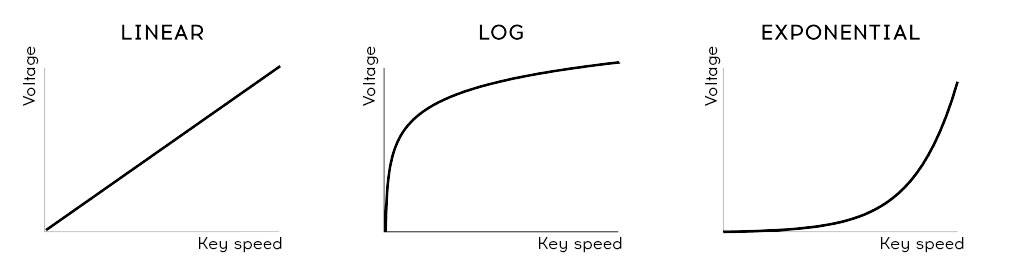
- Hold Shift and turn Rise or Fall to change that stage's shape. Turn left for a logarithmic curve, right for an exponential curve, or use the middle dead zone for a linear curve. The display shows “LINEAR” in that zone.
- Velocity curves
- A logarithmic curve rises quickly and slows near its endpoint. An exponential curve rises slowly, then speeds up. A linear curve changes at a steady rate.
- An exponential Rise with a logarithmic Fall can make the envelope feel sluggish. A logarithmic Rise with an exponential Fall can make it start more sharply and end more reluctantly.
09.6.3 Using the Legato options
- Legato connects each new note to the previous one without a gap. Staccato playing lifts the fingers before playing the next note.
- A Utility setting controls how the Envelope and Cycling Envelope respond to legato in monophonic mode. When the setting is OFF, each added note restarts both envelopes. When it is ON, only the first key starts them; later keys use the contour already in progress.