Microfreak/UG/09 Envelope Gen
09 The Envelope Generator
- The Envelope Generator is one of the MicroFreak's basic building blocks. It shapes a sound's overall loudness or timbre and can send modulation to any Matrix destination, including destinations you create.
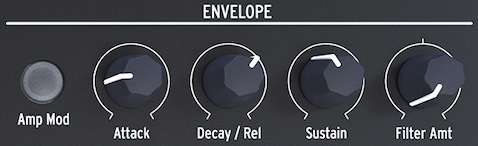
- The Envelope Generator
09.1 What does an Envelope Generator do?
- An instrument's envelope and timbre help make it recognizable. An organ reaches full volume at once, stays there while a key is held, then decays quickly. A piano has a slower attack and longer decay. A string section builds and fades more gradually.
- In electronic music, an envelope can also shape a sound's frequency content. A familiar example is a filter sweep.
- To hear a filter sweep on the MicroFreak:
- Set the filter Cutoff to minimum and Resonance to maximum.
- Set Amp Mod on the Envelope to ON.
- Set Envelope Attack to 1.7 s, Decay to 7.7 s, Sustain to 90%, and Filter Amount to 70.
- The filter will sweep through the oscillator's overtones. The effect is stronger with an oscillator rich in harmonics. Try different oscillator models to hear how the filter changes each one.
- The MicroFreak can use envelopes to shape both a sound's timbre and its amplitude (volume).
09.2 Gates and Triggers
- An envelope needs a trigger or a gate to start.
- A trigger is a very short pulse that can synchronize modules or start the MicroFreak's LFO or envelopes. A gate lasts longer, from a few milliseconds to a few seconds.
- The keyboard is the MicroFreak's primary gate source. Touching and holding a key starts the envelope's Attack stage, followed by Decay/Release and Sustain. The envelope stays at the Sustain level while the key is held. Releasing the key ends the gate, and the level falls to zero at the rate set by Decay/Release.
09.3 Envelope stages
- The MicroFreak's Envelope Generator has three stages: Attack, Decay/Release, and Sustain. It is technically an ADS envelope because the keyboard can hold the Sustain stage indefinitely.
09.3.1 Attack
- Attack sets how long the envelope takes to rise from its minimum to its initial maximum level: from 0 ms to 10 seconds.
09.3.2 Decay/Release
- Decay/Release sets how long the envelope takes to move from its attack level to its Sustain level after Attack ends. Its range is 0 ms to 13 seconds.
09.3.3 Sustain
- Sustain sets the level where the signal settles after Decay. This level is usually lower than the initial level, but it can be the same; in that case, Decay does not change the envelope. Use a low Sustain level for percussive sounds.
09.4 Filter amount
- The Standard Envelope can control filter cutoff and amplitude. When Amp Mod is off, the envelope controls filter cutoff. When Amp Mod is on, it controls both volume and filter cutoff.
- Filter Amount sets how strongly the envelope controls the filter's frequency. It is a bipolar control.
- Filter Amount is a Matrix destination. Modulating it with the LFO can gradually dampen the sound; the LFO waveform determines how the cutoff changes.
09.5 The Amp Mod button
- The keyboard and sequencer gates control the internal Voltage Controlled Amplifier (VCA) directly: a held key turns the sound on, and releasing it turns the sound off.
- Turning on Amp Mod activates the Envelope Generator to shape the volume with those gates. The envelope output also always goes to the filter; Filter Amount sets its effect on cutoff. The envelope is also available as a Matrix source for controlling other MicroFreak modules.
09.6 The Cycling Envelope Generator
- Unlike a standard envelope that runs through its stages once, the Cycling Envelope can retrigger itself after its final stage. It can act as a complex LFO, producing wave shapes that a standard LFO cannot.
- You can change the shapes of the Rise and Fall stages. The Rise, Fall, and Hold levels can be modulated, so the shape can change in real time.
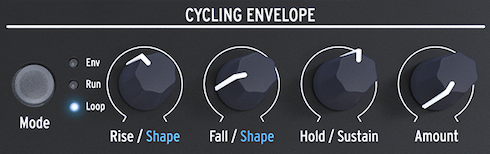
- The Cycling Envelope Generator
09.6.1 The stages of the Cycling Envelope
- The Cycling Envelope has three stages:
- Rise sets how long the envelope takes to reach its maximum after a keyboard or Arp/Seq trigger.
- Fall/Shape sets how long the envelope takes to fall to zero.
- Hold/Sustain, part of the Fall/Shape control, sets the level held during the Hold stage.
- The Mode button selects Env, Run, or Loop:
- Env: The envelope runs once and stops at the end of Fall.
- Run: The envelope free-runs as an LFO and resets when the MicroFreak receives a MIDI Start command.
- Loop: A keyboard, sequencer, or arpeggiator trigger resets the envelope. It retriggers at the end of Fall in Run and Loop modes.
- In Env mode, a keyboard or external gate starts Rise. Sustain stays high while the key is held; releasing the key ends the gate and starts Fall. In Run and Loop modes, Hold stays high for the time set with the Hold knob before Fall begins.
- To hear the stages, connect CycEnv to oscillator Pitch in the Matrix and set the amount to about 20. Set Rise to about 200 ms, Hold to 0, Fall to 0 ms, and Amount to 50%. Pitch rises, then slowly falls; lowering Amount makes the rise less noticeable.
- In Loop mode, very short Rise, Fall, and Hold settings make the Cycling Envelope cycle quickly as a complex LFO. Change these times to change its wave shape.
- In Loop mode, trigger the envelope with the keyboard or Arp/Seq. Set the arpeggiator near 55 bpm and hold a chord to hear the envelope retrigger on each step.
09.6.2 About Changing Shapes
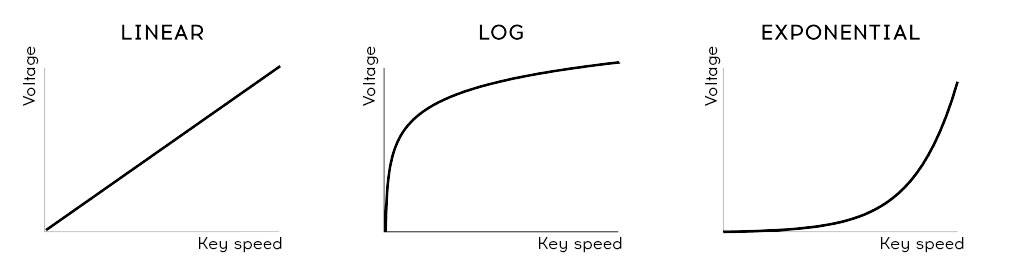
- Hold Shift and turn Rise or Fall to change that stage's shape. Turn left for a logarithmic curve, right for an exponential curve, or use the middle dead zone for a linear curve. The display shows “LINEAR” in that zone.
- Velocity curves
- A logarithmic curve rises quickly and slows near its endpoint. An exponential curve rises slowly, then speeds up. A linear curve changes at a steady rate.
- An exponential Rise with a logarithmic Fall can make the envelope feel sluggish. A logarithmic Rise with an exponential Fall can make it start more sharply and end more reluctantly.
09.6.3 Using the Legato options
- Legato connects each new note to the previous one without a gap. Staccato playing lifts the fingers before playing the next note.
- A Utility setting controls how the Envelope and Cycling Envelope respond to legato in monophonic mode. When the setting is OFF, each added note restarts both envelopes. When it is ON, only the first key starts them; later keys use the contour already in progress.
09.7 Freaky Cycling Envelope Suggestions
- Use the Matrix to modulate the Cycling Envelope's Rise, Hold, and Fall with the LFO or pressure. Pressure gives direct control over the Rise and Fall stages.
- Matrix modulation can be positive or negative. A negative signal to Fall shortens the Fall stage as pressure increases.
- Amount controls how strongly the Cycling Envelope affects its destinations. Adjust it carefully, especially when modulating the analog filter. A control that reduces signal strength is an attenuator.
- The Matrix can combine the Cycling Envelope with stages of the Main Envelope. For example, modulating Attack changes its slope; modulating Decay changes its length. Further Matrix routings can build longer modulation chains.
- Patch ideas:
- Use a slow sine LFO to control Cycling Envelope Rise, then use CycEnv to control Main Envelope Sustain.
- Use a random LFO to control Cycling Envelope Amount, then use CycEnv to control Main Envelope Decay/Release or Sustain.