Microfreak/UG/05 Connections/02 Matrix and Encoder
05.2 The Matrix and its encoder
- The Matrix links control signals from sources to destinations.
- A classic synthesizer sends an oscillator through a filter and then an amplifier. The Matrix lets you override those fixed connections and route triggers, gates, LFO waves, and envelopes to the Digital Oscillator and Filter.
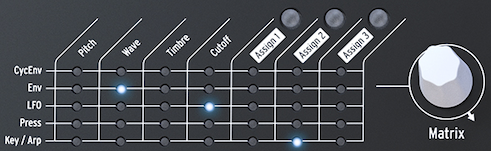
- The Matrix is the main switchboard for creating, changing, and mixing modulation connections. It has a switchboard and an encoder for selecting connections and setting their modulation amount.
- The Matrix and its encoder
- Turn the encoder to choose a source–destination point, then press it to create or edit the connection. It scrolls forward or backward and wraps at the end of the Matrix.
- The Matrix shows each connection's state:
- LED off: no connection is active, or its amount is zero.
- LED on: a connection is active.
- LED blinking: the connection is selected and its modulation amount is being edited.
- The display shows the selected connection and its current modulation amount. Press the encoder to edit the amount; the display inverts and only that connection's LED stays lit. Changes take effect immediately.
- Multiple sources can control the same destination. For example, Key/Arp and the LFO can both affect oscillator pitch, and their modulation amounts are added together. With a rectangular LFO wave, this can transpose a sequence up and down at the LFO rate.
- Setting a connection's amount to zero turns it off. To clear a Matrix point and reset its amount, hold the encoder for at least 0.5 seconds.
- To create and edit a connection:
- Turn the encoder to select a point and press it.
- Turn the encoder to set a positive or negative modulation amount.
- To disable a connection and reset its amount:
- Select the connection with the encoder.
- Hold the encoder for at least 0.5 seconds, or set its amount to zero.
05.2.1 Sources and Destinations
- The Matrix has 35 patch points: five sources on the left and seven destinations across the top.
- Its sources are:
- CycEnv: output of the Cycling Envelope Generator.
- ENV: output of the Envelope Generator.
- LFO: output of the Low-Frequency Oscillator.
- PRESSURE: pressure or velocity output, depending on the Utility setting.
- KEY / ARP: combined output of the keyboard, arpeggiator, and sequencer.
- The first four destinations are Pitch, Wave, Timbre, and Cutoff.
- Pitch, Wave, and Timbre modify the Digital Oscillator's sound.
- Cutoff changes the Filter's cutoff frequency. The Digital Oscillator passes through the Analog Filter, which can remove or emphasize frequencies. See Microfreak/UG/07 Filter.
05.2.2 Assigning destinations
- Assign1, Assign2, and Assign3 are user-defined destinations. They can turn nearly any MicroFreak knob into a modulation destination.
- Master Volume and the Preset Encoder cannot be assigned. Shift-plus-knob parameters, control buttons, and icon buttons such as Spice and Dice cannot be assigned either.
- To assign a destination to one source:
- Select its Assign point in the Matrix and press the encoder to enter edit mode.
- Hold the corresponding Assign button and turn the knob to use as a destination. The display confirms the parameter.
- Turn the encoder to set the modulation amount, then press it to leave edit mode.
- To assign one destination to every source in a column, hold an Assign button and move the desired knob. Then set the amount for each source in that column.
- Possible modulation destinations include:
- Glide: Glide amount.
- Oscillator Type: oscillator model.
- Sample: sample slot index.
- Oscillator Wave, Timbre, and Shape: the corresponding parameter of the selected oscillator.
- Filter Cutoff and Resonance: cutoff frequency and filter bandwidth.
- Envelope Attack, Decay, Sustain, and Filter Amount: the Standard Envelope stages and its amount sent to the amplifier.
- LFO Rate: LFO speed.
- Arp&Seq Rate: arpeggiator and sequencer rate.
- Cycling Envelope Rise, Fall, and Hold: the Cycling Envelope's stages.
- Cycling Envelope Amount: amount sent from CycEnv to the Matrix.
- Matrix Modulation Amount: modulation amount of a Matrix point.
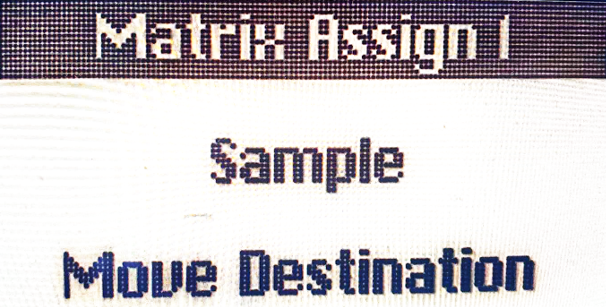
- Starting with MicroFreak firmware 5.0.0, Sample can be assigned by opening the Sample select menu, pressing one of the three Assign buttons, and turning the Type knob.
- Sample assigned as a Matrix destination
- A Matrix connection's modulation amount can itself be modulated. To vary vibrato depth with the Cycling Envelope:
- Route the LFO to oscillator Pitch.
- Select CycEnv→Assign1 in the Matrix and hold Assign1.
- Select the LFO→Pitch point and press the encoder to make it the modulation-amount destination.
- Return to CycEnv→Assign1 and set its amount. The Cycling Envelope now changes the vibrato depth.
- In Paraphonic mode, all voices are assigned simultaneously as a destination.
- To clear all Matrix routings, hold Shift and press the Matrix encoder.
- The Matrix routes sources to destinations and mixes multiple sources at one destination. The encoder sets modulation strength in either a positive or negative direction.