Microfreak/UG/02 Installation/07 Latest Firmware
02.07 Get the Latest Firmware
- The latest MicroFreak firmware adds features described in Microfreak/UG/01 Welcome and Introduction/02 New in FW 5.0.0. Install the latest firmware to get the full MicroFreak experience.
Download the firmware
- Open the Arturia Downloads and Manuals page.
- Find MIDI Control Center in the sidebar and install the latest macOS or Windows version.
- Find MicroFreak in the same sidebar and download its latest firmware.
Install the firmware
- Connect the MicroFreak over USB and power it on, then open MIDI Control Center.
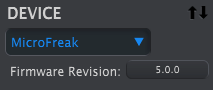
- Select MicroFreak from the DEVICE menu in the upper-left corner. The menu displays the current firmware revision:
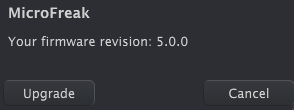
- Click Firmware Revision to open the dialog showing the current version:
- Click Upgrade, then use the operating system file dialog to select the downloaded firmware file.
Note/Warning While the firmware update is in progress, do not turn the MicroFreak's knobs, power it off, or disconnect its USB cable.