Making/Music/Log/26/10/25 Sun
Properties
2026-10-25 Sun
Ghost Gardener requests
- Ghost Gardener please create a namespace hierarchy under Ableton/Live/Mode/Arrangement which will map out all the parts of arrangement mode and give all the buttons and settings dedicated pages that autocomplete in Logseq
project - create UI entity types
import person entity and also UX/Design/Atomic/L1 - Atom and other levels from this brief chatgpt transcript
- You're remembering Atomic Design, a methodology introduced by UX designer Brad Frost in 2013.
It describes a hierarchy of five levels for organizing user interface components, from the simplest building blocks to complete interfaces. The five official levels
Atoms
1
Molecules
2
Organisms
3
Templates
4
Pages
5
Level Definition Example 1. Atoms Indivisible UI building blocks Button, label, input 2. Molecules Simple combinations of atoms Search field with button 3. Organisms Complex, self-contained interface sections Navigation header 4. Templates Page layouts establishing content structure Dashboard layout 5. Pages Templates populated with real content Actual user dashboard
What Led us to Consider Polaris, Shopify’s Design System - Shopify
shopify.comOriginal sources
- Atomic Design — Brad Frost (2013) — The original blog post introducing the methodology.
- Atomic Design Methodology — Chapter 2 — The authoritative, detailed explanation from Frost's book Atomic Design.
One subtle distinction: "Elements" isn't an official level. Frost uses elements as a generic term for interface building blocks, particularly atoms.
Frost also emphasizes that Atomic Design isn't a mandatory bottom-up development process. It's a mental model for thinking about interfaces simultaneously as complete systems and as compositions of reusable parts.
The terminology remains useful for component libraries and design systems, including those implemented with React, Storybook, and Figma.
https://www.google.com/s2/favicons?domain=https://atomicdesign.bradfrost.com&sz=32
Atomic Design by Brad Frost
+2
- You're remembering Atomic Design, a methodology introduced by UX designer Brad Frost in 2013.
- inspired by that create a Logseq/Entity/Definition or two that would let us to have a consistent ability to map out hierarchies of UI elements into pages of logseq, structurally inspired by Logseq/Entity/Book/Section but defined for a different purpose. I'm thinking that we would let us map out the UI the Microfreak, the Launchpad and Ableton/Live, so at any point we can have autocompleted in Logseq any part of these and reference them.
- For example, I already have referenced Microfreak/UI/Oscillator/Knob/Timbre would model the UI that points to or corresponds to Microfreak/UG/06 Dig Osc/01 as Soundgen
- please create a page in the garden for each parameter of each oscillator. For example, in Times below follow the recording. Control names come from Microfreak/UG/21 Appendix D - CC Values. With V.Analog, the panel's Wave knob (CC 10) sets Detune, the Timbre knob (CC 12) sets Shape, and the Shape knob (CC 13) sets Wave. Microfreak/UG/06 Dig Osc/03 Types/06 VAnalog I would like these to be hyperlinks to logseq pages.
- create a plan for how to model all the types of midi mapping encoders in midi devices - they shouldn't be overfit on Midi though. Maybe for example,
- buttons
- toggle buttons
- multi-value toggle buttons
- similar to the Microfreak/UG
- buttons that fire an event but aren't toggled
- continuous rotary encoders
- discrete rotary encoders
- faders
- etc
- buttons
- drawing from Microfreak/UG/03 Overview/01 Front Panel,
create Microfreak/UI/Front/Row/Top/01 Matrix/Button/Assn/1, Microfreak/UI/Front/Row/Top/01 Matrix/Knob, Microfreak/UI/Front/Row/Top/02 Paraphonic Button, Microfreak/UI/Front/Row/Top/02 Paraphonic Button/Hold, Microfreak/UI/Front/Row/Top/02 Paraphonic Button/Hold/Shift Microfreak/UI/Front/Row/Top/03 Panel Button, Microfreak/UI/Front/Row/Top/04 OLED, Microfreak/UI/Front/Row/Top/05 Preset Knob, Microfreak/UI/Front/Row/Top/04 OLED, Microfreak/UI/Front/Row/Top/06 Save Button/Hold, etc and other sections of the UI, so every button and knob is appropriately modeled in the garden - be sure to include pictures
My Notes
- listened through GitP/A/Session/26/10/24-Sat
Yellow notebook — visualizing GitP sessions
- These pages carry no date. They come right before the 2026-10-26 Mon 00:15 entry, after listening through GitP/A/Session/26/10/24-Sat.
Visualizing MicroFreak Ghost in the Patch sessions
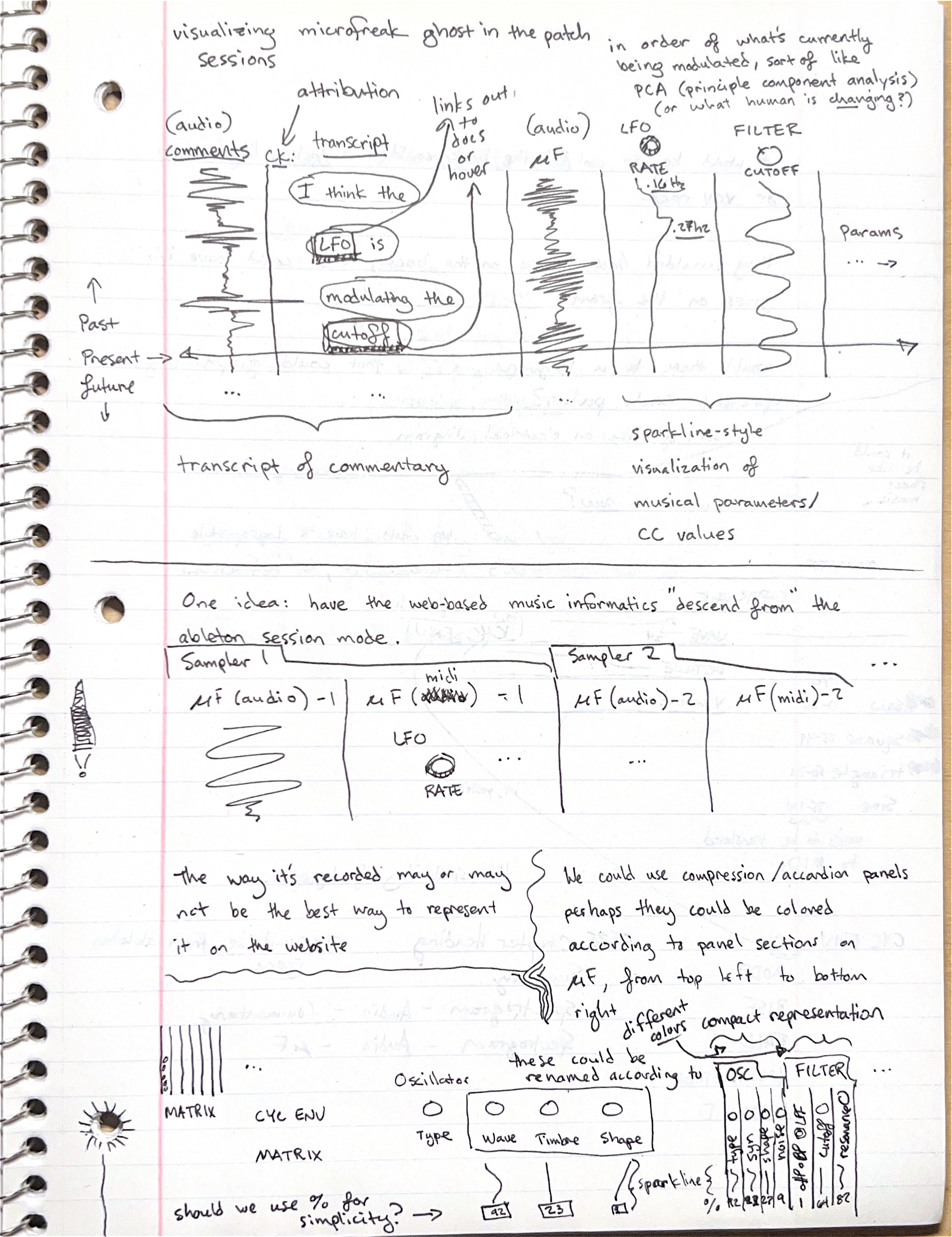
Diagram
- A timeline drawn as vertical columns, with time running down the page. A horizontal "Present" line crosses every column, with "Past" above it and "Future" below.
- Columns, left to right:
- "(audio) comments" — a waveform of the spoken commentary.
- "transcript", attributed to "CK:" — speech bubbles reading "I think the", "LFO is", "modulating the", "cutoff". The words LFO and cutoff are boxed, with an arrow labelled "links out to docs or hover".
- "(audio) μF" — the MicroFreak waveform.
- "LFO RATE" — a knob with a sparkline drifting from ".16 Hz" to ".27Hz".
- "FILTER CUTOFF" — a knob with a wavy sparkline.
- "Params … →"
- A bracket under the left columns reads "transcript of commentary"; one under the right columns reads "sparkline-style visualization of musical parameters / CC values".
- Top right: "in order of what's currently being modulated, sort of like PCA (principle component analysis) (or what human is changing?)"
- Middle sketch, under "One idea: have the web-based music informatics "descend from" the ableton session mode.": tabs "Sampler 1" and "Sampler 2", each holding a "μF (audio)" column with a waveform and a "μF (midi)" column with an LFO RATE knob.
- Bottom sketch: narrow collapsed columns labelled "MATRIX", "CYC ENV", "MATRIX", then an Oscillator section with knobs "Type", "Wave", "Timbre", "Shape" and value boxes "42" and "23" plus a "sparkline". A note says "these could be renamed according to" the oscillator type. To the right, a "compact representation" in "different colors": thin vertical columns under "OSC" (type, saw, shape, noise) and "FILTER" (LPF/BP/HPF, cutoff, resonance) with values "% 12 88 27 9 1 64 82".
Transcription
- visualizing microfreak ghost in the patch sessions
- One idea: have the web-based music informatics "descend from" the ableton session mode.
- The way it's recorded may or may not be the best way to represent it on the website
- We could use compression / accordion panels perhaps they could be colored according to panel sections on μF, from top left to bottom right
- should we use % for simplicity? →
AI notes (Anthropic/Model/Claude/5/5/Opus)
- A session page could read like a scrolling score: the commentary transcript beside the audio, and each Microfreak parameter as a sparkline.
- Parameter columns would be ordered by what is changing most right now, and grouped into collapsible panels coloured by the MicroFreak's panel sections.
- The page layout could mirror the Ableton/Live tracks the session was recorded on, though the recording layout may not be the best reading layout.
Patch jacks, a patch DSL and a Logseq-style outline
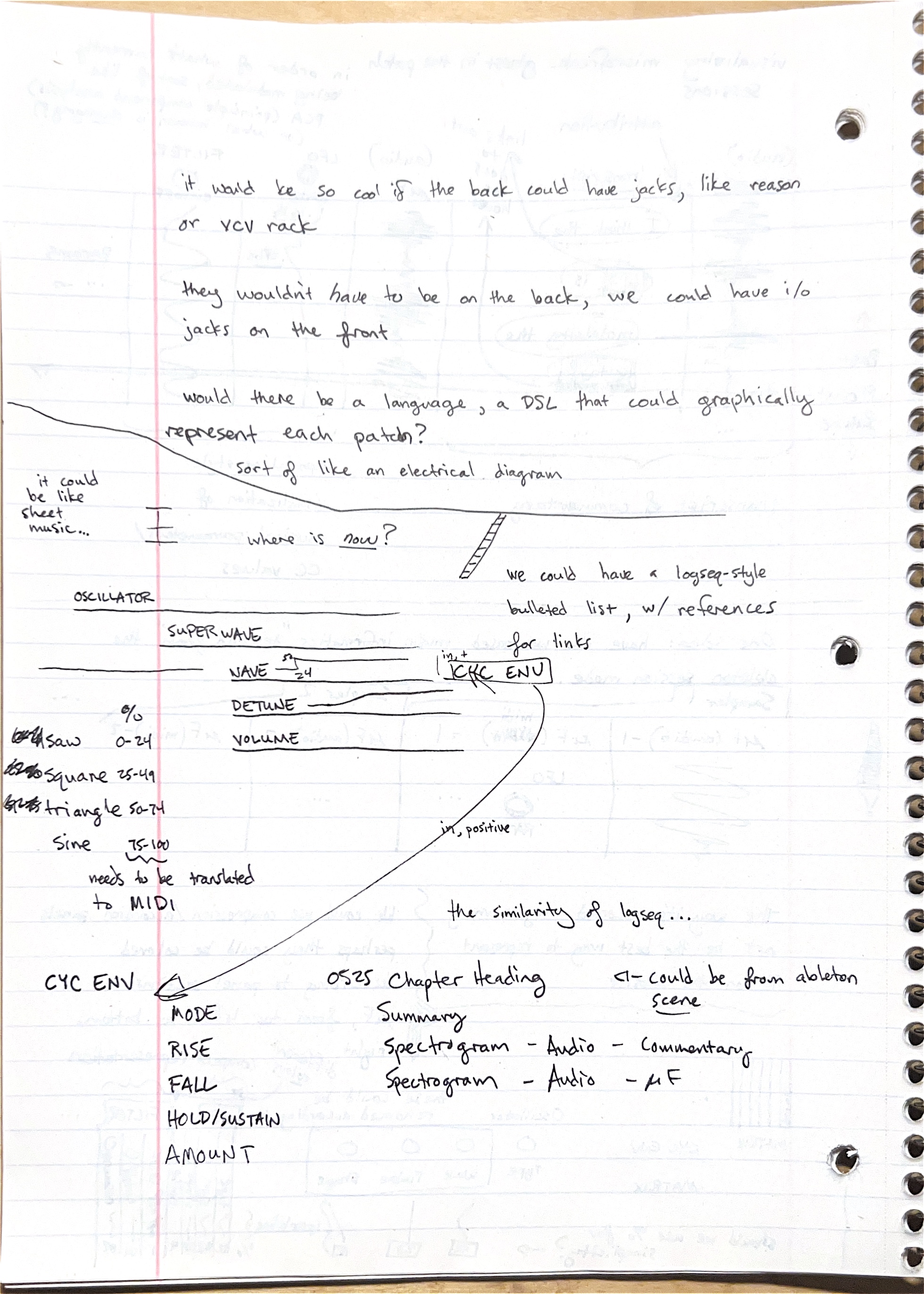
Diagram
- A Logseq-style outline of the oscillator: "OSCILLATOR" > "SUPERWAVE" > "WAVE", "DETUNE", "VOLUME". WAVE carries a small value mark ("5→24"?) and a cable to a box labelled "CYC ENV", marked "in, +".
- A long curved cable labelled "in, positive" runs down to a second outline, "CYC ENV" > "MODE", "RISE", "FALL", "HOLD/SUSTAIN", "AMOUNT".
- Left margin: Superwave Wave ranges in percent — saw 0–24, square 25–49, triangle 50–74, sine 75–100, with "needs to be translated to MIDI".
- A ladder-like line connects the outline to "we could have a logseq-style bulleted list, w/ references for links".
Transcription
- it would be so cool if the back could have jacks, like reason or vcv rack
- they wouldn't have to be on the back, we could have i/o jacks on the front
- would there be a language, a DSL that could graphically represent each patch? sort of like an electrical diagram
- it could be like sheet music… where is now?
- we could have a logseq-style bulleted list, w/ references for links
- the similarity of logseq…
- 0525 Chapter Heading ← could be from ableton scene
AI notes (Anthropic/Model/Claude/5/5/Opus)
- A patch could be written as an outline of module > parameter, with block references acting as patch cables — here Microfreak/UI/Oscillator/Knob/Type/SuperWave/Wave modulated by the Microfreak/UI/Front/Row/02 Main/04 Cycling Envelope.
- Percent ranges are easier to read than MIDI values but would need translating to CC values.
- A GitP chapter heading could come from an Ableton scene and hold a summary plus spectrograms of the commentary and the synth.
Ghost in the Patch Logseq rendering
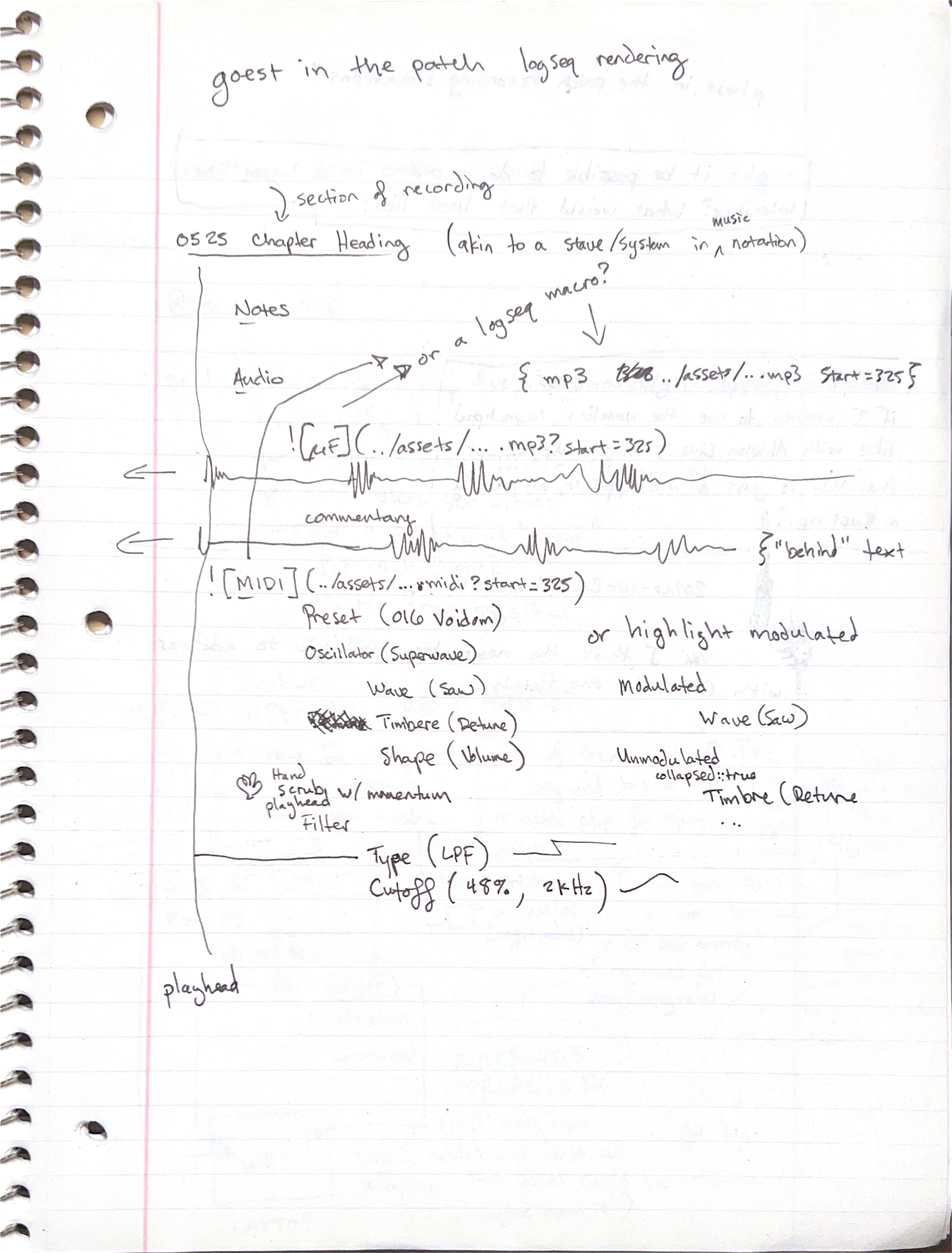
Diagram
- A vertical "playhead" line runs down the left edge, with a hand icon: "Hand scrub playhead w/ momentum". Arrows point left from two waveforms toward the playhead.
- Rows under "0525 Chapter Heading":
- "Notes"
- "Audio" —
{ mp3 ../assets/...mp3 Start=325 }, labelled "or a logseq macro?" over a MicroFreak waveform- "commentary" over a second waveform, with
{"behind" text - An outline: Preset (016 Voidom) > Oscillator (Superwave) > Wave (Saw), Timbre (Detune), Shape (Volume); Filter > Type (LPF) with a step line, Cutoff (48%, 2kHz) with a curve.
- Right side, "or highlight modulated": "Modulated" lists Wave (Saw); "Unmodulated", marked
collapsed:: true, lists Timbre (Detune …
Transcription
AI notes (Anthropic/Model/Claude/5/5/Opus)
- Each GitP chapter would act like a stave: notes, audio and commentary embeds that start at the chapter's timestamp, the MIDI, then the preset's parameters as an outline.
- Modulated parameters stay open and unmodulated ones collapse, so the page shows what is moving.
- The example preset is Microfreak/Preset/016 Voidom.