Launchpad/UG/09 Sequencer/13 Settings
9.13 Sequencer Settings
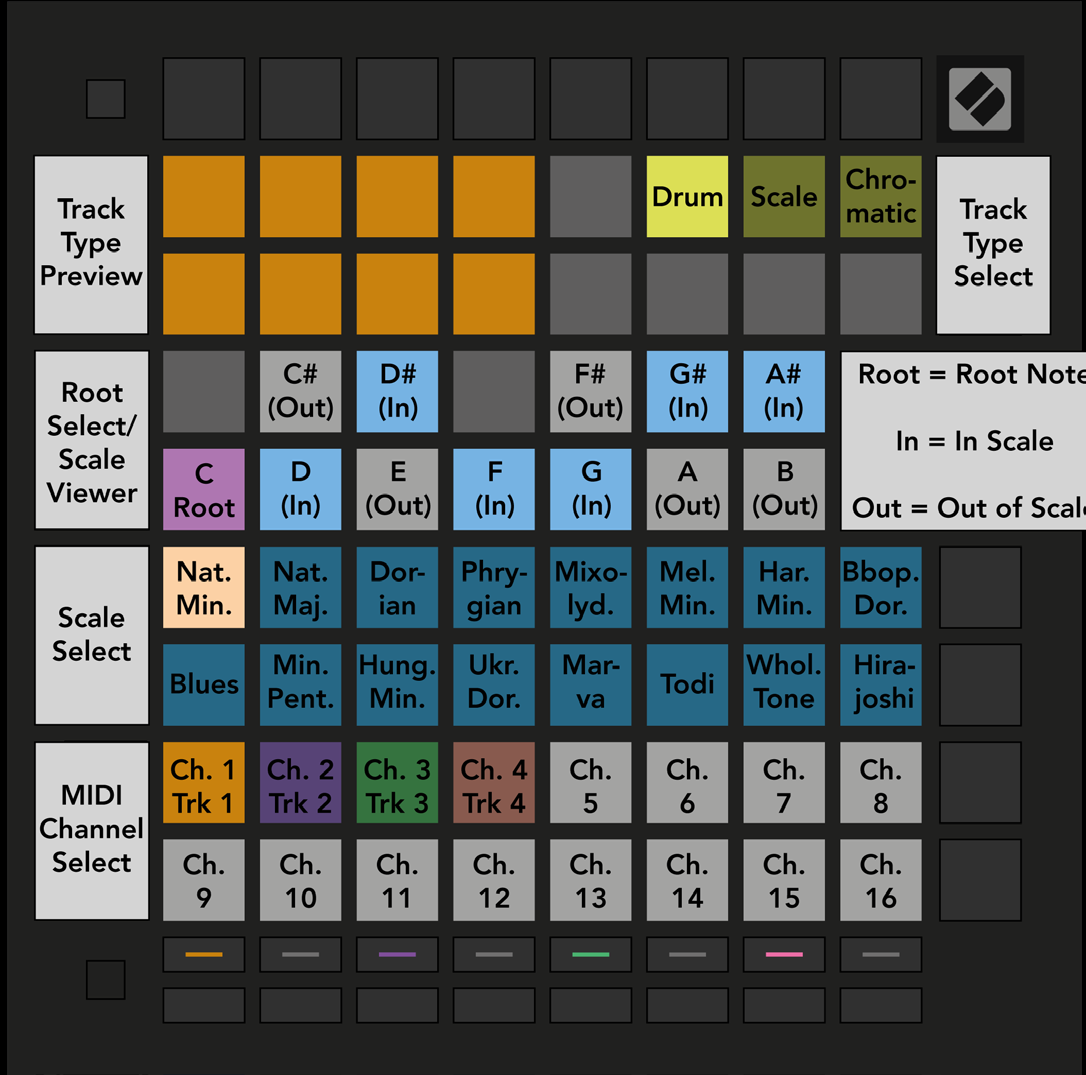
- Sequencer Settings controls each track’s type and MIDI channel, plus the scale and root note.
9.13.1 Accessing Sequencer Settings
- Hold Shift and press Sequencer to open Sequencer Settings.
- Sequencer Settings view
9.13.2 Track Types
- Use the three pads at the top right to choose Drum, Scale, or Chromatic. Select the track to change with its track-select button.
- The top-left 4 × 2 pads preview the left side of the chosen track’s Play Area layout.
9.13.3 Root Select/Scale Viewer
- The piano-layout viewer shows scale notes in blue, the root in purple, and out-of-scale notes in dim white.
- Press a pad in the viewer to change the root. The root selection applies in Note, Chord, and Sequencer modes.
9.13.4 Selecting the Scale
9.13.5 Setting MIDI Channel
- Each track can transmit on any MIDI channel from 1 to 16. Assign different channels to address separate Ableton Live instruments or external hardware.