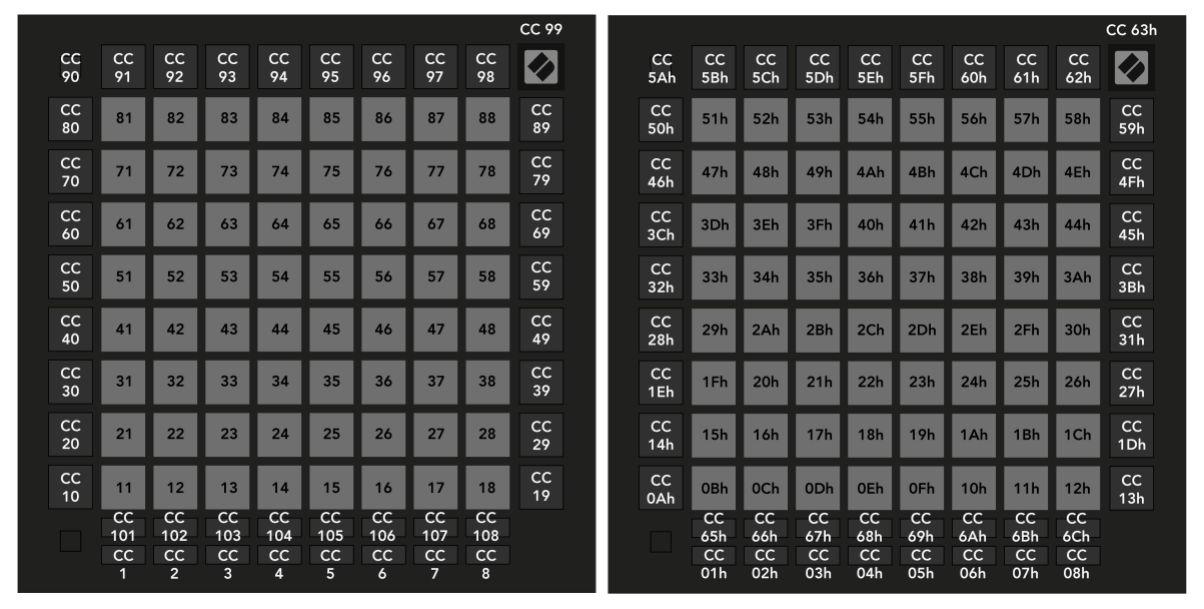
Launchpad/PRG/05 Software Integration/11 Programmer Layout
Programmer mode layout
- Every pad and button in Programmer Mode accepts both Note and CC messages for lighting. The layout shows which type each one sends when pressed.
- Numbering:
- Grid pads send notes
10 x row + column, rows and columns 1-8 from the bottom left: 11-18 on the bottom row up to 81-88 on the top row. - Left column: CC 10, 20, ... 80 from bottom to top. Top-left button: CC 90.
- Right column: CC 19, 29, ... 89 from bottom to top.
- Top row: CC 91-98. Logo: CC 99.
- Below the grid: CC 101-108 in the upper row and CC 1-8 in the lower row.
- Programmer mode layout, decimal (left) and hex (right)
- The User Guide's map is Launchpad/UG/11 Appendix/01 Default MIDI Mappings/09 Programmer Mode.