Launchpad/PRG/04 Controlling the Surface
Controlling the Surface
- Three setups let software light the pads:
- Live Mode with Session (DAW Mode): the usual starting point for a script. MIDI lights the 8x8 grid, every button, and the logo. DAW Mode adds the Drum Rack layout and DAW faders, and Note, Chord, and Custom Modes stay available.
- Live Mode with a Custom Mode: when a Custom Mode has no On Colour, so pads do not light themselves when pressed, MIDI can light them. Custom Mode MIDI mappings are edited in Novation Components. Note and Custom Modes stay available.
- Programmer Mode: every pad and button sends a MIDI message and lights when sent that same message. All other device functions are disabled, including the Mode buttons.
Lighting LEDs via MIDI
- Session Mode takes colours on the DAW interface. Custom Modes and Programmer Mode take colours on the MIDI interface.
- The channel sets the lighting behaviour:
- Channel 1, static colour: Note
90h (144), CC B0h (176) - Channel 2, flashing colour: Note
91h (145), CC B1h (177) - Channel 3, pulsing colour: Note
92h (146), CC B2h (178)
- For a Note On, the note number picks the pad and the velocity picks the palette colour. For a CC, the controller number picks the pad and the value picks the colour.
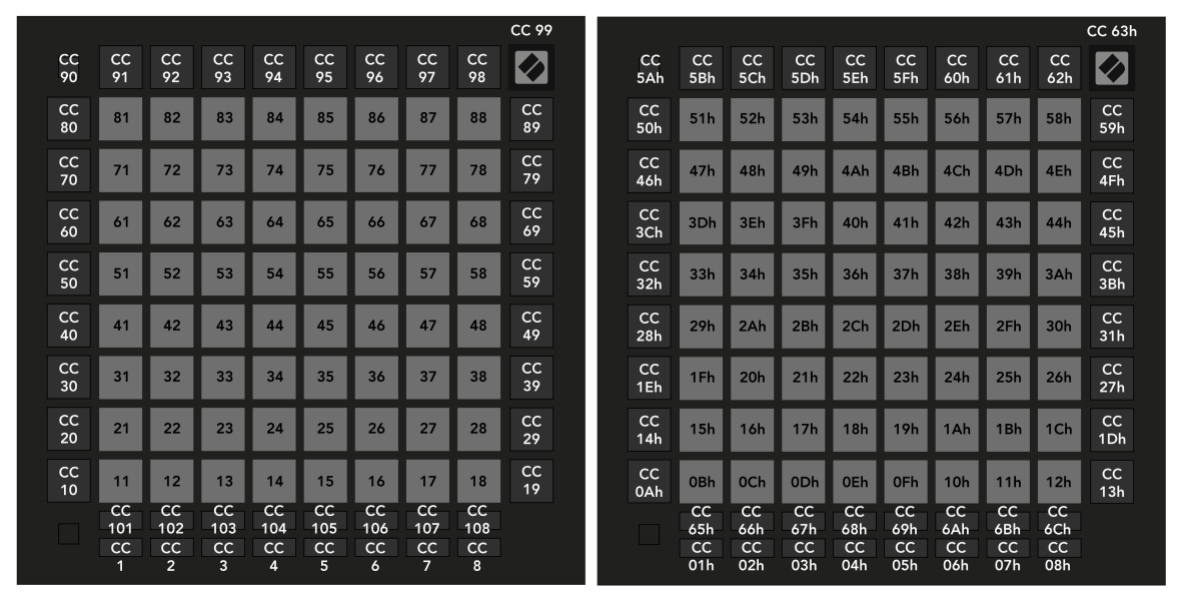
- Session Mode layout, decimal (left) and hex (right). Numbers are notes unless marked CC.
- The Session layout uses the same numbers as Launchpad/PRG/05 Software Integration/11 Programmer Layout.
Colour palette
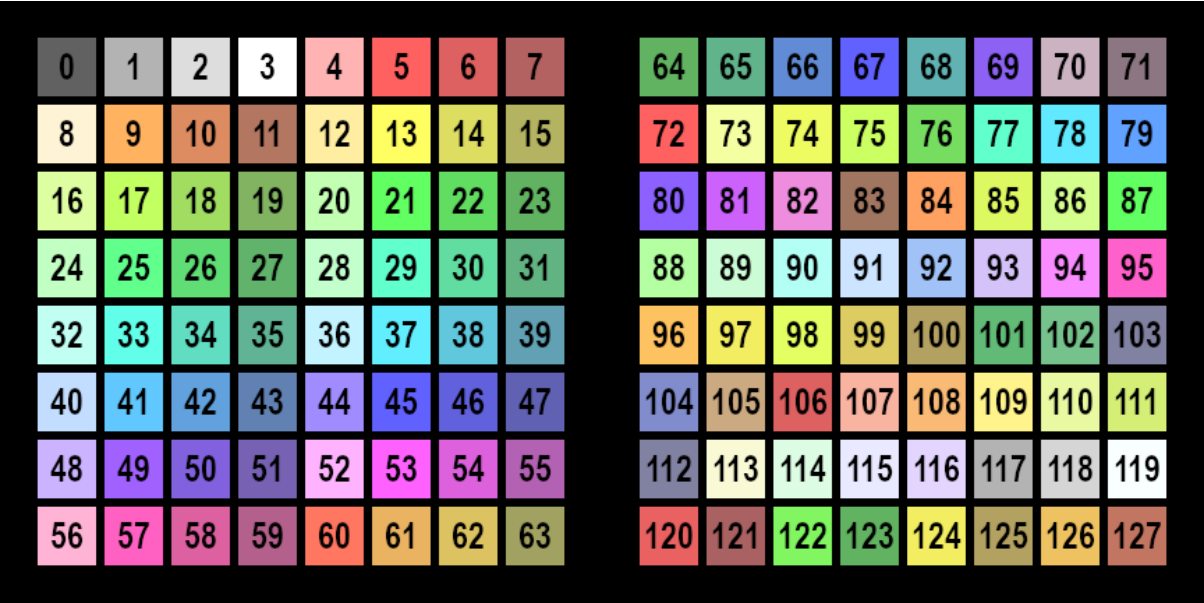
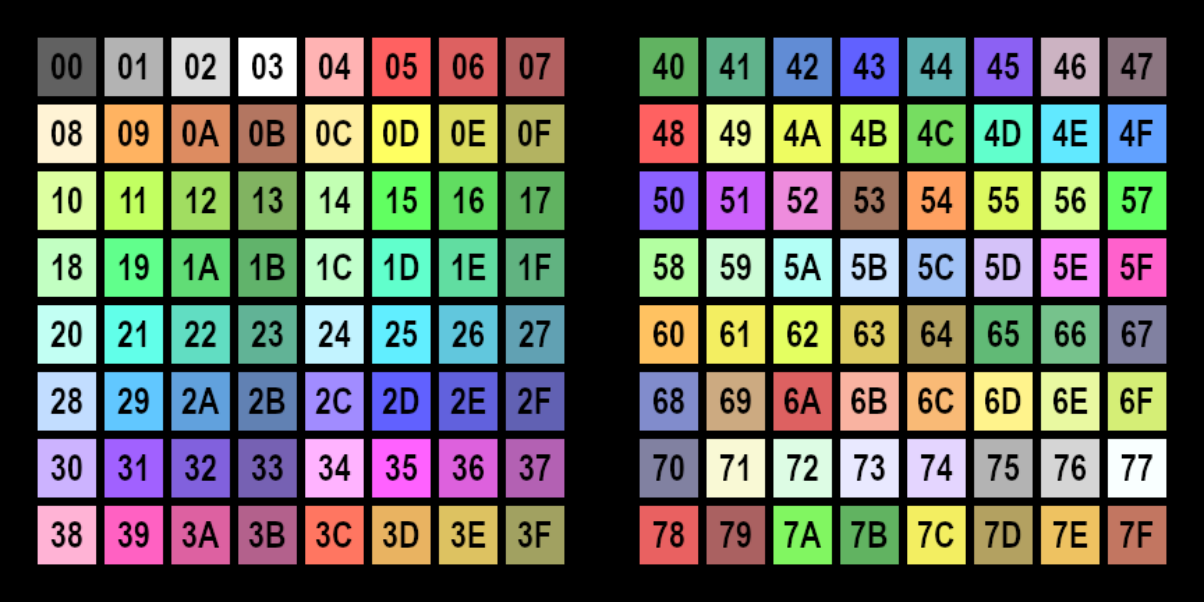
- Notes and CCs choose colours by index into a fixed 128-entry palette. Index 0 is off.
- Colours named in the guide's examples: 5 red, 13 yellow, 19 green, 21 green, 37 turquoise, 45 blue.
- Palette, decimal indices
- Palette, hex indices
- For arbitrary colours use RGB lighting in Launchpad/PRG/04 Controlling the Surface/06 LED Lighting SysEx.
Flashing colour
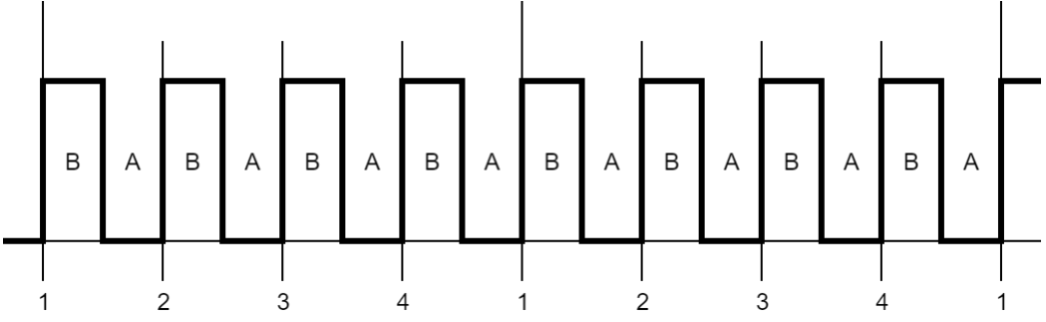
- A flashing pad alternates at 50% duty cycle between colour A, its static or pulsing colour, and colour B, the colour in the flashing message.
- One period is one beat, synced to incoming MIDI beat clock. Without clock it uses 120 BPM or the last clock received.
- Flashing waveform over two bars
Pulsing colour
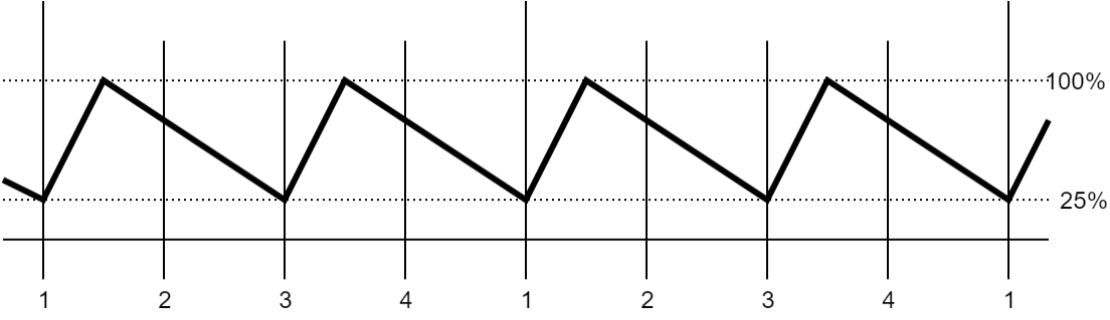
- A pulsing pad fades between dark and full intensity. One period is two beats, with the same clock source as flashing.
- Pulsing waveform
Examples
- These assume Programmer Mode.
- Lower-left pad static red:
90h 0Bh 05h (144 11 5). Channel 1 means static, note 11 is the lower-left pad, velocity 5 is red. - Upper-left pad flashing green:
91h 51h 13h (145 81 19). Channel 2 means flashing, note 81 is the upper-left pad, velocity 19 is green. - Lower-right pad pulsing blue:
92h 12h 2Dh (146 18 45). Channel 3 means pulsing, note 18 is the lower-right pad, velocity 45 is blue. - Turn the lower-right pad off:
90h 12h 00h (144 18 0), or the Note Off 80h 12h 00h (128 18 0). Either clears the pulsing colour set above.
LED lighting SysEx message
- One SysEx message can light many LEDs. LED indices are always the Programmer Mode numbers, whatever layout is selected.
- Hex:
F0h 00h 20h 29h 02h 0Eh 03h <Colour Spec> [<Colour Spec> ...] F7h - Decimal:
240 0 32 41 2 14 3 <Colour Spec> [<Colour Spec> ...] 247
- Each
<Colour Spec> is a lighting type byte, an LED index byte, then 1-3 bytes of lighting data. - Lighting types:
00h (0) static: 1 byte, palette index01h (1) flashing: 2 bytes, colour B then colour A02h (2) pulsing: 1 byte, palette index03h (3) RGB: 3 bytes, red, green, blue, each 0-127
- A message may carry up to 106 Colour Specs, enough for the whole surface.
- Example in Programmer layout:
F0h 00h 20h 29h 02h 0Eh 03h 00h 0Bh 0Dh 01h 0Ch 15h 17h 02h 0Dh 25h F7h (240 0 32 41 2 14 3 0 11 13 1 12 21 23 2 13 37 247)- Pad 11, the bottom-left pad: static yellow (13).
- Pad 12: flashing between 21 and 23, dim and bright green.
- Pad 13: pulsing turquoise (37).