Ableton/Live/UG/33 Max for Live Devices/03 Max for Live MIDI Effects/04 MPE Control
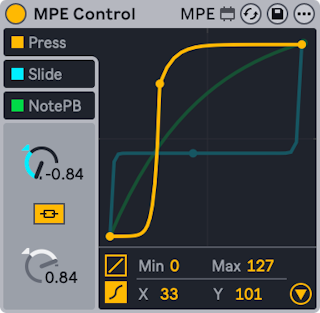
- MPE Control reshapes incoming MPE data with curves, usually ahead of a device that uses that data. It can also turn MPE into ordinary channel-wide MIDI so an MPE controller can play instruments without MPE.
- MPE sends controller data per note, so each note can be shaped on its own; ordinary MIDI CCs affect every note. More on MPE in the Editing MPE chapter.
- Example: with Expression Control mapping Slide to an instrument's filter cutoff, MPE Control can shape the slide so only high slide values open the filter fully.
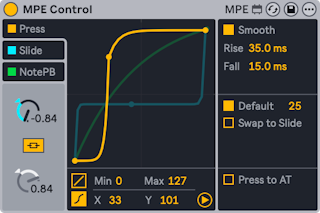
- Three sources, each with its own curve and on/off toggle: Press (pressure), Slide, and NotePB (per-note pitch bend). The selected source's curve is drawn in front.
- Curve types, chosen at the bottom left of the display:
- Linear — two breakpoints. Curve bends it to compress (easier to stay low) or expand (easier to reach high values). Min and Max, or dragging the end points, set the range.
- S-shaped — a third, movable breakpoint in the middle splits the curve in two. The halves are linked; Curve Link off gives each its own Curve dial. The X-Y controls also move the middle point.
- The triangle at the bottom right opens the advanced settings. Each source has a Smooth toggle with its own Rise and Fall, plus source-specific controls.
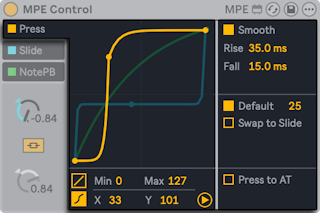
- MPE pressure: per-note pressure on a key or pad after the initial strike, like polyphonic aftertouch.
- Default — a value to use for notes that carry no MPE data
- Swap to Slide — sends pressure to the Slide source instead, for controllers that only have polyphonic aftertouch
- Press to AT — converts pressure to channel aftertouch for instruments without MPE
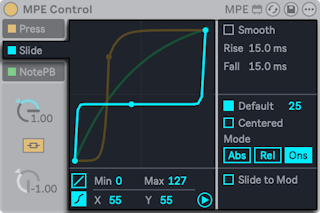
- MPE slide: the finger's vertical position on a key or pad, sent as CC 74.
- Default — a value for notes without MPE data
- Centered — for pad controllers: the middle of the pad gives zero, rising as the finger moves away vertically
- Mode:
- Abs (default) — values are absolute
- Rel — every note starts in the middle of the range and moves only as the finger slides
- Ons — the value updates only on Note On; this turns off smoothing
- Slide to Mod — converts slide to Mod Wheel (CC 1) for instruments without MPE
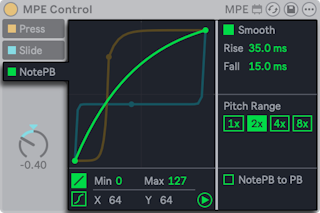
- MPE per-note pitch bend: horizontal movement on a key or pad, bending only that note.
- Pitch Range — matches a controller and an instrument with different bend ranges. At 2x, a controller with ±48 semitones drives an instrument set to ±24. When per-note bend is mapped to something other than pitch, higher values cover more range with less movement.
- NotePB to PB — converts per-note bend to ordinary pitch bend for instruments without MPE