Ableton/Live/UG/33 Max for Live Devices/03 Max for Live MIDI Effects/02 Expression Control
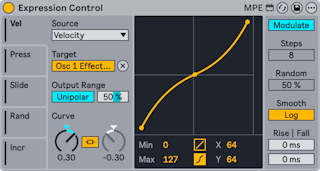
- A modulator driven by MIDI and MPE sources.
- Five Mod Source tabs, each set by its MIDI Input Source menu to one of: Velocity, Modwheel, Pitchbend, Pressure, Keytrack, Expression, Random, Increment, Slide, Sustain. Map assigns a target to each source.
- The Modulation toggle at the top right:
- Modulate — the target stays adjustable and the two values merge. A polarity toggle chooses Bipolar or Unipolar, and Output Range Max sets the output at full input.
- Remote Control — Expression Control alone sets the value, between Output Range Min and Max.
- Curve Type — linear (two breakpoints, shaped by Curve A) or S-shaped (three breakpoints; Curve A shapes the upper part, Curve B the lower). Curve Link ties both parts to Curve A, inversely. Min/Max and the middle point's X-Y sliders, or dragging in the display, also shape the curve.
- Increment Steps (1–32), active when Increment is a source, sets how many notes it takes to sweep the whole range. Stopping transport resets the count.
- Random Amount, active when Random is a source, sets how far each note's value can deviate.
- Smoothing Type — linear or logarithmic; Rise and Fall set how fast values move up or down, 0–1000 ms.