Ableton/Live/UG/33 Max for Live Devices/02 Max for Live Audio Effects
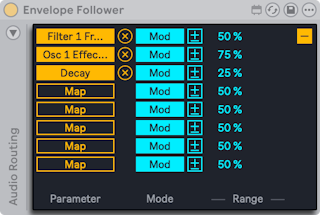
- A utility delay and three modulators. The modulators — Envelope Follower, LFO and Shaper — share one mapping system:
- Map then click any automatable parameter to make it a target; Unmap removes it. Show/Hide Multimap reveals more Map buttons, up to eight targets.
- Mod toggles between Modulation and Remote Control.
- Modulation (default) — the target can still be moved by hand. Modulation Polarity chooses Bipolar (around the base value) or Unipolar (one direction from it); Modulation Amount sets the depth.
- Remote Control — the modulator alone sets the value; Min and Max scale the range.
- Ableton/Max for Live/Audio Effect
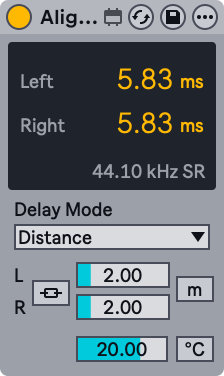
- A utility that delays a signal by time, samples or distance.
- Delay Mode:
- Time — milliseconds; for lining up with A/V gear or slight stereo widening
- Samples — for compensating latency from other devices
- Distance — meters or feet; for timing offsets between speakers in a PA. A Temperature setting (°C or °F) matches the room, since sound travels at different speeds in warm and cold air.
- Link L/R — the left channel's delay drives both channels and Delay Right is disabled
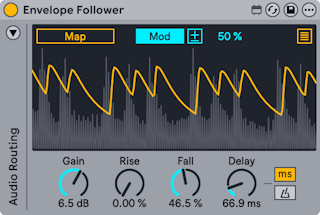
- A modulator that follows the level of the incoming audio and turns it into a smooth control curve. Auto-wah is the classic use.
- Mapping, Mod, polarity and Min/Max work as described in Ableton/Live/UG/33 Max for Live Devices/02 Max for Live Audio Effects.
- Gain — input gain
- Rise and Fall — smooth the attack and release of the curve
- Delay — delays the curve, in time or synced divisions (Delay Mode buttons)
- Sidechain: by default the curve comes from the track's own input. The triangle at the top left opens the Audio Routing panel.
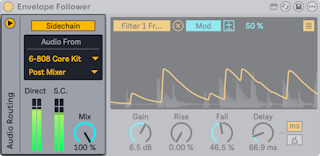
- turn on Sidechain, choose the source track in Audio From, and choose Pre FX, Post FX or Post Mixer (and a Rack channel if needed)
- Direct and S.C. meters show the track and sidechain levels
- Sidechain Mix — 0% uses only the track input, 100% only the sidechain; a Drum Rack as sidechain gives rhythmic ducking or gating
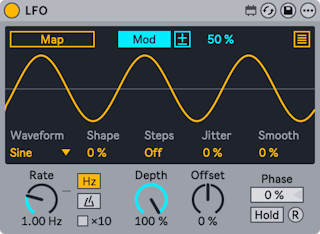
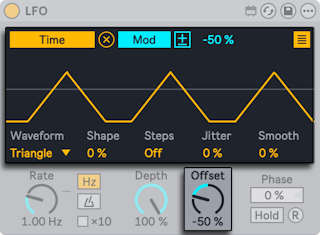
- A modulator that drives mapped parameters with a low-frequency oscillator.
- Mapping, Mod, polarity and Min/Max work as described in Ableton/Live/UG/33 Max for Live Devices/02 Max for Live Audio Effects.
- Waveform — Sine, Up, Down, Triangle, Square, Random, Bin, Stray or Glider
- Shape bends the wave; Steps quantizes it into up to 24 steps. Shape is disabled for Random, Bin, Stray and Glider; Steps for Random, Bin and Square.
- Jitter adds randomness; Smooth softens sudden changes, including jitter.
- Rate — in Hz or synced divisions (Time Mode toggles). In Hz, ×10 multiplies the rate.
- Depth — modulation amount for all targets, 0% to 100%
- Offset — moves the center of the output up or down; the horizontal line in the display marks the center
- Phase — start position in the cycle, 0% to 100%
- Hold — freezes the output; releasing Hold continues from the held value
- R — retriggers from the Phase position
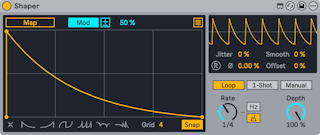
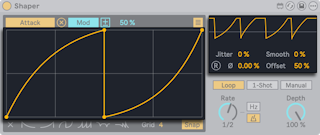
- A modulator whose output is a breakpoint envelope drawn in its display.
- Mapping, Mod, polarity and Min/Max work as described in Ableton/Live/UG/33 Max for Live Devices/02 Max for Live Audio Effects.
- Drawing:
- click to add a breakpoint;
Option-drag (Mac) or Alt-drag (Windows) between points to curve a segment; Shift-click a point to delete it - Clear erases the envelope; six presets next to it start a new one
- Grid sets grid divisions; Snap snaps points to the grid
- The small display at the top right shows the output like an oscilloscope.
- Jitter adds randomness; Smooth softens sudden changes.
- Phase — start position in the cycle; R retriggers from there (disabled in Sync time mode)
- Offset — moves the center of the output up or down
- Trigger modes:
- Loop — repeats at Rate
- 1-Shot — plays once each time the mappable T button is pressed
- Manual — the Manual control scrubs through the envelope
- Rate — in Hz or synced divisions
- Depth — modulation amount for all targets