Ableton/Live/UG/29 Audio Effect Reference/42 Vocoder
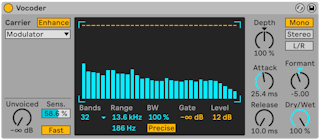
- Vocoder is not in the Intro and Lite editions.
- A vocoder imposes the level contour of one signal, the modulator (usually speech or drums), onto the frequencies of another, the carrier (usually a rich synth such as strings or a pad). The classic result is a talking synth or robot voice.
- Both signals pass through banks of band-pass filters; the level in each modulator band sets the level of the matching carrier band.
- Put Vocoder on the modulator's track. Carrier options:
- Noise — internal noise; its X-Y display sets downsampling (horizontal, left lowers the sample rate) and density (vertical, down thins it)
- External — any internal routing point; the usual choice for robot voices
- Modulator — the modulator carries itself, a resynthesized version shaped by Vocoder's controls
- Pitch Tracking — a monophonic oscillator that follows the modulator's pitch, limited by High and Low. Saw or three pulse waves, with Pitch for coarse tuning. It holds each detected pitch until it finds a new one, so changing its settings or resetting it (for instance by grouping the track) can change the sound unexpectedly. Best on single melodic lines or voice; unpredictable but interesting on chords and drums.
- Enhance — normalizes the carrier's spectrum and dynamics for a brighter sound, useful with external carriers
- Unvoiced — level of an extra noise source for pitchless sounds like "f" and "s"; Sens. sets detection (100% always on, 0% off); Fast/Slow how quickly it switches
- The center display shows each band's level; click in it to lower bands.
- Bands — number of filters; more is more accurate and uses more CPU
- Range — frequency span of the filters; narrow it if the sound gets too piercing or boomy
- BW — filter bandwidth; 100% is most accurate, other values can be interesting
- Precise/Retro — equal gain and width for every band, or narrower, louder bands toward the top
- Gate — bands below the threshold are silent
- Level — output boost or cut
- Depth — how much of the modulator's envelope reaches the carrier; 0% none, 100% classic vocoding, 200% only the loudest peaks
- Attack and Release — response speed; very fast keeps transients but can distort
- Channel switches — Mono (both mono), Stereo (mono modulator, stereo carrier), L/R (both stereo)
- Formant — shifts the carrier's filter bank; small changes on a voice can change its apparent gender
- Dry/Wet — balance of processed and dry signal
- Setups for the most common uses.
- 1. Put Vocoder on the vocal track — a recorded clip, or a live mic chosen as the track input.
- 2. Put a synth such as Ableton/Live/UG/31 Instrument Reference/01 Analog on another track, played from a clip or live.
- 3. Set Carrier to External and pick the synth track in Audio From (Post FX in the lower chooser works best).
- 4. For live input, arm both tracks.
- 5. Play the synth while speaking: the speech rhythm comes through with the synth's tone. Solo the voice track to hear only the vocoded sound.
- Bright, harmonically rich patches, such as saw-based ones, make the words clearer; Unvoiced and Enhance add more clarity.
- Carrier Modulator, Depth 100%, Enhance on — then turn Formant to change the source's character, and try the filter bank controls too.