Ableton/Live/UG/29 Audio Effect Reference/40 Utility
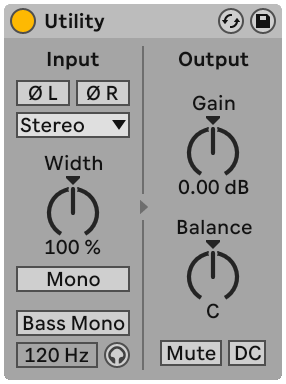
- Utility handles common signal tasks, often alongside other devices.
- Phase — one switch per channel to invert left or right
- Channel Mode — use only Left or only Right (on both outputs), for stereo files with different material on each side
- Width — stereo width; 0% mono, above 100% wider. Mid/Side Mode in its context menu swaps it for a Mid/Side control: toward 100M sums to mono, toward 100S leaves only the side signal (left and right 180° apart). Width and Mid/Side are disabled when Channel Mode is Left or Right.
- Mono — sums the input to mono
- Bass Mono — makes the lows mono below Bass Mono Frequency (50–500 Hz), so they hold up on mono playback; Bass Mono Audition plays only those lows for tuning the frequency
- Gain — −∞ to +35 dB. Handy for automating fades while leaving the track's Volume for mixing. Arrow keys step 1 dB from −18 to +35 dB and speed up below −18 dB.
- Balance — pans the signal
- Mute — silences the input at Utility's position. Since a track's own mute is at the end of the chain, Utility before a delay or reverb can cut its input and let the tail continue.
- DC — removes DC offset and inaudibly low frequencies; matters only when nonlinear devices such as compressors or waveshapers follow
- Related question: Ableton/Track/Q/How can I turn a mono signal into stereo in a channel?