Ableton/Live/UG/29 Audio Effect Reference/37 Spectral Time
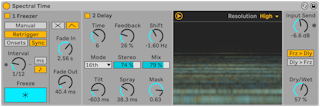
- Spectral Time combines spectral freezing and spectral delay. Filters, delays and frequency shifting resynthesize the input: sustain a sound forever, add timed fades, smear frequencies over time, or add metallic echoes.
- Two sections, Freezer and Delay, used alone or in series (freezer into delay), switched with Freezer On and Delay On.
- The spectrogram shows dry (yellow) and wet (blue) signals and can be hidden.
- Zero Dry Signal Latency in the context menu passes the dry signal with no delay instead of aligning it with the effect — useful when playing an instrument through it live.
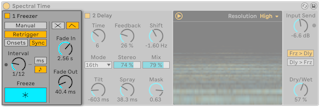
- The Freeze button must be on in both modes.
- Manual — click Freeze to freeze; Fade In and Fade Out in ms
- Retrigger — freezes automatically:
- Onsets — at each detected transient; Sensitivity 0–100%
- Sync — at regular intervals set by Interval, in ms or beat values (Freezer Time Unit)
- Fade shape for both:
- Crossfade — new freeze fades in as the old one (or dry signal) fades out; X-Fade sets the length as a percentage of the interval
- Envelope — each freeze fades in and out by Fade In and Fade Out; up to eight freezes can overlap
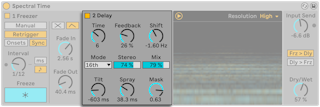
- Makes delayed copies of the spectrum; fed by the Freezer when it is on.
- Time — delay time; Mode sets the unit: Time (ms), Notes (beat divisions), 16th, 16th Triplet, 16th Dotted
- Feedback — more repeats
- Shift — each repeat moves up or down in frequency by this amount
- Stereo — width of Tilt and Spray
- Dry/Wet — affects the Delay section only
- Tilt — delays high frequencies more (positive) or low frequencies more (negative)
- Spray — scatters delay times across frequencies at random
- Mask — limits Tilt and Spray to highs (positive) or lows (negative)
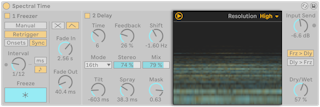
- Resolution, at the top right of the spectrogram, trades accuracy for latency. Lower it while recording to reduce latency.
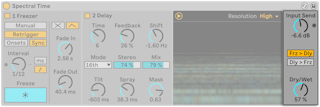
- Input Send — input gain
- Frz > Dly / Dly > Frz — order of the two sections
- Dry/Wet — overall mix; 100% on a return track