Ableton/Live/UG/29 Audio Effect Reference/33 Roar/01 Input Section
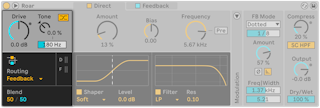
- Drive — input level into the gain stages; adds or removes distortion across all stages at once, or adjusts a signal so a preset behaves as intended
- Tone Amount — tilts the input: positive boosts highs and cuts lows, negative the reverse. Tone Frequency sets the shelf frequency. Positive Tone keeps heavily distorted guitar or bass from getting muddy.
- Color Compensation — applies the opposite Tone curve after the distortion, so Tone shapes only what gets distorted. With negative Tone it saturates drums without losing low-end punch.
- Routing Mode — seven routings. All but Single and Multi Band have a Blend control between the two stages.
- Single — one stage
- Serial — two shapers in a row; Blend goes from Stage 1 alone to both stages
- Parallel — two independent shapers; Blend goes from Stage 1 to Stage 2. Two very different curves (such as Half Wave Rectifier and Fractal) with Blend modulated make the sound move between them.
- Multi Band — Low, Mid and High bands processed separately, split by two crossover filters; for drums or saturating a whole mix
- Mid Side — mid and side processed separately, to enhance the stereo image without changing the center
- Feedback — signal and its feedback processed separately; can turn Roar into a distinctive delay. Modulating Shaper Amount with an envelope gives shuffled delays; small Shaper Bias offsets make delays that decay as they repeat.
- Delay — Stage 2 processes the delayed output of Stage 1. The first pass is not scaled by feedback, giving single distorted slapbacks; Stage 2 then feeds back into itself for longer tails.