Ableton/Live/UG/29 Audio Effect Reference/33 Roar
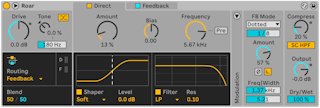
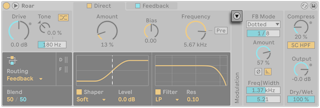
- Roar is a saturation and coloring device with up to three gain stages in several routings. Its shaper curves and filters cover warm saturation, moving harmonics and noisy glitches, and its feedback and built-in compressor add sounds no other Live device makes.
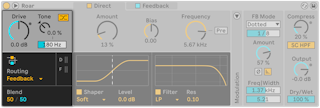
- Drive — input level into the gain stages; adds or removes distortion across all stages at once, or adjusts a signal so a preset behaves as intended
- Tone Amount — tilts the input: positive boosts highs and cuts lows, negative the reverse. Tone Frequency sets the shelf frequency. Positive Tone keeps heavily distorted guitar or bass from getting muddy.
- Color Compensation — applies the opposite Tone curve after the distortion, so Tone shapes only what gets distorted. With negative Tone it saturates drums without losing low-end punch.
- Routing Mode — seven routings. All but Single and Multi Band have a Blend control between the two stages.
- Single — one stage
- Serial — two shapers in a row; Blend goes from Stage 1 alone to both stages
- Parallel — two independent shapers; Blend goes from Stage 1 to Stage 2. Two very different curves (such as Half Wave Rectifier and Fractal) with Blend modulated make the sound move between them.
- Multi Band — Low, Mid and High bands processed separately, split by two crossover filters; for drums or saturating a whole mix
- Mid Side — mid and side processed separately, to enhance the stereo image without changing the center
- Feedback — signal and its feedback processed separately; can turn Roar into a distinctive delay. Modulating Shaper Amount with an envelope gives shuffled delays; small Shaper Bias offsets make delays that decay as they repeat.
- Delay — Stage 2 processes the delayed output of Stage 1. The first pass is not scaled by feedback, giving single distorted slapbacks; Stage 2 then feeds back into itself for longer tails.
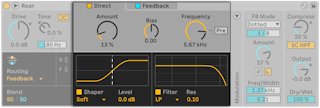
- Each routing has its own gain stages, each switched on with its Stage toggle. Every stage tab has Shaper Amount, Shaper Bias and Filter Frequency, plus shaper and filter type menus.
- Shaper Amount — saturation; also drag the curve in the display. Distortion happens where the signal reaches the curve's bends.
- Shaper Bias — offsets the signal for asymmetric distortion; high values sound like a broken circuit, extreme values silence it
- Shaper Type — twelve curves:
- Soft Sine — smooth, warm, analog-like even when pushed
- Digital Clip — hard clipping with harsh upper harmonics
- Bit Crusher — amplitude quantization like Ableton/Live/UG/29 Audio Effect Reference/30 Redux; more Amount means fewer bits and a stronger compander. Good with bias modulation; very audible on quiet signals.
- Diode Clipper — virtual analog clipping circuit; like Soft Sine with softer highs
- Tube Preamp — soft tube saturation that keeps transients and dynamics
- Half Wave Rectifier — fully asymmetric; adds crunch to drums
- Full Wave Rectifier — raises the signal an octave; adds harmonics to synths
- Polynomial — shifts from a sine curve to more complex shapes; good for modulation and metallic sounds
- Fractal — lots of high harmonics
- Tri Fold — triangle wavefolder; like Fractal but harsher
- Noise Injection — stereo noise then smooth distortion; saturation with grit
- Shards — constantly changing stereo curve segments that break the signal apart rhythmically
- The toggle under the display turns the shaper off; Shaper Level makes up level changes from the curve.
- Filter Frequency — cutoff. With Pre on, the filter comes before the shaper and leaves the shaper's harmonics alone.
- Filter types: LP, BP, HP, Notch, Peak (with Filter Peak Gain), Morph (low-pass through band-pass to high-pass, with a Morph control), Comb (notches; flanger-like when swept), Resampling (sample-rate artifacts like Redux), Dispersion (delays frequencies by different amounts without changing level, for metallic, spring-like tones). All but Resampling have Resonance.
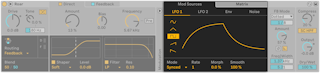
- The Modulation panel's toggle shows the Mod Sources and Matrix tabs.
- Sources, each with its own display:
- LFO 1 and LFO 2 — sine, triangle, square, up or down. Mode sets Free (Hz), Synced, Triplet, Dotted or Sixteenth; Rate, Morph (reshapes the wave) and Smooth (softens sudden changes).
- Env — envelope follower on Roar's input. Attack, Release, Envelope Hold (finish the attack before releasing), Threshold and Gain (sensitivity and strength), Frequency and Width (which band it listens to), and Envelope Input Listen. Example: follow the snare in a drum loop and push Dry/Wet or Shaper Amount on each hit.
- Noise — Simplex and Wander (smooth random, Simplex less regular; slow organic wandering at low rates), S & H (stepped random at the Noise Rate), Brown (filtered noise for a noise floor, crackle or hiss). Rate in Hz or synced, with smoothing.
- Matrix — sources across, targets down. With the tab open, click a parameter to add it as a target, then drag a cell up or down to set the amount. Global Modulation Amount scales everything; X clears all modulation.
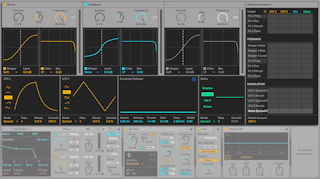
- The header toggle expands the matrix, showing all gain stages, sources and targets at once.
- Colored LEDs in the Modulation column show which sources are active.
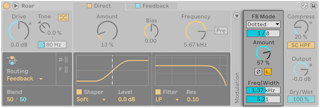
- Feeding Roar back into itself adds ringing, strange tones.
- Feedback Mode — Time, Synced, Triplet and Dotted use the feedback as a delay; Note makes it ring at a chosen pitch.
- Feedback Amount — how much is fed back. The compressor in the loop pulls feedback down on loud signals.
- Feedback Invert — inverts the feedback phase for cancellation effects
- Feedback Gate — feedback fades out once input stops; off, it continues forever
- Feedback Filter Frequency and Width — band-pass filter on the feedback
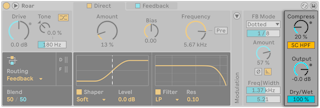
- Compression Amount — compression on the output, and so on what is fed back
- Compressor Sidechain HP Filter — high-passes the compressor's detection so lows cause less gain reduction
- Output Gain — wet level, followed by a hard clipper and then Dry/Wet; makes up for Drive and Shaper Amount
- Dry/Wet — balance of dry and wet output


- By default Roar's own input drives the envelope follower and the feedback pitch. The Sidechain Section toggle at the top left opens external audio and MIDI sidechain controls.
- External SC — External Source picks the audio source, External Tapping Point Post FX or Post Mixer. Mix blends internal (0%) and external (100%) as the trigger; SC Gain sets trigger level only.
- MIDI > FB Note — incoming MIDI sets the feedback pitch in Note mode. Pick the track under MIDI From and Pre FX or Post FX. Feedback Mode and Feedback Amount are disabled while this is on.
- Sidechain Listen — replaces the output with the sidechain signal for monitoring