Ableton/Live/UG/29 Audio Effect Reference/31 Resonators
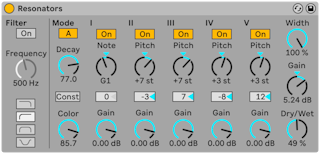
- Resonators is five resonators in parallel that give the input a pitched character, from plucked strings to vocoder-like tones. They tune in semitones, scale degrees or a tuning system — Ableton/Live/UG/15 Tuning Systems.
- Input filter first: low-pass, band-pass, high-pass or notch, with Frequency.
- Mode — A sounds more realistic; B is interesting with Resonator I set low.
- Decay — how long the resonators ring; longer is more sustained and tonal, like an undamped piano string. Low notes ring longer unless Const is on.
- Color — brightness
- Resonator I takes both channels; II and IV the left; III and V the right.
- Tuning:
- by default Resonator I sets the root and the others are intervals above it
- with scale awareness, Resonator I follows the clip's scale in octave 2
- with a tuning system, Resonator I is an absolute pitch from the tuning
- Note sets the root — semitones C-1 to C5, scale degrees, or tuning indices; Resonator I Fine Tuning in cents
- Each resonator has On/Off (off saves CPU; turning off I does not affect the others) and Gain. II–V follow Note and add their own Pitch (±24 semitones or ±21 scale degrees) and fine tuning.
- Output: Width (wet only; 0% folds II–V to mono), Gain (resonated level unless Dry/Wet is 0%), Dry/Wet.