Ableton/Live/UG/29 Audio Effect Reference/30 Redux
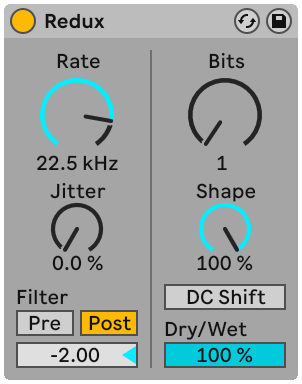
- Redux degrades sound with downsampling and bit reduction, from harsh aliasing to warm 8-bit grit. Noise, stereo width and filtering can be added, and the quantizer curve allows gentle or extreme bitcrushing.
- The downsampling controls are on the left. Without filters, downsampling adds inharmonic content that depends on the material and the chosen rate.
- Rate — the sample rate the signal is reduced to; lower adds more imaging and inharmonic tones
- Jitter — noise on the downsampler's clock, adding randomness, noise and stereo width
- Pre — filter before downsampling, narrowing what gets downsampled (and the Jitter width)
- Post — low-pass after downsampling to reduce imaging. Post-Filter Octave sets it in octaves above or below half the Rate value.
- The bit reduction controls are on the right. Fewer bits mean less dynamic range, more noise and distortion; at extremes everything becomes jagged square waves.
- Bits — bits used for the output
- Shape — the quantizer curve; higher values keep quiet parts finer than loud parts. The result depends on the input's dynamic range.
- DC Shift — offsets the signal before quantizing, changing the distortion a lot at low Bits: louder and crunchier
- Dry/Wet — set to 100% on a return track