Ableton/Live/UG/29 Audio Effect Reference/24 Limiter
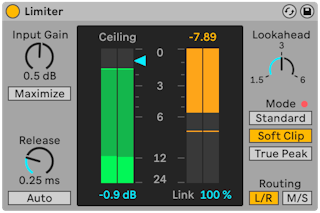
- Limiter is a mastering-grade limiter that keeps the output below a set level — a compressor with an infinite ratio. It belongs on the Main track to prevent clipping in the converters. Compression basics are in Ableton/Live/UG/29 Audio Effect Reference/09 Compressor.
- Ceiling — the maximum output level; signal that never reaches it is untouched
- Gain Reduction meter — current reduction at the ceiling or threshold
- Link — how much gain reduction the two channels share (L/R or M/S, per Routing Mode). 100% keeps the stereo image steady; 0% limits each channel separately, for split signals or a deliberate stereo wobble.
- Input Gain — level into the limiter
- Maximize — turns Ceiling into Threshold, so one control sets loudness: lowering it raises the output by the same amount. Input Gain becomes Output, the target level.
- Release — how long limiting continues after the signal drops. Fast is louder and punchier; slow is smoother but can flatten dynamics. Auto sets release from the material and disables Release.
- Lookahead — 1.5, 3 or 6 ms. Shorter allows more limiting but can distort, especially bass; longer catches very fast peaks. Longer lookahead adds latency.
- Ceiling Mode:
- Standard — default
- Soft Clip — soft-clips near the ceiling for color and punch; an LED flashes when clipping
- True Peak — prevents inter-sample peaks
- Routing Mode:
- L/R — channels limited separately; more limiting, some stereo image distortion
- M/S — limits in mid/side; keeps the stereo image but adds latency
- Anything after Limiter can raise the level again. To be sure the output never clips, put Limiter last on the Main track and keep the Main volume below 0 dB.