Ableton/Live/UG/29 Audio Effect Reference/23 Hybrid Reverb/03 Convolution Reverb Engine
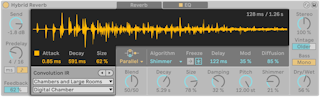
- Convolution reverb uses recordings of real spaces, called impulse responses, to put a sound in that space. Any recording can be an IR — a famous hall, a snare drum, a garbage can, a voice.
- Convolution IR: the upper menu picks a category, the lower one an IR. Arrow buttons step through IRs and on into the next category. The display draws the IR, reflecting Attack, Decay and Size.
- Categories: Early Reflections, Real Places, Chambers and Large Rooms, Made for Drums, Halls, Plates, Springs, Bigger Spaces, Textures, User.
- Drag an audio file onto the display to add it to User; dragging from a folder adds every audio file in it. User IRs are forgotten if the device is removed and added again, and must be dragged back in.
- Attack, Decay — envelope of the IR; Size — relative size of the IR