Ableton/Live/UG/29 Audio Effect Reference/23 Hybrid Reverb
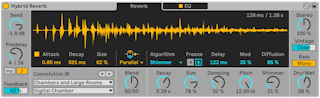
- Hybrid Reverb combines convolution reverb with several algorithmic reverbs, for natural spaces, drones or heavy transformation.
- The convolution engine comes with impulse responses (IRs) and accepts any audio file as an IR, with controls to shape it.
- The algorithmic engine has several modes, from clean and smooth to metallic and gong-like.
- The two engines run alone, in series or in parallel with an adjustable balance. An EQ can be applied to either, and a Vintage control imitates old digital reverbs.
- Signal runs left to right: input section, the two reverb engines (combined by the routing section), the EQ, then the output.
- Convolution controls are yellow; algorithmic controls are blue.
- Send — gain into the reverb; the dry signal passes unchanged
- Predelay — delay before the first early reflection. It affects how big a room sounds; natural values are about 1–25 ms. Predelay Sync chooses time or beat-synced values.
- Feedback — predelay output fed back into its input; time and synced modes each keep their own setting
- The main window has Reverb and EQ tabs. In the Reverb tab, Routing offers:
- Serial — convolution feeds the algorithmic engine. Blend sets how much convolution goes on; 100/0 is pure convolution, 0/100 pure algorithmic fed by the convolution.
- Parallel — both engines side by side; Blend sets the balance
- Algorithm — only the algorithmic engine
- Convolution — only the convolution engine
- Controls for an unused engine are grayed out. Blend has no effect in Algorithm or Convolution routing.
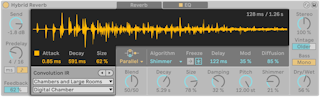
- Convolution reverb uses recordings of real spaces, called impulse responses, to put a sound in that space. Any recording can be an IR — a famous hall, a snare drum, a garbage can, a voice.
- Convolution IR: the upper menu picks a category, the lower one an IR. Arrow buttons step through IRs and on into the next category. The display draws the IR, reflecting Attack, Decay and Size.
- Categories: Early Reflections, Real Places, Chambers and Large Rooms, Made for Drums, Halls, Plates, Springs, Bigger Spaces, Textures, User.
- Drag an audio file onto the display to add it to User; dragging from a folder adds every audio file in it. User IRs are forgotten if the device is removed and added again, and must be dragged back in.
- Attack, Decay — envelope of the IR; Size — relative size of the IR
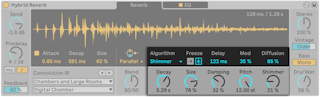
- The algorithmic engine is built only from digital delay lines, without samples. Its controls sit right of the Blend knob and change with the Algorithm chooser.
- Algorithms: Dark Hall, Quartz, Shimmer, Tides, Prism. All have:
- Decay — time for the tail to fall by 60 dB
- Size — size of the virtual room
- Delay — extra predelay in ms for this engine
- Freeze — stops input and makes the decay infinite so the reverb sustains; Freeze In keeps adding input to the frozen sound, building it up
- A smooth, classic hall for medium to long halls.
- Damping — high-frequency filtering; higher is darker
- Mod — movement in the tail; more gives chorusing and fewer resonances
- Shape — from small and resonant to large and diffuse
- Bass X — crossover for the low end of the tail; Bass Mult scales its decay time
- Long decays with a very small Size give metallic, gong-like resonances.
- A hall-like reverb with audible echoes in the tail and clear early reflections; suits voices, drums, transient material and echo effects.
- Damping — high-frequency filtering; higher is darker
- Lo Damp — low-frequency filtering; higher is brighter
- Mod — movement in the tail
- Diffusion — density of the tail
- Distance — how far away the reflections are; closer is denser, farther spaces the echoes out
- Dense diffuse delays with a pitch shifter in the feedback; tails rise or fall in pitch. Low diffusion is a plain delay, high diffusion a lush reverb.
- Damping — high-frequency filtering
- Mod — movement in the tail
- Pitch — pitch shift in the feedback, in semitones
- Diffusion — density; below 10% gives dub-style delays, good on drums
- Shimmer — amount of pitch-shifted signal; 100% on melodic material gives harmonies
- Here Size sets the spacing of echoes on percussive material.
- A smooth reverb whose output is modulated by a multiband filter, giving rippling bands.
- Damping — high-frequency filtering
- Wave — modulation shape from noise (0%) through sine (50%) to square (100%)
- Tide — strength of the texture
- Phase — left/right offset; 180° is fully opposite
- Rate — modulation rate in beat divisions, with triplet, 16th and dotted variations
- A bright, clearly artificial diffuse reverb based on spectrally flat "velvet" noise. It adds depth without getting in the way, suits short non-linear decays on drums, and gives a clean digital sound on longer decays.
- Low Mult and High Mult — scale the decay of the low and high parts of the tail
- X over — crossover between those parts
- Small Decay and Size give a classic 1980s gated snare reverb.
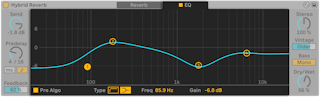
- The EQ lives in the display's second tab, with its own on/off toggle.
- By default it comes after both engines; Pre Algo puts it before the algorithmic engine in any routing.
- Four bands. The low and high bands switch between pass filters (6 to 96 dB/octave) and shelves; the two middle bands are peaks covering the whole range, from wide boosts to fairly narrow cuts.
- Stereo — width of the wet signal; 0% mono, above 100% wider
- Vintage — imitates the lower sample rates and bit depths of old digital reverbs; presets Subtle, Old, Older and Extreme
- Bass Mono — makes output below 180 Hz mono for a tighter low end
- Dry/Wet — set to 100% on a return track